Where each tool sits in the tapeout flow
The smoke test you just passed checked a list of tools, and this page shows where each of them fits on the way from an idea to a chip. You won’t use them to design anything in IC101; the design work itself comes in later courses. Both flows below end at tapeout, the point where a finished chip design is sent off to be manufactured. What you send to the fab is a GDSII file, the format that describes the final layout.
Analog and mixed-signal flow
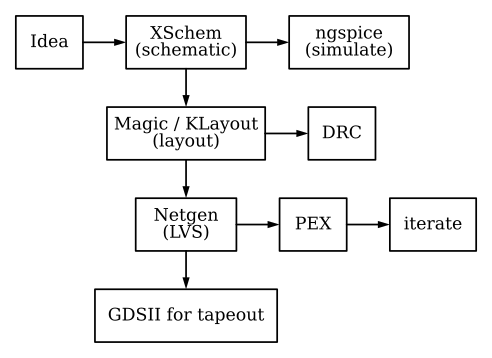
| Tool | Stage |
|---|---|
| XSchem | Draw and edit schematics |
| ngspice | Simulate circuits from those schematics |
| Magic / KLayout | Full-custom layout; DRC |
| Netgen | Layout vs schematic (LVS) |
Digital flow (open-source ASIC)
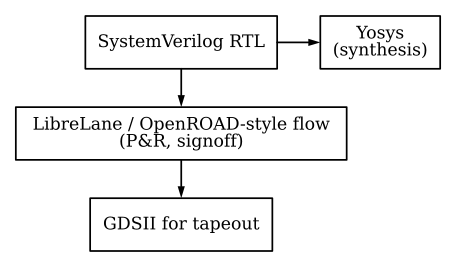
| Tool | Stage |
|---|---|
| Yosys | RTL → gate-level netlist |
| Verilator / cocotb | Pre-silicon verification (later courses) |
| LibreLane | Automated RTL-to-GDSII (DD103 and later) |
The early digital courses also use FPGAs, as a second path alongside the open ASIC flow. In DD102 you take a design through the open FPGA toolchain (Yosys, nextpnr and IceStorm). That toolchain is already in the workbench image, so you won’t have any vendor software to install.
Pick a track
This is the end of IC101. Both tracks start from here, and both assume the workbench you’ve just built. You can take them in either order, or take both.
| Track | Start with | What you do first |
|---|---|---|
| Analog | AD101: Signals | Use notes and chords to learn to read signals in time and in frequency, and to see what a filter does to them |
| Digital | DD101: Intro to Digital Logic | Build logic circuits in browser simulators, from a single NAND gate up to a full adder |
Each track then runs in order, AD101 → AD102 → AD103 → AD104 and DD101 → DD102 → DD103 → DD104, and the end of every course links to the next one. Every course that uses the tools reuses this workspace. Some early courses run in a web browser instead, and for those you won’t need Docker until their labs say so.
A few links are worth keeping to hand:
- If you change the Docker tag or the PDK pin, run the smoke test again (Lab 03, Part 4).
- When something breaks, start with Troubleshooting.
- Every course is listed in one place, at edu.uoftasic.com.