Lab 02: Read the red X
You’ll break your own repository five times, each time in a way that one of the team’s repositories broke or that one of Tiny Tapeout’s checks exists to catch. A course script makes each breakage as a single commit. For each one, you predict what will fail, push, find the job, the step and the first error line that explain the red X, and write them in a file called DIAGNOSIS.md before you fix anything. Each fix is a commit of your own, and GitHub has to run it green.
Package: labs/lab-02-read-the-red-x/
Before you start
Read What a cloud runner is, Reading a workflow file and The Tiny Tapeout workflows.
Finish Lab 01: every job green on a commit of yours, with Pages on. This lab starts from that state.
Every command runs in a terminal on the workbench desktop, in your repository’s folder. In each new terminal, run these first:
. /foss/designs/common/.designinit
L=/foss/designs/modules/ic102-d/labs/lab-02-read-the-red-x
cd /foss/designs/projects/ttsky-ic102-d
To read a job’s log you have to be signed in to GitHub, even for your own public repository. A run’s summary page is public, and GitHub shows the logs behind it only to people who are signed in.
This lab takes about 1 hour 15 minutes, most of it waiting for runs. A docs or test run finishes in about a minute. A gds run takes about 5 minutes (4 min 30 s to 5 min 30 s in the course’s practice repository), and you can read ahead in this lab while it runs.
Part 1: The diagnosis file
Make sure your clone is up to date with GitHub and has nothing uncommitted, because the breakage script refuses to run otherwise:
git pull
git status
You should see
nothing to commit, working tree clean.Copy the diagnosis template to the top of your repository and look at the breakages:
cp $L/DIAGNOSIS-template.md DIAGNOSIS.md
python3 $L/break.py --list
You should see the five commit messages the breakages will use:
1  info.yaml: tidy up the project section
2  docs: start info.md again from the template's layout
3  Rename the top module so that it's unique on the shuttle
4  Output the difference ui_in - uio_in instead of the sum
5  info.yaml: run the design at 50 MHz
They read like commits a teammate might push. A commit’s message doesn’t always say everything the commit did:
protocol-emulator’sb976406 docs: update info.yamlalso renamed a module.Commit
DIAGNOSIS.mdand push it, so each entry you add later travels with its fix:git add DIAGNOSIS.md git commit -m "Add DIAGNOSIS.md for Lab 02" git push
Part 2: Breakage 1, step by step
Which job tells you first that info.yaml is wrong, and which line in its log says how?
You’ll go through the same eight steps for every breakage, and this part takes you through them once, with breakage 1.
Make the breakage:
python3 $L/break.py 1You should see
Committed breakage 1 as <hash>: info.yaml: tidy up the project section, thenNothing has been pushed.Don’t look at the diff yet.Predict, and write it in the Prediction field of the breakage’s entry: which workflows go red, and which job finishes red first? You know from the commit message that
info.yamlchanged, and from The Tiny Tapeout workflows which jobs read it.Push, and open the Actions tab of your repository:
git pushFind the first red job. Open its run, click the red job, and the failed step opens by itself. Inside a step that runs one of Tiny Tapeout’s actions, the failure is in a section nested in it; read down from the top of the failed section to the first line that names a problem.
Write the Job that failed first, the Step (the workflow’s step, and the action’s section inside it if there is one) and the First error line, copied without its timestamp.
Only now, look at what changed (
git show), fix it the way a teammate should have, and write the Fix in a sentence.Commit the fix together with your updated
DIAGNOSIS.md, push, and wait until every job is green again. Then fill in Fix commit with the fix’s hash (git log --oneline -1) and commit that small change too. Don’t push it on its own, though. It goes up with the next breakage, in one push, and GitHub runs the workflows only on the newest commit of a push. If you pushed it by itself, the two pushes, a minute apart, would start twogdsruns whoseviewerjobs deploy to Pages at about the same time, and the second one would fail. In the course’s practice repository it failed with:##[error]HttpError: Deployment request failed for eda299edadf9f73ed66d97f537dae4a0840d10d6 due to in progress deployment. Please cancel c70f08ac35a93511ba610109124c852b4108bc57 first or wait for it to complete.Check your entry so far, without asking GitHub yet:
python3 $L/check.py --offlineYou should see
entry filled in; fix <hash> comes after breakage <hash>under Breakage 1.
What should breakage 1’s entry say? Write yours before you open this.
Two workflows go red, docs and gds, and docs usually finishes first: in hart-1’s runs with the same mistake, the docs job took 30 s and the gds job 54 s, and in the course’s practice repository 38 s and 43 s. test stays green, because the testbench never reads info.yaml.
In docs, the step is “Build docs”, section “Check info.yaml and docs/info.md”, and the error is the line under the heading:
## Errors in info.yaml
- Project title cannot be empty
That’s what the practice repository’s docs job printed for this breakage on Nov 16. When we ran tt-support-tools’ docs check in the course image, on a broken copy of the template and at 9d13ff3 (the commit the runner used that day), it printed the same text. hart-1’s docs log (run 43752267314) has the same line in a longer list, because its title, author, description and pinout were all empty.
In gds, the step is “Build GDS”, section “Fetch verilog and build config”. In hart-1’s run (43752267356) it reads:
2026-11-15 19:25:32,583 - project - ERROR - Error loading /home/runner/work/hart-1/hart-1/info.yaml: Project title cannot be empty, Project author cannot be empty, Project description cannot be emptyYours names your repository and lists only the title. The cat: ... No such file or directory from “Linter output” further down is a consequence of that first error, as Reading a workflow file explains. The fix is to put the title back.
You should see: Breakage 1’s entry complete, and every job green on its fix commit.
Part 3: Breakage 2
Can a section be “missing” from a file you can see it in?
Run
python3 $L/break.py 2and follow the routine from Part 2.TipAnswerOnly
docsfails, in the same section as breakage 1, with:## Errors in docs/info.md - Missing 'How it works' section in docs/info.md - Missing 'How to test' section in docs/info.mdThose are the last two lines of
hart-1’s docs log too. The script put the template’sdocs/info.mdback, so both headings are there. The check looks for the template’s placeholder sentences under them (“Explain how your project works”), and reports a section as missing for as long as its placeholder is still there.gdspasses, because only the docs check readsdocs/info.md.The fix is to write the two sections again, or to undo the commit:
git revert HEADmakes a new commit that undoes the last one and leaves the history intact.
You should see: docs red with the two “Missing” lines, and green again after your fix.
Part 4: Breakage 3
What does a test do when the design it tests has a new name?
Run
python3 $L/break.py 3and follow the routine. This one fails in two workflows a few minutes apart, so wait for both before you write the entry.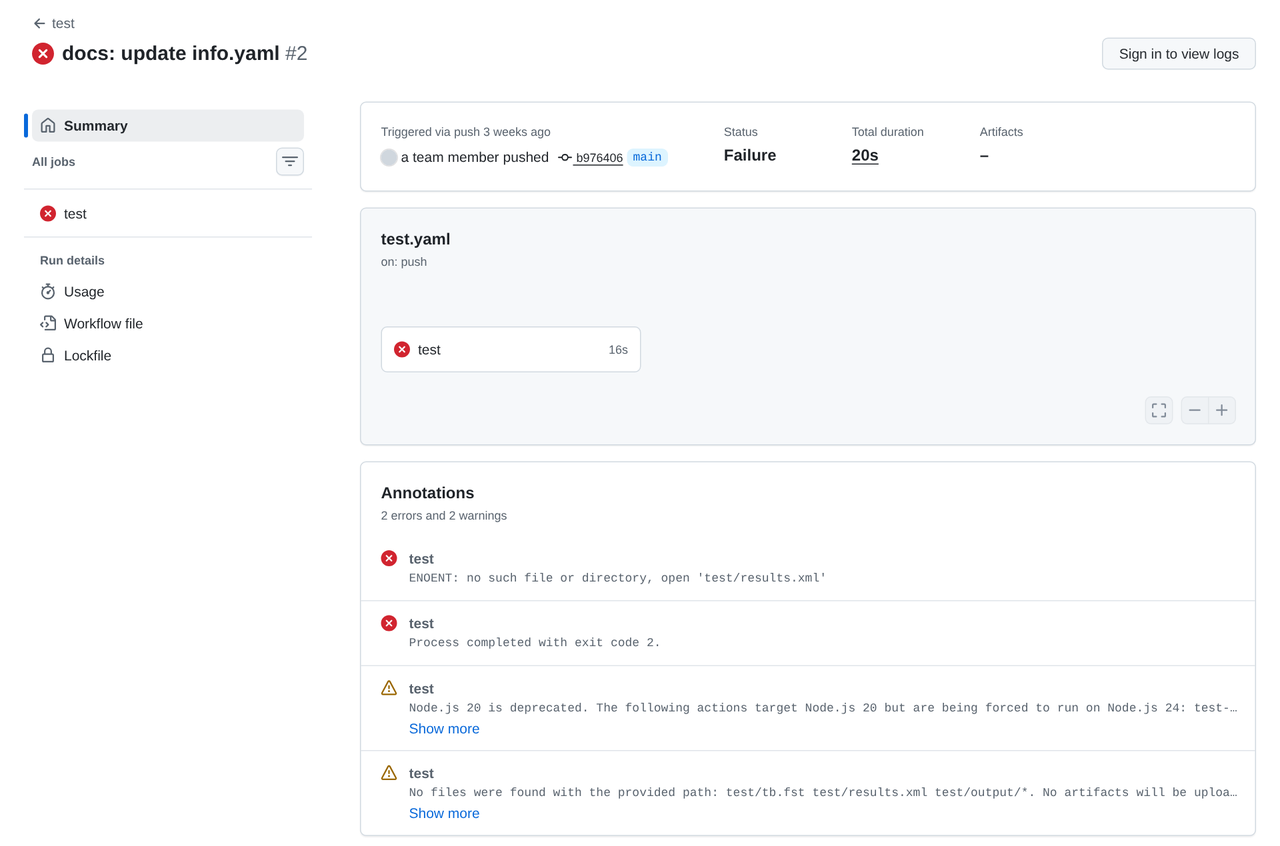
The run of protocol-emulator’s test workflow after the same mistake. The annotations show what went wrong afterwards; the cause is only in the log. That’s
protocol-emulator’s run for the same mistake, seen without signing in. None of its annotations says what’s wrong.TipAnswerThe script renamed the top module in
src/project.vand ininfo.yaml, tott_um_<your username>_adder, and lefttest/tb.vinstantiatingtt_um_example.testfails first, in “Run tests”. This isprotocol-emulator’s line for the same mistake (run 40123836544):/home/runner/work/protocol-emulator/protocol-emulator/test/tb.v:27: error: Unknown module type: tt_um_exampleYours names your repository and says
tb.v:31, the line of the current template’stb.vthat names the module. In the course’s practice repository thetestjob printed/home/runner/work/ic102-test-d/ic102-test-d/test/tb.v:31: error: Unknown module type: tt_um_exampleafter 20 s, and the course’smake testprinted the same line for/foss/designs/projects/ttsky-ic102-d/test/tb.v. Thengdsgoes red too, but only ingl_test, which runs the same testbench on the netlist: inprotocol-emulator’s run 41345900293, and in the practice repository’s, thegdsandprecheckjobs passed andgl_teststopped at the sameUnknown module typeline. Theresults.xmlandtb.fstmessages after it, and in the annotations, are consequences: the simulation never started.The fix is to change the one line in
test/tb.vthat names the module, rather than undo the rename, because the template asks for a top module with your username in it.
You should see: test and gl_test red with Unknown module type, and green after the fix.
Part 5: Breakage 4
When a test fails because the design changed on purpose, what’s the right fix?
Run
python3 $L/break.py 4and follow the routine, but stop before you fix it and answer the question in step 2 first.TipAnswer: the errortestfails in “Run tests”, and latergl_testfails in the same way. The failure reads:AssertionError: assert LogicArray('11110110', Range(7, 'downto', 0)) == 50The practice repository’s
testandgl_testjobs printed that line, and so did the course’smake test.The template’s test drives 20 and 30 and expects their sum, 50. The design now subtracts, and \(20 - 30 = -10\), which is
11110110, or 246, in eight bits.The commit says the design should output the difference now.
protocol-emulatoronce had a failing assertion and commented it out (a5f1475, “chore: temporarily remove assertion from test.py”), and its test has passed ever since while checking nothing. What should you do instead?TipAnswerChange the test to expect the new behaviour, and make it stronger while you’re there. Expect 246 for 20 − 30, and add a second case the other way round (30 − 20 = 10), so that a subtraction with its operands swapped can’t pass. In our run that version passed with
test.test_project PASS 110000.00. A fix that deletes the assertion turns the cross green and leaves you with a test that can’t fail.Make that fix and run the test locally before you push, then finish the routine:
make -C /foss/designs/modules/ic102-d/labs/common/tt-tools test PROJECT="$PWD"
You should see: your strengthened test passing locally, and test and gds green on GitHub.
Part 6: Breakage 5
What does Tiny Tapeout’s validator accept for clock_hz?
Run
python3 $L/break.py 5and follow the routine.TipAnswerdocsandgdsfail, in the same places as breakage 1. The docs check prints:## Errors in info.yaml - Invalid value for 'clock_hz' in 'project' section, must be an integerand the
gdsjob’s “Fetch verilog and build config” section, in the practice repository:2026-11-16 09:09:02,783 - project - ERROR - Error loading /home/runner/work/ic102-test-d/ic102-test-d/info.yaml: Invalid value for 'clock_hz' in 'project' section, must be an integerThere both jobs took 24 s and finished in the same second, so either can be the one that failed first.
50MHzreads as text in YAML, and the field wants a whole number of hertz. The fix isclock_hz: 50000000, or the number your design really runs at.Fill in the last section of
DIAGNOSIS.md, “A value no workflow catches”: a value you could put ininfo.yamlthat every workflow accepts and that is still wrong, and why the workflows accept it.TipAnswerclock_hz: 50is one. It’s an integer, so the validator accepts it, but it says the design runs at 50 Hz, a factor of a million below the 50 MHz the commit message meant.protocol-emulator’s pull request #2 points out the same value. Another is a pinout that callsuio[0]an input while the design drives it withuio_oe[0] = 1.There’s no next breakage to carry your last
DIAGNOSIS.mdchanges, so commit them and push them on their own.
You should see: five entries, each followed by a green fix, and the extra section filled in.
Finishing
You’re done when python3 $L/check.py prints 5 of 5 breakages diagnosed and fixed and VERDICT: PASS: every entry in DIAGNOSIS.md is filled in, each fix commit comes after its breakage, and GitHub ran all six jobs green on every fix. On the course’s practice repository it printed:
Breakage 1
  entry filled in; fix bf7a3fc comes after breakage b8352cc
  GitHub: all six jobs passed on the fix

Breakage 2
  entry filled in; fix 42c5311 comes after breakage eda299e
  GitHub: all six jobs passed on the fix

Breakage 3
  entry filled in; fix c81b926 comes after breakage d5a5a36
  GitHub: all six jobs passed on the fix

Breakage 4
  entry filled in; fix 9126c83 comes after breakage 757853c
  GitHub: all six jobs passed on the fix

Breakage 5
  entry filled in; fix e9f320e comes after breakage 0e0b02d
  GitHub: all six jobs passed on the fix

A value no workflow catches: filled in

5 of 5 breakages diagnosed and fixed
VERDICT: PASS
Questions:
In breakages 1 and 5,
docsandgdsboth failed. Why does Tiny Tapeout checkinfo.yamlin two workflows?TipAnswerThey use it for different things.
docsbuilds the datasheet page from it, andgdsneeds the top module, the source files and the tile size to build the layout, so each of them reads it and stops if it can’t. So you see the same error twice, and fixing it once fixes both.Which breakage would have gone unnoticed by a teammate who only ever runs the test locally?
TipAnswerBreakages 1, 2 and 5. The local test never reads
info.yamlordocs/info.md; only the runner’sdocsandgdsjobs do, and the course doesn’t reproduce either of those on your workbench. That’s one reason to count a check as passed only when it has passed on the runner.
Submit: the link to your repository’s DIAGNOSIS.md on GitHub.
Next on the Course path: read RTL and gate-level tests and Your tools and the runner’s tools, then do Lab 03: Make it yours.