Lab 04: A change through review
You and a partner each make a small Tiny Tapeout project of your own, the review sandbox, and put branch rules on it. Each of its sixteen output pins is driven by a slot that starts empty. You’ll claim a pin in your partner’s sandbox with a pull request from a fork, and your partner has to approve it before it can merge. In your own sandbox you’ll review your partner’s pull request and ask for a change. You’ll also claim the pin next to theirs yourself, which leaves them a conflict to resolve, and their claim in their own sandbox leaves you one.
Package: labs/lab-04-a-change-through-review/
Before you start
Read Pull requests and review, Branch rules and How open-source projects work.
Find a partner who’s doing this lab at the same time as you. You each own one repository and contribute to the other’s, so you’ll wait for each other a few times; agree how you’ll say when you’re ready (the team Discord is fine).
You need the token from Lab 01, Part 2. Its Workflows permission matters here, because the first push of your sandbox includes the files in
.github/workflows/.Every command runs in a terminal on the workbench desktop. In each new terminal, run these first; the steps use
$Lfor this lab’s package and$TTfor the test job’s tools:. /foss/designs/common/.designinit L=/foss/designs/modules/ic102-d/labs/lab-04-a-change-through-review TT=/foss/designs/modules/ic102-d/labs/common/tt-tools
The steps write YOUR-USERNAME and PARTNER-USERNAME for your two GitHub usernames, and N for a pull request’s number. The examples have you claim uo[3] for a parity block in your partner’s repository, and uo[4] for a majority block in your own; use your own pins and blocks.
This lab takes about 1 hour 45 minutes. That includes the 5 to 10 minutes GitHub’s runners take after each push, but not the time you spend waiting for your partner.
Part 1: Your review repository
What does it take to turn the course’s folder into a repository with rules on it?
On GitHub, create a new public repository called
ttsky-ic102-d-reviewin your own account. Leave it empty: no README, no.gitignoreand no licence, because the sandbox has its own.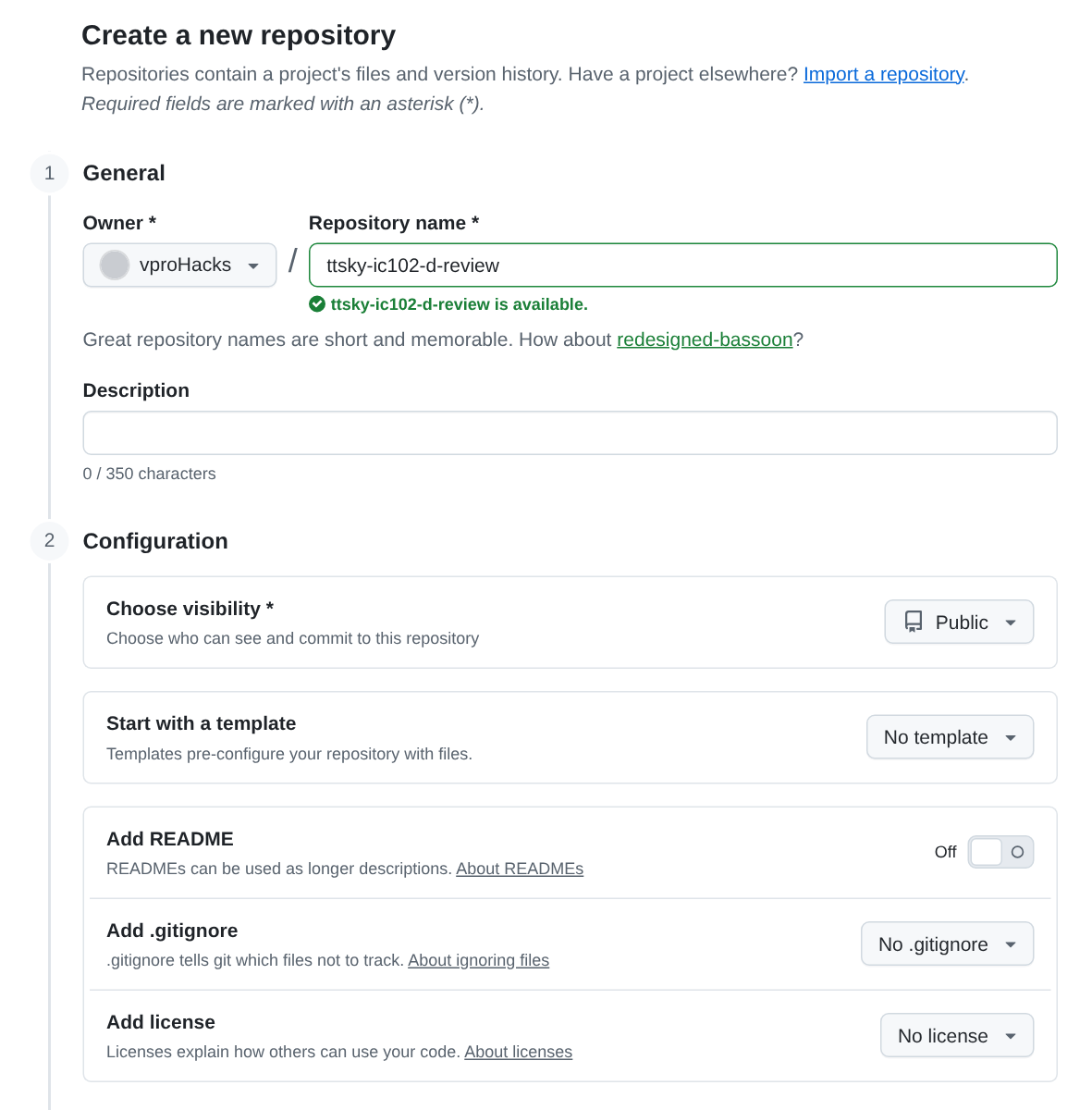
Creating the empty review repository in the course’s practice run on Nov 16, 2026. The form started with Add README off and with No .gitignore and No license chosen, so none of the three had to be changed. Make a repository from the sandbox folder, and push it:
mkdir -p /foss/designs/projects && cd /foss/designs/projects
cp -r $L/sandbox ttsky-ic102-d-review
cd ttsky-ic102-d-review
git init -b main
git config user.name "Your Name"
git config user.email "ID+USERNAME@users.noreply.github.com"
git config credential.helper 'cache --timeout=28800'
git add -A
git commit -m "Start from the IC102-D review sandbox"
git remote add origin https://github.com/YOUR-USERNAME/ttsky-ic102-d-review.git
git push -u origin main
You should see
50 files changed, 1497 insertions(+)from the commit, and the push end with* [new branch] main -> mainandbranch 'main' set up to track 'origin/main'.The push starts the sandbox’s three workflows, and
viewerfails with the 404 from Lab 01, because Pages is off in a new repository. Turn Pages on as in Lab 01, Part 5, then start a new run ofgdswith Run workflow onmain. (A re-run would fail, for the reason that part gives.)Add the rules. On GitHub, open Settings › Rules › Rulesets, choose New ruleset › Import a ruleset, and pick
ruleset.jsonfrom your clone. On your laptop it’s in theprojects/ttsky-ic102-d-reviewfolder of your workspace. Before you press Create, check the page againstRULESET.md, which describes the same ruleset in the five parts of Branch rules. The bypass list has one entry, the repository’s admin role (which is you), set to “For pull requests only”.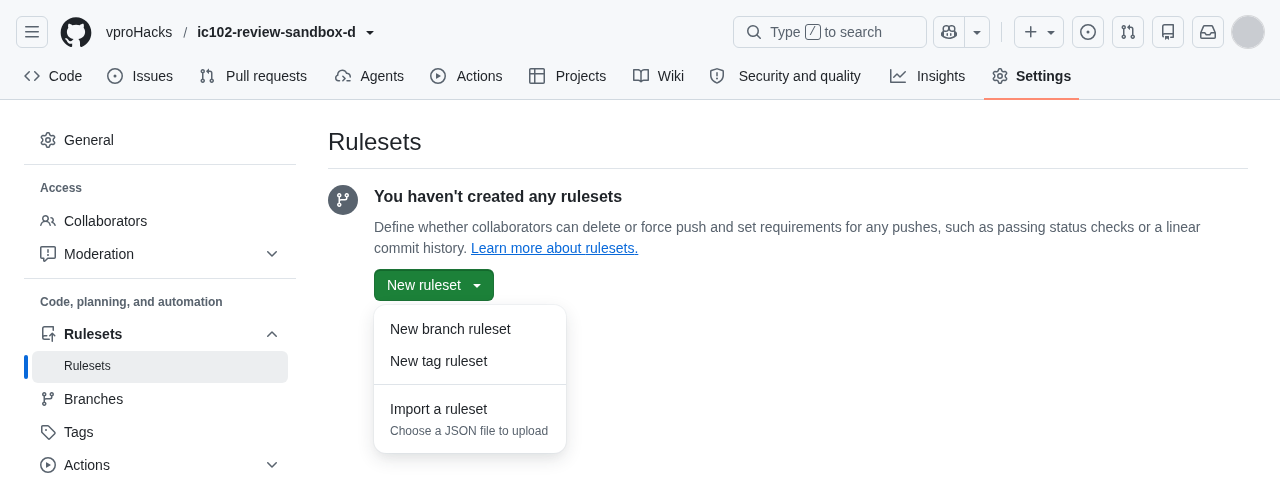
Importing the sandbox’s ruleset: the New ruleset menu, with Import a ruleset at the bottom. Before you try it, write down what will happen if you commit straight to
mainand push. Then try it with a commit that changes nothing, and throw the commit away afterwards:git commit --allow-empty -m "Try to push to main" git push origin main git reset --hard origin/mainGitHub refuses the push and names the rules, although the repository is yours. In the course’s practice sandbox the push printed:
remote: error: GH013: Repository rule violations found for refs/heads/main.
remote: Review all repository rules at https://github.com/vproHacks/ic102-review-sandbox-d/rules?ref=refs%2Fheads%2Fmain
remote:
remote: - Changes must be made through a pull request.
remote:
remote: - 5 of 5 required status checks are expected.
remote:
To https://github.com/vproHacks/ic102-review-sandbox-d.git
 ! [remote rejected] main -> main (push declined due to repository rule violations)
error: failed to push some refs to 'https://github.com/vproHacks/ic102-review-sandbox-d.git'
The bypass list lets you skip the approval, but only in a pull request.
You should see: all three workflows green on your main, viewer included, and a direct push refused.
Part 2: Claim a pin in your partner’s repository
What does a pull request need for your partner to review it in five minutes?
Fork your partner’s repository: open
https://github.com/PARTNER-USERNAME/ttsky-ic102-d-reviewand press Fork, at the top right. On the Create a new fork page that opens, check that Owner is your own account, which it should be already. Repository name starts out as the name of the repository you’re forking, and you already have attsky-ic102-d-review, so change it tottsky-ic102-d-review-forkand wait for GitHub to say that the name is available. Leave Copy themainbranch only ticked, and press Create fork (forking a repository). The fork is yours to push to; your partner’smainchanges only through pull requests.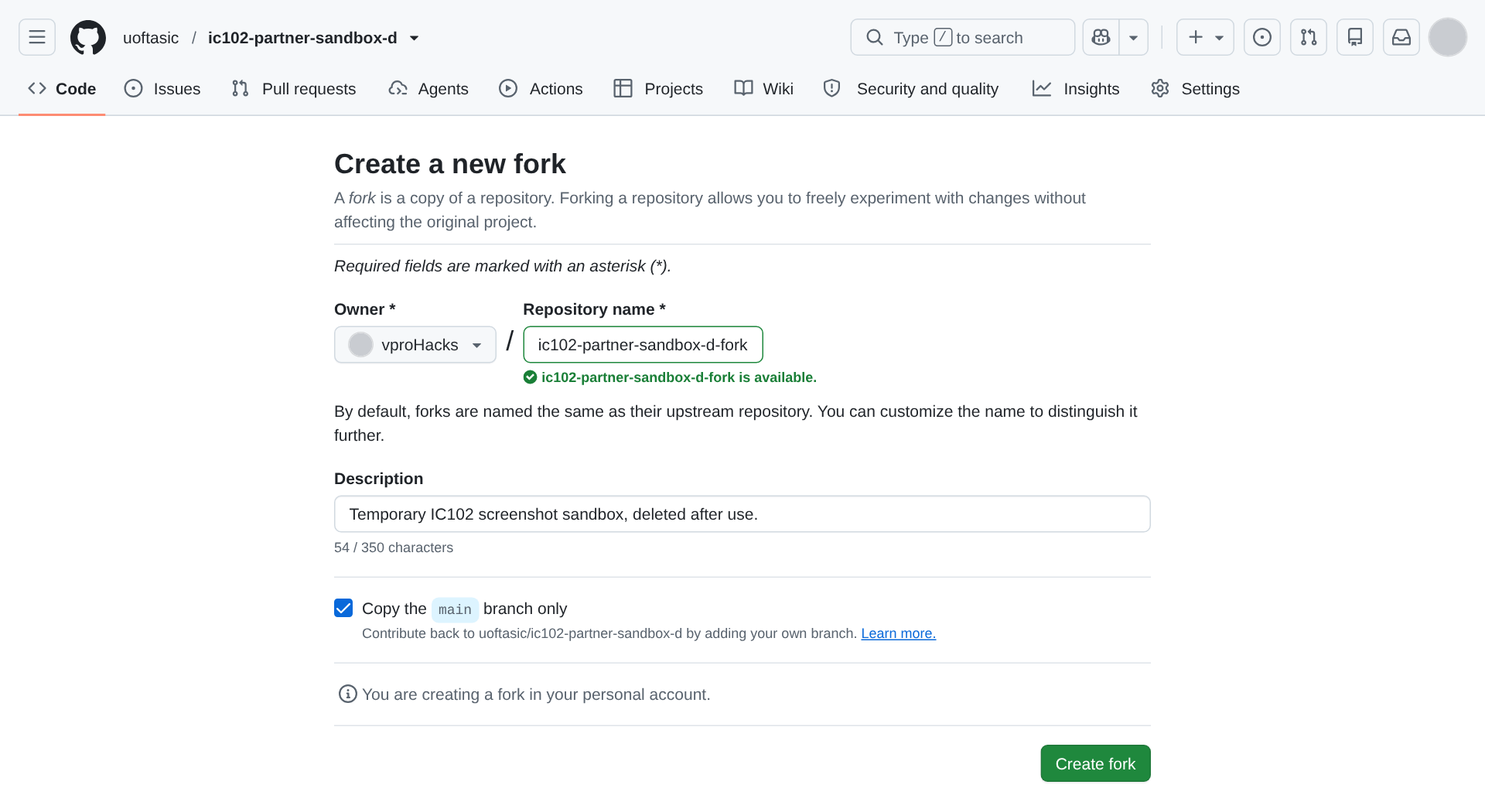
Forking your partner’s repository, in the course’s practice run on Nov 16, 2026, where the uoftasic organization’s repository ic102-partner-sandbox-d stood in for your partner’s. Owner and Copy the main branch only are as the page opened, and the name has been changed to end in -fork. Clone your fork, and add your partner’s repository as a second remote called
upstream, so you can fetch what they merge:cd /foss/designs/projects git clone https://github.com/YOUR-USERNAME/ttsky-ic102-d-review-fork.git cd ttsky-ic102-d-review-fork git config user.name "Your Name" git config user.email "ID+USERNAME@users.noreply.github.com" git config credential.helper 'cache --timeout=28800' git remote add upstream https://github.com/PARTNER-USERNAME/ttsky-ic102-d-review.git git remote -vYou should see
origin(your fork) andupstream(your partner’s), each twice.Pick a block.
python3 $L/claim.py --listprints eight, fromparity(“1 when an odd number of the eight ui_in pins are 1”) totoggle. Pick a pin fromuo[0]touo[6]: your partner will claim the one after yours, and the optional Part 6 usesuio[7]. Then make a branch named after what it does, and put the block in your slot:git switch -c claim-uo3-parity python3 $L/claim.py parity uo3 --by YOUR-USERNAMEYou should see:
Wrote src/slot_uo3.v and test/test_uo3.py (parity on uo[3]).
Now edit by hand: the line `uo[3]: ""` in info.yaml, and the `uo[3]` row of the table in docs/info.md.
Make those two edits yourself. They’re the claim that the datasheet and the next person read, and they’re where conflicts happen.
git diff -- info.yaml docs/info.mdshould show one changed line in each file, like these from a practice run:- uo[3]: "" + uo[3]: "parity of ui_in"-| `uo[3]` | unclaimed | | +| `uo[3]` | parity: 1 when an odd number of ui_in pins are 1 | student-b |Run the tests, and read your slot’s test in
test/test_uo3.pywhile they run:make -C "$TT" test PROJECT="$PWD"You should see
test_uo3.test_uo3_parity PASS 650.00, and** TESTS=16 PASS=16 FAIL=0 SKIP=0. An unclaimed slot’s test checks that its pin stays 0.Commit, push the branch to your fork, and open a pull request into your partner’s
main:git add -A git commit -m "Claim uo[3] for a parity block" git push -u origin claim-uo3-parityOpen the link that
git pushprints, and check that the base repository is your partner’s and the base branch ismain. The description starts from the sandbox’s template: fill in every section, including the test summary you just saw and whether an AI tool wrote any of it. Then tell your partner the pull request’s number.Before your partner does anything, predict whether this pull request could be merged once its checks pass.
TipAnswerNo. Your partner’s ruleset needs an approval from someone with write access, which only your partner has, and only your partner can press the merge button in a repository you can’t push to. The checks won’t even start until your partner approves them. You’ve never had a commit or pull request merged into their repository, which makes you a first-time contributor there, and by default GitHub holds a first-time contributor’s workflow runs until someone with write access approves them (workflows from forks).
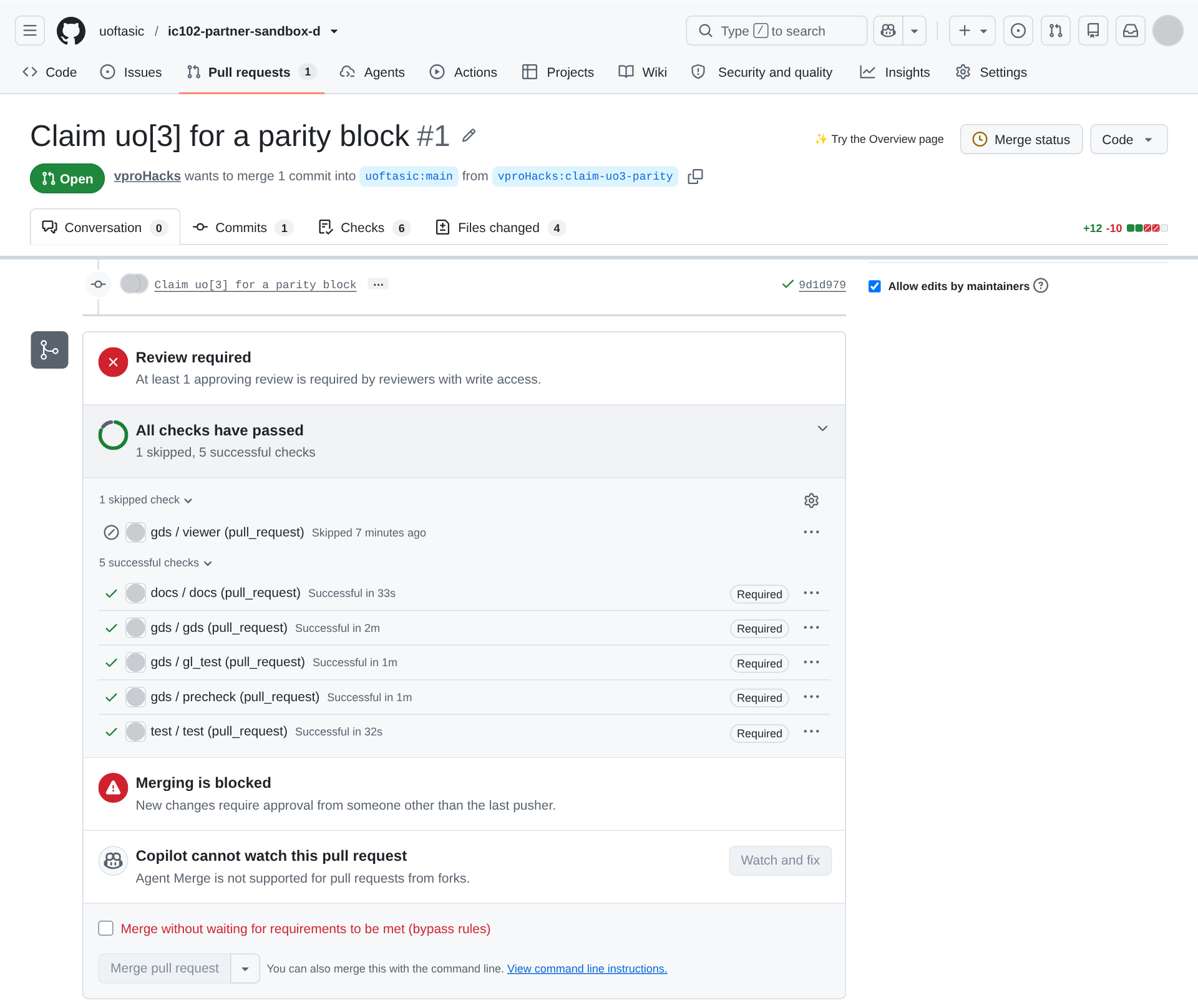
A pull request from a fork as its author sees it, in the course’s practice run, where the uoftasic organization’s repository ic102-partner-sandbox-d stood in for your partner’s. The line under the title says where it goes, uoftasic:main, and where it comes from, the fork’s claim-uo3-parity branch. The merge box says why it can’t merge yet: “Review required” and “Merging is blocked”. The account that opened that pull request owns the organization, so its checks ran without waiting for anyone, and GitHub offered it the bypass box at the bottom. On your partner’s repository your checks will wait for your partner, and there will be no bypass box, because you’re not on their bypass list. The row “Copilot cannot watch this pull request” is there because Copilot’s Agent Merge doesn’t work on pull requests from forks, and you can ignore it.
You should see: your pull request open on your partner’s repository, with its checks waiting for your partner to approve them.
Part 3: A neighbouring claim
What happens to an open pull request when main changes under it?
Open the pull request your partner made on your repository. Its workflows haven’t run, because your partner has never had a commit or pull request merged into your repository, and by default GitHub holds a first-time contributor’s runs until you approve them. Their pull request runs code they wrote on your repository’s runners, and it can change the workflow files themselves, so GitHub wants you to look at it first. GitHub’s documentation gives the steps (approving workflow runs from forks): on the pull request’s Files changed tab, read the changes, paying most attention to anything in
.github/workflows/. Then press Awaiting approval, at the top right of the pull request, which opens the Merge status panel, and press Approve workflows to run.GitHub decides whether to hold the runs each time workflows are started. It looks at who opened the pull request and at whose action started the runs, and with the default setting it doesn’t ask about anyone who has had a commit or pull request merged into the repository (workflows from forks). So the runs of your partner’s later pushes can be held too, until their first pull request is merged. Approve them the same way whenever GitHub asks.
Look at Files changed and note the pin your partner claimed. Claim the one after it yourself, in your own clone, on a branch, the same way as in Part 2 (the two edits by hand, then the tests):
cd /foss/designs/projects/ttsky-ic102-d-review
git switch -c claim-uo4-majority
python3 $L/claim.py majority uo4 --by YOUR-USERNAME
You should see
test_uo4.test_uo4_majority PASS 650.00among sixteen passing tests. Commit,git push -u origin claim-uo4-majority, and open the pull request into your ownmain.When its five checks are green, merge it. GitHub says “Review required” and “Merging is blocked”, and offers you a box to tick, Merge without waiting for requirements to be met (bypass rules), because the ruleset puts you on the bypass list “For pull requests only”. Tick it and press Bypass rules and merge.
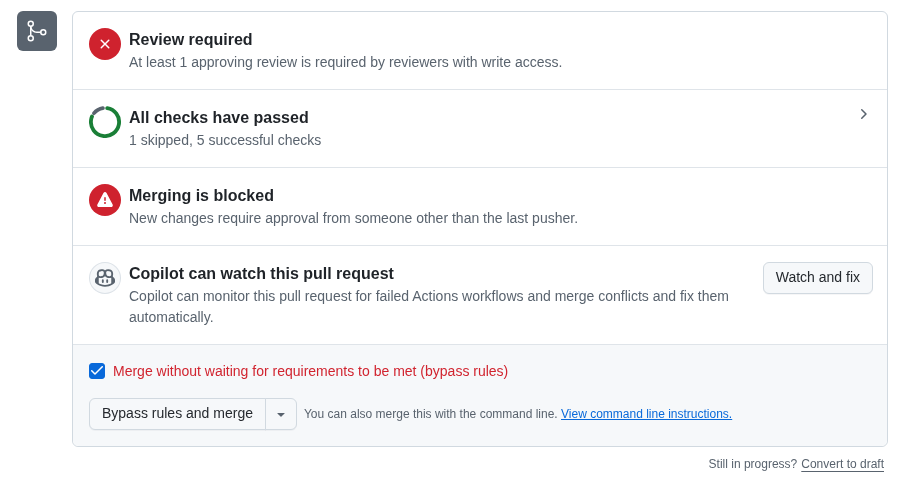
Merging your own claim with the bypass. The skipped check is viewer, which the sandbox runs only on main. You can’t approve your own pull request: GitHub greys out Approve and Request changes for its author. And your partner couldn’t have approved it in a way that counts, because only approvals from people with write access count, and your partner has none.
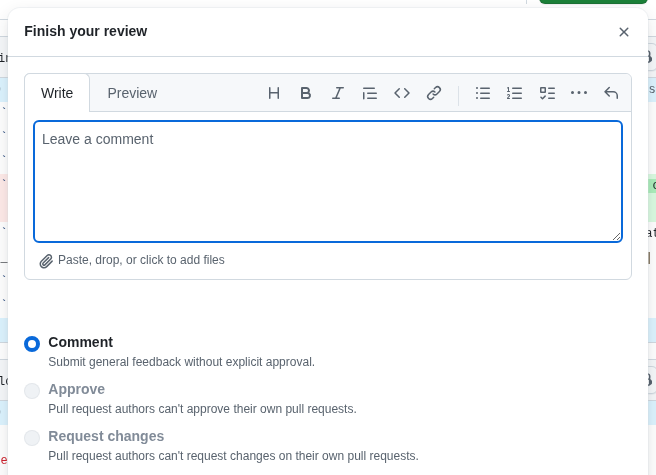
The review dialog on your own pull request, where only Comment is possible. Predict what your partner’s pull request says now, then look at it.
TipAnswer“This branch has conflicts that must be resolved”, in
info.yamlanddocs/info.md. Your line and theirs are neighbours in both files, and git won’t merge two changes to adjacent lines by itself, because it can’t tell whether one depends on the other. Above it, the checks now say “Checks awaiting conflict resolution”.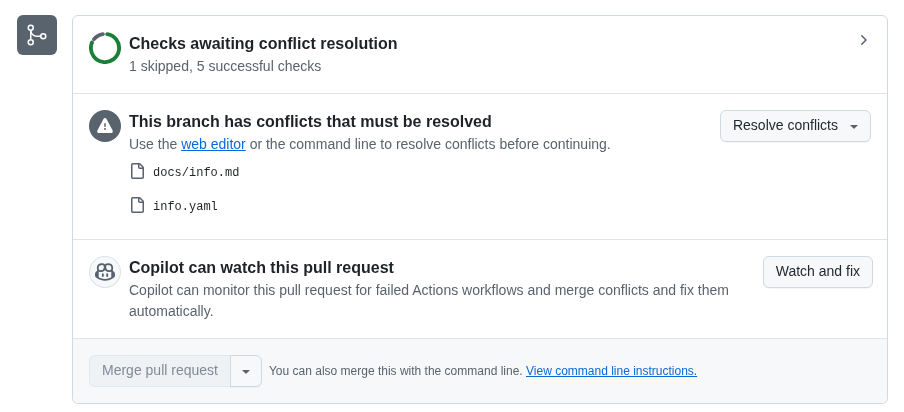
The merge box of a pull request whose branch conflicts with main, from the course’s practice sandbox.
You should see: your claim merged, main’s runs green, and a conflict on your partner’s pull request.
Part 4: Review your partner’s pull request
What can you find in your partner’s change that no check can?
Read the description first, then Files changed, then the checks. Go through the list in
CONTRIBUTING.md: the test, the pin, only four files changed, the description, the checks.The starter tests from
claim.pycheck two input values each. Find out whether that’s enough for your partner’s block: check out their branch, break their block in a way that still passes those two values, and run the tests. GitHub keeps every pull request’s latest commit in the repository it’s aimed at, asrefs/pull/N/head, so you can fetch it without adding your partner’s fork as a remote. For a parity block, a version that looks at only half the inputs does that:git switch main git pull git fetch origin pull/N/head git switch --detach FETCH_HEAD sed -i 's/assign out = \^in;/assign out = ^in[3:0];/' src/slot_uo3.v make -C "$TT" test PROJECT="$PWD"You should see
* branch refs/pull/N/head -> FETCH_HEADfrom the fetch, and thentest_uo3.test_uo3_parity PASS 650.00, although the block now ignoresui_in[7:4]. Put things back withgit checkout -- .andgit switch main.(Use your partner’s slot and block in place of these. For another block, think about which inputs its two test values never exercise.)
Write your review. First add a comment on any line where you found something else: on Files changed, hover over the line, click the blue comment icon, type the comment, and press Start a review (Add review comment for the ones after it). Those comments stay pending, and only you can see them, until you submit the review. Then press Submit review. It opens the Finish your review dialog pictured in Part 3, step 3, where Approve and Request changes were greyed out because the pull request was your own. Type a comment that says what to add and why: which input values, and which wrong block they would catch. Select Request changes, and press Submit review in the dialog (reviewing a pull request).
You should see: a review from you on your partner’s pull request that requests changes.
Part 5: Answer the review and resolve the conflict
What happens to an approval when you push again?
When your partner’s review of your pull request arrives, make the change they asked for in your fork’s clone: add the test cases, run the tests, commit, and push to the same branch. Reply to each comment and resolve it, because the ruleset won’t merge with a conversation still open. In the practice run, the parity test’s list of cases became
[(0x00, 0), (0x01, 1), (0x10, 1), (0x80, 1), (0xF0, 0), (0xFF, 0)], and the test reportedPASS 1050.00. Ask your partner to look again. Your pull request gets no new runs yet, because GitHub doesn’t runpull_requestworkflows on a pull request that has a conflict. (In the practice sandbox, this push started no runs at all.)When your partner approves, the pull request still can’t merge, because of the conflict from Part 3.
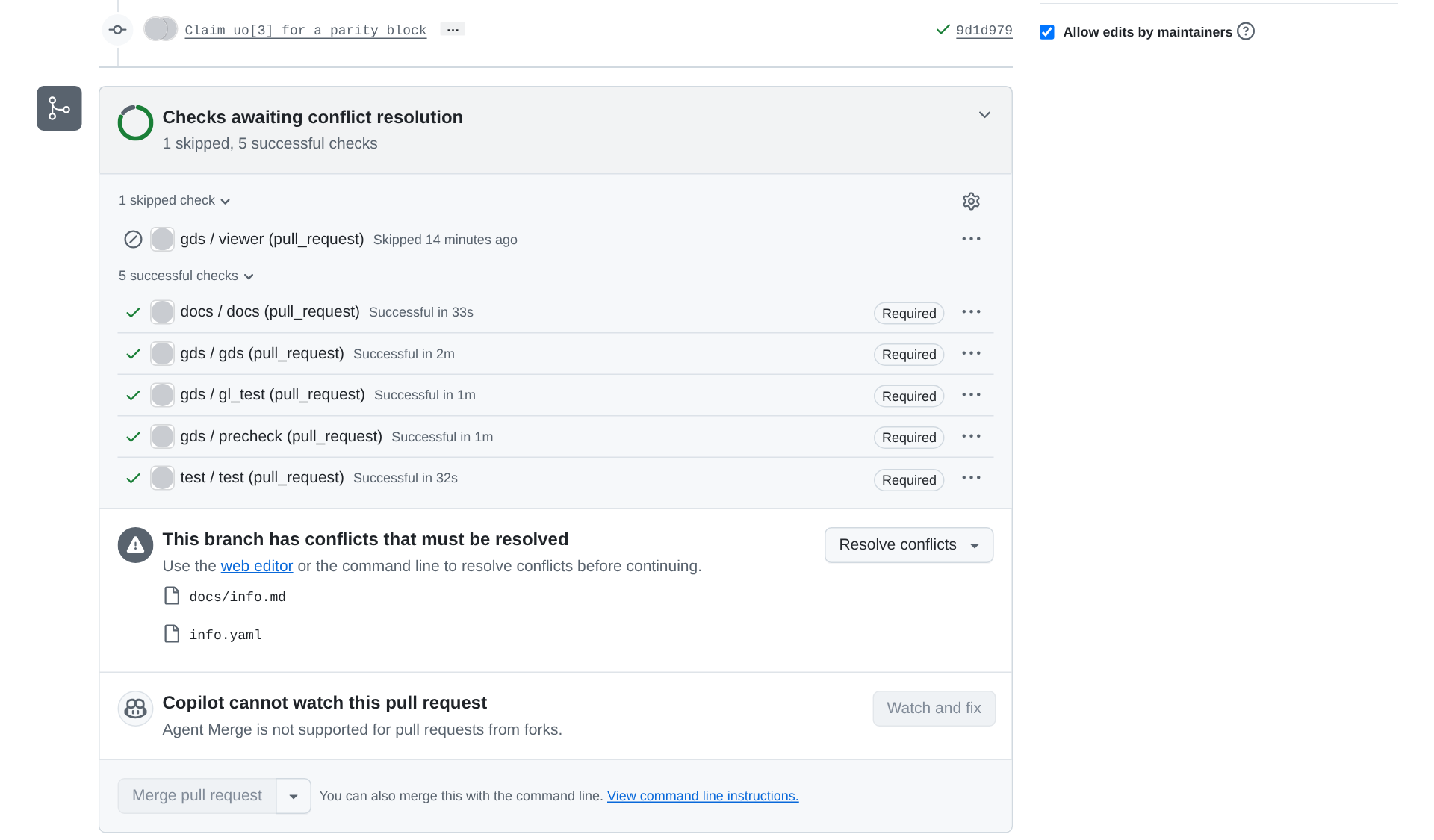
Your pull request on your partner’s repository once their claim on the next pin has been merged, in the course’s practice run, where the uoftasic organization’s repository ic102-partner-sandbox-d stood in for your partner’s. The box lists the two files that conflict, and Merge pull request is greyed out. Bring your partner’s
maininto your branch:git fetch upstream git merge upstream/mainIn the practice run, where
uo[4]had been merged intomainand the branch claimeduo[3], that printed:Auto-merging docs/info.md CONFLICT (content): Merge conflict in docs/info.md Auto-merging info.yaml CONFLICT (content): Merge conflict in info.yaml Automatic merge failed; fix conflicts and then commit the result.and
info.yamlheld:<<<<<<< HEAD uo[3]: "parity of ui_in" uo[4]: "" ======= uo[3]: "" uo[4]: "majority of ui_in[2:0]" >>>>>>> upstream/mainResolve it: keep both claims (here,
uo[3]: "parity of ui_in"anduo[4]: "majority of ui_in[2:0]"), delete the three marker lines, and do the same with the two rows indocs/info.md. Then finish the merge, test, and push:git add info.yaml docs/info.md git commit --no-edit make -C "$TT" test PROJECT="$PWD" git pushYou should see both claimed slots’ tests pass,
test_uo3.test_uo3_parity PASS 1050.00andtest_uo4.test_uo4_majority PASS 650.00, withTESTS=16 PASS=16, and the conflict message gone from the pull request.Before you look, predict whether your pull request is still approved.
TipAnswerNo. The ruleset dismisses an approval when new commits arrive, because the reviewer approved the commits they saw, and the merge commit you just pushed isn’t one of them. It also requires the last push to be approved by someone other than the person who pushed it. Ask your partner to approve the runs and the pull request again.
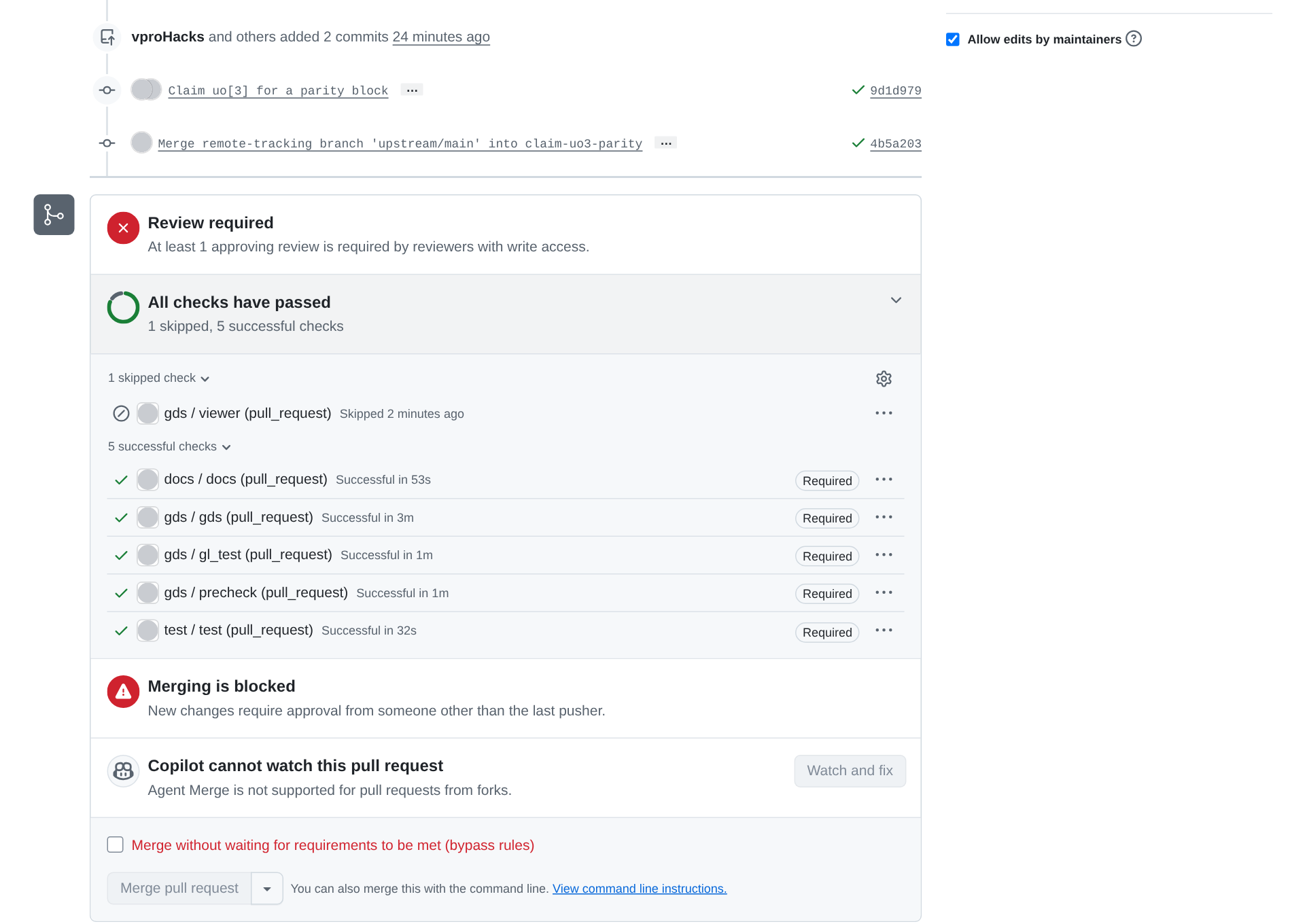
The pull request from the fork after its merge commit was pushed, in the course’s practice run, where the uoftasic organization’s repository ic102-partner-sandbox-d stood in for your partner’s. The conflict is gone and the five required checks passed on the merge commit, but the box still says “Review required” and “Merging is blocked”. Nobody had approved this pull request, so the picture can’t show an approval being dismissed. The bypass box is there because the account that opened the pull request owns the organization. Your partner merges it, since only they can. Then run the check on your own work, with your pull request and the one you reviewed:
python3 $L/check-pr.py PARTNER-USERNAME/ttsky-ic102-d-review#N YOUR-USERNAME/ttsky-ic102-d-review#NIt reads both pull requests from GitHub’s public API and checks two things: that yours was merged, with an approval from someone other than you that came before the merge, and that on the one you reviewed you requested changes and its author pushed at least one commit after that. It prints a
todo:line for each one that isn’t done yet, andVERDICT: PASSonly when there are none. In the course’s practice run, theuoftasicorganization’s repositoryic102-partner-sandbox-dstood in for your partner’s. One account opened both of its pull requests, #1 from a fork and #2 from a branch of the repository itself, so it could neither approve the first nor request changes on the second. There was no reviewed pull request to give the check, so it was run on #1 and #2 of that repository, and it printed:uoftasic/ic102-partner-sandbox-d #1: Claim uo[3] for a parity block author vproHacks merged 2026-11-16T23:27:34Z approved by nobody yet uoftasic/ic102-partner-sandbox-d #2: Claim uo[4] for a majority block author vproHacks vproHacks hasn't requested changes on it todo: #1 has no approval from someone else that came before the merge todo: request a change on #2 (Part 4) VERDICT: not yet
You should see: your pull request merged, and both pins’ rows filled in on your partner’s main.
Part 6: A pull request written by an AI tool (optional)
About 15 minutes. The course has a pull request, “Claim uio[7]: heartbeat”, whose code and description an AI coding tool wrote. Its description says so in its last line, and says that the course left problems in it on purpose. All sixteen tests pass on it with the course’s tools (we checked), and that’s part of the exercise. You each open it on the other’s repository, and each review the one opened on your own.
In your fork’s clone, put it on a branch of its own, push it, and open a pull request into your partner’s
maintitledClaim uio[7]: heartbeat, with the text of$L/ai-pr/pr-body.mdas its description:cd /foss/designs/projects/ttsky-ic102-d-review-fork python3 $L/ai-pr.py git push -u origin ai-claim-uio7-heartbeatYou should see
Committed the AI-written pull request as ... on branch ai-claim-uio7-heartbeat.When your partner’s arrives on your repository, approve its runs if GitHub asks, and review it as you reviewed their claim, but treat every statement in its description as a claim to check, as Pull requests and review suggests. Request changes, naming each problem you find with its file and line. Don’t approve it and don’t merge it; close it when you’re done.
There are three problems. src/slot_uio7.v sets oe to 0, so uio[7] stays an input and the heartbeat never leaves the chip, while info.yaml calls it an output. test/test_uio7.py has its only real assertion commented out (“flaky at gate level”, which the pull request gives no evidence for), its last assertion (in (0, 1)) can’t fail, and it never checks uio_oe. And the description says the tests pass “with cocotb 2.0.1”, which is the workbench’s version; the runner and the course’s make test use 2.1.0.
Finishing
You’re done when check-pr.py prints VERDICT: PASS for your pull request and the one you reviewed: yours was merged into your partner’s repository after they approved it, and the review you wrote in yours asked for a change that its author then pushed.
Questions:
Your test passed before your partner asked for more cases, and it passes after. What did the new cases buy?
TipAnswerThey gave you a test that fails on blocks that are wrong in ways the old one missed, such as the half-parity block in Part 4. What a test is worth depends on which wrong designs it can catch, and the only way to find out is to try some, as you did when you reviewed your partner’s pull request.
You and your partner claimed
uo[3]anduo[4]and got a conflict. Would claims onuo[3]anduo[5]have conflicted?TipAnswerNo. Git merges two changes cleanly when at least one unchanged line separates them, and the
uo[4]line would sit between them. Neighbouring lines conflict because git can’t tell whether the two edits depend on each other.
Submit: the links to your pull request and to the review you wrote.
Going further (optional)
Rules exist because without them a pull request merges whenever someone presses the button. Try check-pr.py on sentry’s pull request #33, the one with thirteen reviews in Pull requests and review, giving it as both of the pull requests it asks for:
python3 $L/check-pr.py uoftasic/sentry#33 uoftasic/sentry#33Its first block reads as follows, with roles in place of the two people’s usernames:
uoftasic/sentry #33: Event Decoder FSM
  author        <author>
  merged        2026-11-02T03:53:11Z
  approved by   <reviewer> at 2026-11-02T03:53:32Z after the merge
The approval came 21 seconds after the merge, because sentry has no ruleset and nothing made the merge wait for it.
The sandbox’s workflows differ from the template’s in their on: section and in one line of the viewer job. Compare .github/workflows/gds.yaml in the sandbox with your own ttsky-ic102-d’s, and work out why your partner’s pull request from a fork got runs at all, why each workflow ran once per push to it, and why viewer shows as skipped on pull requests. Reading a workflow file has the parts you need.
Next on the Course path: read History as evidence, then do Lab 05: Find the commit that broke it.