Threads, mailboxes and events
This page answers: a testbench has to drive, watch and check all at once. How do SystemVerilog classes run side by side, and how do they hand packets to each other?
Lab 02’s environment runs seven objects at the same time: a generator, a driver, two monitors, two sinks and a scoreboard. Each object’s run() task is a separate thread, a piece of code that runs alongside the others and can wait for a clock edge, a delay or a packet without holding them up. The objects pass packets to each other through three mailboxes. The scoreboard you’ll write in Lab 02, Part 3 runs two threads of its own, one for each mailbox it reads. This page covers fork and its three kinds of join, what goes wrong when you fork threads in a loop, mailboxes, events, and how to stop threads you no longer want.
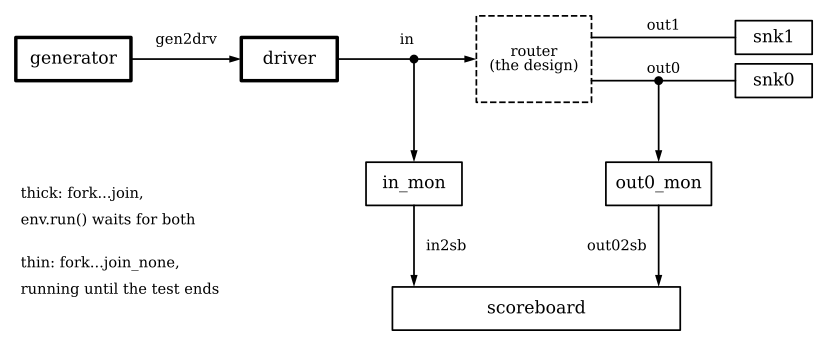
From Lab 02’s env.svh. Each solid box is an object whose run() is one thread, and the dashed box is the router. The arrows labelled gen2drv, in2sb and out02sb are the three mailboxes, and in, out0 and out1 are the router’s streams. The generator and the driver, in thick boxes, are started with fork ... join. The sinks, the monitors and the scoreboard are started with fork ... join_none and run until the test ends.
We ran every example on this page in the course image. The source is in guide-examples/threads-mailboxes-and-events/, and guide-examples/README.md gives the command for each output, in its section for this page.
fork and its three joins
fork starts each statement between it and its join as a thread of its own. The thread that ran the fork is called the parent, and the three kinds of join differ only in how long the parent waits before it goes on. The example’s fork_test forks the same three threads three times, once with each kind of join. Threads A, B and C finish 10, 20 and 30 ns after they start:
fork
  #10 $display("%0d ns:   A finished", $time);
  #20 $display("%0d ns:   B finished", $time);
  #30 $display("%0d ns:   C finished", $time);
join            // then join_any, then join_none
0 ns: fork...join
10 ns: A finished
20 ns: B finished
30 ns: C finished
30 ns: the parent goes on after join
30 ns: fork...join_any
40 ns: A finished
40 ns: the parent goes on after join_any
50 ns: B finished
60 ns: C finished
60 ns: wait fork returns
60 ns: fork...join_none
60 ns: the parent goes on after join_none
70 ns: A finished
80 ns: B finished
90 ns: C finished
90 ns: wait fork returnsjoinwaits for every thread, so the parent went on at 30 ns, when the slowest one finished.join_anywaits for the first thread to finish, so the parent went on at 40 ns, when A finished. It doesn’t stop the other two, and B and C kept running until 50 and 60 ns.join_nonedoesn’t wait at all, so the parent went on at 60 ns, the moment it forked them.wait forkwaits until every thread the parent has forked so far has finished. The example calls it afterjoin_anyand afterjoin_none, so that all three threads have finished before it moves on.
Lab 02’s env::run() uses two of these. It starts the sinks, the monitors and the scoreboard with fork ... join_none, because each of them runs a forever loop that never finishes. Then it starts the generator and the driver with fork ... join, because the rest of the test has to wait until the driver has sent every packet. Once they’ve finished, it waits 50 cycles for the outputs to drain and calls the scoreboard’s report(). The forever threads are still running at that point, and they run on until the test ends.
Threads forked in a loop
A forked thread shares its variables with the code around it. That’s what you want when two threads share a counter, but not when you fork a thread in each pass of a loop and each thread is meant to see the value from its own pass. capture_test forks three threads that each print the loop variable 1 ns later, and then three that each print a copy of it made inside the loop:
for (int i = 0; i < 3; i++)
  fork
    #1 $display("%0d ns:   i = %0d", $time, i);
  join_none
#5;
for (int i = 0; i < 3; i++) begin
  int j = i;
  fork
    #1 $display("%0d ns:   j = %0d", $time, j);
  join_none
end
0 ns: three threads print the loop variable i
1 ns: i = 3
1 ns: i = 3
1 ns: i = 3
5 ns: three threads print j, a copy made in each pass
6 ns: j = 0
6 ns: j = 1
6 ns: j = 2The three threads in the first loop share one i, and by the time they print it, the loop has finished and left it at 3. In the second loop, j is declared inside the loop body. This code is in a method of a class, and as Classes for testbenches explained, a method’s local variables are automatic. Each pass through the loop body therefore makes a new j, and each thread keeps the j from its own pass.
The same loop goes wrong in a module’s initial block, where variables are static unless you declare them automatic. There, int j = i; declares a single variable, and its initializer runs once, before the simulation starts, so all three threads print the same j. The example’s top module runs the loop in its initial block twice, first with int j = i; and then with automatic int j = i;:
0 ns: in a module's initial block, int j = i
1 ns:   j = 0
1 ns:   j = 0
1 ns:   j = 0
5 ns: in a module's initial block, automatic int j = i
6 ns:   j = 0
6 ns:   j = 1
6 ns:   j = 2
Verilator warns about this (%Warning-IMPLICITSTATIC, “The initializer value will only be set once”), but IMPLICITSTATIC is one of the five warnings the labs’ build turns off, so you’ll only see it from make lint. Write automatic whenever you declare a variable with an initializer inside an initial or always block, or inside a task or function that isn’t in a class.
Mailboxes
A mailbox carries values from threads that put() them to threads that get() them, in the order they were put. get() waits while the mailbox is empty, and if you gave the mailbox a size when you made it, put() waits while it’s full. mailbox_test has a generator that makes four items as fast as it can and a driver that takes 10 ns over each, joined by a mailbox #(int). We ran it once with no limit on the mailbox and once with room for one item:
mailbox bound 0 (unbounded)
0 ns: gen put 0
0 ns: gen put 1
0 ns: gen put 2
0 ns: gen put 3
0 ns: gen has made all four
0 ns:   drv got 0
10 ns:   drv got 1
20 ns:   drv got 2
30 ns:   drv got 3
mailbox bound 1
0 ns: gen put 0
0 ns: drv got 0
0 ns: gen put 1
10 ns: drv got 1
10 ns: gen put 2
20 ns: drv got 2
20 ns: gen put 3
20 ns: gen has made all four
30 ns: drv got 3With the unbounded mailbox, the generator made all four items at 0 ns, and the driver worked through them, one every 10 ns. With room for one, each put() waited until the driver had taken the item before it, so the generator kept pace with the driver and finished at 20 ns. The driver got the same items at the same times both ways.
Lab 02’s mailboxes are all unbounded (gen2drv = new();), so its generator makes every packet at the start and the driver works through them. The monitors’ mailboxes are the other way round, with the reader waiting for the writer. A monitor puts a packet into its mailbox each time one finishes on its stream, and the scoreboard’s get() waits until the next one arrives. The scoreboard reads both of these mailboxes, which it calls from_in and from_out0, and the two fill at their own pace. A thread waiting in from_out0.get() can’t take a packet from from_in at the same time, so the scoreboard runs two threads. One predicts each input packet as it arrives, and the other checks each packet from output 0 against the predictions made so far.
The #(int) in mailbox #(int) is the type of value the mailbox carries. Lab 02’s mailboxes are mailbox #(packet), so they carry handles to packets, and a get() hands the receiving thread the same object that the sender made. Classes for testbenches showed the same thing with a queue.
Events
An event lets one thread signal others without passing a value. ->done triggers the event done, and every thread waiting for it goes on. There are two ways to wait for an event, and they differ in what happens when the trigger comes before the wait. event_test triggers done at 10 ns and then, in the same time step, starts one thread that waits with @done and another that waits with wait (done.triggered):
10 ns: ->done
10 ns:   wait (done.triggered) returns
30 ns: end of the demo
@done waits for the next time done is triggered, so a thread that reaches it after the trigger, even in the same time step, misses that trigger and waits for another. event_test never triggers done again, so its @done thread never prints. done.triggered stays true for the rest of the time step in which done was triggered, so wait (done.triggered) doesn’t miss it. Use wait (e.triggered) whenever the wait might start in the same time step as the trigger.
Stopping threads
disable fork ends every still-running thread that the current thread has forked, along with any threads those have forked. It’s often used for a wait with a time limit. You fork the thing you’re waiting for and a timer, wait with join_any for whichever finishes first, and then disable fork ends the one that’s left. It also ends any threads that the same thread forked earlier for another job, such as a monitor started with join_none.
disable_test shows this with a monitor, a forever loop that counts a tick every 10 ns. It starts the monitor with join_none and then waits with a time limit, using this task:
task wait_with_timeout();
  fork
    #25  $display("%0d ns:   the thing we waited for happened", $time);
    #100 $display("%0d ns:   timeout", $time);
  join_any
  disable fork;
endtask
The test does all of this twice, with a new monitor each time. The first time, the thread that started the monitor calls the task directly. The second time, it calls the task from a thread forked just for it (fork wait_with_timeout(); join). Each time, 50 ns after the wait, it prints how many ticks the monitor has counted:
25 ns:   the thing we waited for happened
75 ns: with a bare disable fork: the monitor has counted 2 ticks
100 ns:   the thing we waited for happened
150 ns: with the wait in its own fork: the monitor has counted 7 ticks
The first time, disable fork ended the monitor along with the timer, because the same thread had forked both, and the monitor stopped at 2 ticks. The second time, the task ran in a thread of its own, which had forked only the two threads in the wait, so disable fork ended the timer and the monitor kept counting. In Lab 02’s env::run(), the sinks, the monitors and the scoreboard are forked from the same thread that forks the driver, so a bare disable fork added there would stop them too.
Check yourself
env::run()starts the sinks, the monitors and the scoreboard withfork ... join_none. What would happen if it usedfork ... joininstead?TipAnswerThe sinks’
run()is aforeverloop, and once you’ve written the monitor and the scoreboard, theirrun()tasks never finish either, so ajoinwould wait for ever.env::run()would never get to the generator and the driver, no packet would be sent, and the run would go on untilmakestopped it afterRUN_TIMEOUT, 300 s by default.You copy the second loop of
capture_test, the one withint j = i;in its body, into a module’sinitialblock. What does it print, and what one-word change fixes it?TipAnswerIt prints
j = 0three times. In aninitialblockjis static, so there is only onej. Its initializer runs once, before the simulation starts, and the loop never sets it again. Declaring itautomatic int j = i;makes a newjin each pass, and the threads print 0, 1 and 2.The generator puts four items into
mailbox #(int) mb = new(1)and the driver takes 10 ns over each. When does the generator finish, and when would it finish withnew()?TipAnswerWith room for one item, the generator finishes at 20 ns, because each
put()waits until the driver has taken the item before it. Withnew()the mailbox is unbounded, and the generator finishes at 0 ns.mailbox_testprinted both.To give
env::run()a time limit, you add a timer thread to the fork that starts the generator and the driver, change itsjointojoin_any, and put a baredisable forkafter it. The test now reports[SB] 0 packets in. What happened?TipAnswerThe generator puts every packet into its unbounded mailbox at the start and returns, so
join_anyreturned before the driver had sent anything. Thendisable forkended every thread thatenv::run()had forked. That included the driver and the timer, and also the sinks, the monitors and the scoreboard, just as it ended the monitor indisable_test. Start the generator outside the timed fork, and put the driver and the timer in afork ... join_anyinside afork ... joinof its own, so thatdisable forkonly reaches those two threads.
Further reading
ChipVerify covers threads, mailboxes, events and semaphores in more detail than this page. Most of the logs on its SystemVerilog pages come from Cadence simulators rather than Verilator, and the course doesn’t reuse its code.
- Processes: a short overview of the chapter.
- fork join, fork join_any and fork join_none. The join_none page covers the loop-variable problem and its
automaticfix. - wait fork.
- disable fork join. It warns that
disable forkreaches further than you might expect, but it doesn’t show the fix this page uses, which is to put the wait in afork ... joinof its own. - Mailbox: bounded and unbounded mailboxes,
try_put,try_getandpeek. - Event:
@eagainste.triggered. - Semaphore: the third way threads coordinate, for sharing something only one of them may use at a time.