KiCad files in git
This page answers: which of the files in a KiCad project belong in your repository, and how does anyone review a change to a board when its diff runs to thousands of lines?
KiCad saves a board, its schematic and its project settings as plain text, so git can store them, show their history and merge them the way it does source code. KiCad also writes other files next to them, such as lock files, a cache and its own local history, and none of those belong in git. And a small change to a board can rewrite thousands of lines of the board file. From Lab 03 on, your board lives in a repository of your own, and in Lab 05 you add the .gitignore that this page describes.
What’s in a project folder
To see which files KiCad adds to a project, we copied Tiny Tapeout’s DIP dock to a scratch folder, opened its board in the PCB Editor of KiCad 10.0.5, saved it without changing anything, and closed the editor, listing the folder after each step. Before we opened the board, the folder already held a dip-dock.kicad_prl, because every kicad-cli run on a project writes one next to it, even a check. Opening the board added two lock files, ~dip-dock.kicad_pcb.lck and ~dip-dock.kicad_pro.lck, which tell another copy of KiCad that the files are in use. Saving added a folder named .history, and closing the editor removed the two lock files.
A file belongs in git if you made it and it can’t be made again from the other files. The table lists each kind of file in a project and whether it belongs in git. Everything in its “No” rows either records one person’s session or can be made again.
| File | What it is | In git? |
|---|---|---|
name.kicad_pro |
The project: design rules, net classes, ERC and DRC severities, and which checks the designer turned off. JSON. | Yes |
name.kicad_sch |
The schematic, one file per sheet. | Yes |
name.kicad_pcb |
The board. | Yes |
name.kicad_dru |
Custom design rules, if the board has any. | Yes |
fp-lib-table, sym-lib-table |
The project’s own library tables, which say where its footprint and symbol libraries are. | Yes |
your own .kicad_sym and .pretty libraries |
Symbols and footprints you made for this board. | Yes |
name.kicad_prl |
Local settings: which layers are visible, and other choices about your own view of the board. | No |
~name.kicad_pcb.lck and other .lck files |
Lock files, present only while a file is open. | No |
.history/ |
KiCad 10’s local history, a folder of automatic snapshots. | No |
fp-info-cache |
A cache of what’s in the footprint libraries, which KiCad can build again. | No |
*-backups/, _autosave-* |
Backup and autosave files. | No |
| Gerbers, drill files, BOMs, renders | Outputs, made from the files above. | No: CI makes them |
The .history folder is new in KiCad 10, and KiCad puts a README.txt in it that says:
This directory contains automatic snapshots of your project files.
KiCad periodically saves copies of your work here, allowing you to
recover from accidental changes or data loss.
The folder is a git repository of its own, with a .gitignore that lists fp-info-cache and *-backups/, and the README says you can turn it off in Preferences → Common → Project Backup. The snapshots are useful on your own machine, but your board’s repository already keeps the board’s history, so leave .history/ out of it.
Outputs stay out of git because each one is correct only for the version of the design it was made from. Tiny Tapeout’s breakout-pcb repository, for example, tracks dip-dock/dip-dock.xml, an export from the Schematic Editor that records the date it was made (2026-10-29) and the full path of the schematic on the designer’s own computer. As soon as anyone changes the schematic, that file is out of date until someone remembers to export it again. If you do want to keep the files that went to the fab, keep a copy for each order, the way Tiny Tapeout’s separate pcb-files repository archives the production files it used for each run.
A .gitignore for a board
Tiny Tapeout’s demo board repository (TinyTapeout/tt-demo-pcb at bbf3dd1) has a .gitignore written for KiCad, and it’s a good place to start:
# For PCBs designed using KiCad: https://www.kicad.org/
# Format documentation: https://kicad.org/help/file-formats/

# Temporary files
*.000
*.bak
*.bck
*.kicad_pcb-bak
*.kicad_sch-bak
*-backups
*.kicad_prl
*.sch-bak
*.lck
*~
_autosave-*
*.tmp
*-save.pro
*-save.kicad_pcb
fp-info-cache

# Netlist files (exported from Eeschema)
*.net

# Autorouter files (exported from Pcbnew)
*.dsn
*.ses

# Exported BOM files
*.xml
*.csv
It covers the lock files (*.lck), the local settings (*.kicad_prl), the footprint cache and the backups. It was written before KiCad 10, so it doesn’t list .history/, and a board repository for this course needs that line as well.
Ignoring a file that git already tracks
Line 19 of the demo board’s .gitignore is fp-info-cache, but the same repository tracks the board’s fp-info-cache anyway, and at the pinned commit the cache is a 3,924,749-byte file in git like any other. The cache was committed first, on October 14, 2023 at 16:49 (commit 974c613, 93,108 lines), and the .gitignore that lists it was committed four minutes later, at 16:53 (commit 0e63c95). Counting that first commit, 20 commits up to the pinned one have changed the cache, adding 306,006 lines and removing 198,254, all in a file that KiCad can build again by itself.
This is a common mistake, and git is doing what its documentation describes. The gitignore manual page says that a gitignore file “specifies intentionally untracked files that Git should ignore. Files already tracked by Git are not affected.” A pattern in .gitignore stops git from adding a file, and it does nothing to a file that git already has. To stop tracking one, the same page says to “use git rm --cached to remove the file from the index”. That leaves your copy on disk and records the file’s removal in your next commit, and from then on the ignore rule applies to it.
The demo board’s .kicad_prl was in the same first commit, and the same .gitignore lists it as *.kicad_prl. It stayed in the repository until commit 3b4873f removed it in September 2025. Counting the commit that added it and the one that removed it, 31 commits changed it. So write the .gitignore before your first commit, and if git status ever lists a file you meant to ignore, check whether git is already tracking it.
A save with no edits
When we saved the DIP dock in the course’s pinned image without touching anything, git saw 111 lines added and 225 removed in dip-dock.kicad_pcb. Every changed line was inside the render_cache of three silkscreen labels, ui_in, uio and uo_out. The designer set those three labels in the FreeMono font, and KiCad stores the outlines of labels like these in the board file. The image doesn’t have FreeMono, so KiCad drew the labels again in the font it substituted and saved the new outlines. (Outputs in CI shows the warning that kicad-cli prints about the same missing font.)
The same thing can happen on your own computer with any font that the designer had and you don’t. A KiCad 9 board that you save in KiCad 10 is also rewritten in the newer format, as Getting started explains. Neither does the board any harm, but both put lines in a commit that have nothing to do with the change you meant to make. Read git diff --stat before you commit, and if it lists a file you didn’t mean to change, find out why before you commit it.
Reviewing a change to a board
git shows a change to a board file as a text diff, the same as for any other file, but the diff can be enormous. Commit ecb636a of the demo board, “Reworked manual clocking circuit, Iref current source for analog, TVS diodes on analog lines”, changed 60,318 lines of tinytapeout-demo.kicad_pcb and 12,558 lines of its schematic. Later the same day, a commit that its author called “minor pcb cleanup” (293a3e2) still changed 5,770 lines of the board, far more than a reviewer can read line by line.
A reviewer can compare pictures of the board instead. Here is the “minor” commit as two renders made by kicad-cli, with the pixels that changed between them marked in red:
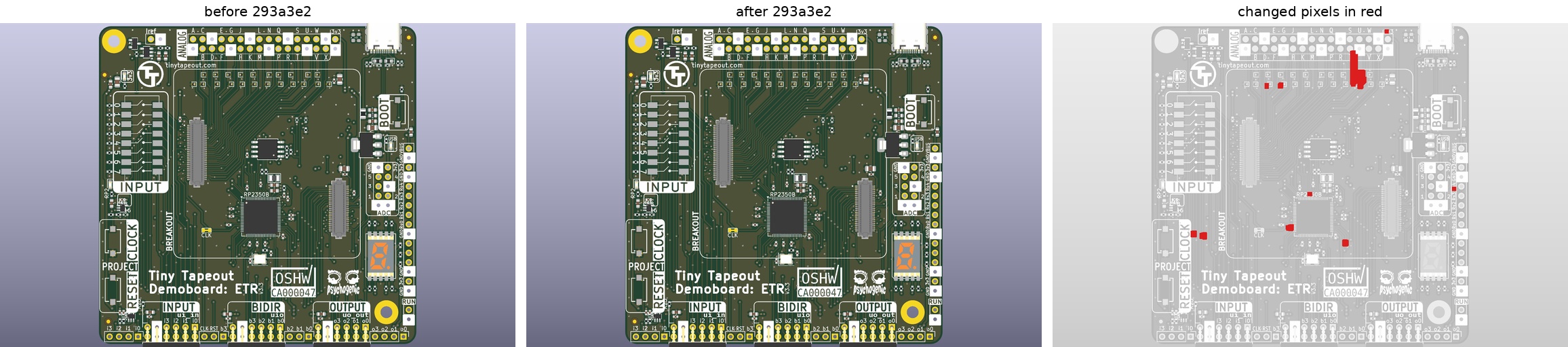
Tiny Tapeout’s demo board (tt-demo-pcb, Apache-2.0) before and after commit 293a3e2, rendered from the top, with the parts’ 3D models, by kicad-cli pcb render in kicad/kicad:10.0.5-full. 934 of the 1,542,912 pixels in a render changed, about 0.1 %. The red marks are thickened so that you can see them at this size. They are a track near the analog header with a spot at the header’s right-hand end, a few spots along the row of small parts below the header and around the RP2350, two spots on the left edge of the board and one on the right. Made by scripts/figures/review_diff.py.
Lab 05’s workflow makes renders and layer plots on every push so that whoever reviews a pull request can compare the images from the two commits, and open the board in KiCad only where a picture raises a question. A render shows only the outside of the board, so the top render above would miss a change on the bottom or on an inner layer. The workflow renders the bottom as well, and a change on an inner layer shows up only in that layer’s plot.
Pictures are easiest to review when each commit makes one change. If a commit moves a part and also re-annotates the schematic, both the pictures and the diff show the two changes at once, and the reviewer can’t tell which marks or lines belong to which. (On the demo board, commit 9c07f7f, “re-annotated entire schem”, replaced 2,102 lines of the board file by itself, which git counts as 4,204 changed lines.) Write what changed, and why, in the commit message too, because the message is the only part of a commit that a reviewer reads without opening anything.
KiCanvas, a viewer for KiCad files that runs in a browser, would let a reviewer look at a board without installing KiCad. Its last commit was on April 28, 2026, though, and we haven’t confirmed that it reads KiCad 10 files, so until someone does, use the images from CI and KiCad itself.
Libraries in the repository
KiCad needs a board’s libraries to check the board fully, so keep them where KiCad can find them on any machine. KiCad’s project library tables (fp-lib-table and sym-lib-table) can give a library’s path relative to the project with ${KIPRJMOD}, which stands for the project’s own folder. A library inside the repository is then found wherever the repository is cloned.
Tiny Tapeout keeps its library in a git submodule. The SKY130 breakout’s tables find it at ${KIPRJMOD}/../tinytapeout-kicad-libs/, a folder beside the board’s own, and breakout-pcb’s .gitmodules makes that folder a submodule that points at psychogenic/tinytapeout-kicad-libs. A plain git clone leaves a submodule’s folder empty until you ask git to fetch it, so the course’s fetch script (Getting started) fetches the library separately and puts it in that folder.
A board still opens when its libraries are missing, because the board and schematic files carry copies of every footprint and symbol they use. DRC and ERC compare those copies with the libraries, and they report each copy whose library they can’t find or whose library version differs, so missing libraries show up as warnings. The SKY130 breakout’s stitching vias use a footprint library named flyingcarsfootprints, which isn’t in either of Tiny Tapeout’s library repositories, and we couldn’t find it published anywhere, so there’s no library you can install to clear the warnings about it. Your own board shouldn’t need anything that isn’t in your repository or in KiCad’s standard libraries.
Check yourself
After an evening’s work,
git statuslistsboard.kicad_prl,~board.kicad_pcb.lckand a new.history/folder as untracked. Which of them do you commit?TipAnswerNone. The
.kicad_prlholds your local view settings, the lock file exists only while the board is open, and.history/holds KiCad’s own snapshots. All three belong in.gitignore.You add
fp-info-cacheto your.gitignore, butgit statusstill shows it as modified after every session. Why, and what fixes it?TipAnswergit is already tracking the file, and
.gitignoredoesn’t affect tracked files.git rm --cached fp-info-cacheremoves it from the index without deleting your copy; after you commit that, the ignore rule applies. This is what happened to Tiny Tapeout’s demo board, where the cache was committed four minutes before the.gitignorethat lists it.You opened your board, changed nothing, saved it, and
git diff --statshows 300 changed lines in the.kicad_pcb. Name two things that could cause that.TipAnswerKiCad redrawing text in a font your machine doesn’t have and saving the new outlines, as it did with the DIP dock in the course image, and KiCad converting a file saved by an older major version to its own format. Look at which lines changed before you commit them.
A teammate’s pull request changes 5,000 lines of the board file. How do you review it?
TipAnswerNot by reading the diff. Compare the renders and layer plots that CI made for the two commits, open the board in KiCad where a picture raises a question, and read the commit messages for what was meant to change. If the pull request mixes several changes, ask for it to be split.
Next: Lab 05: Fab outputs in CI.