Outputs in CI
This page answers: how can a computer check your board and build its fabrication files every time you push, and how do you know that it ran the same KiCad, set up the same way, as the runs that produced the numbers on the lab pages?
Continuous integration (CI) means that every time you push, a fresh machine checks out your commit and runs a fixed list of commands on it. You met it in IC102, in the workflows that Tiny Tapeout’s template runs on your project. For a board, the first commands are the checks you’d otherwise run by hand (ERC, DRC and schematic parity), and the rest build the fabrication outputs and some images that a reviewer can look at without opening KiCad. In Lab 05 you add a workflow like this to your board repository, then break the board on purpose and watch the run go red.
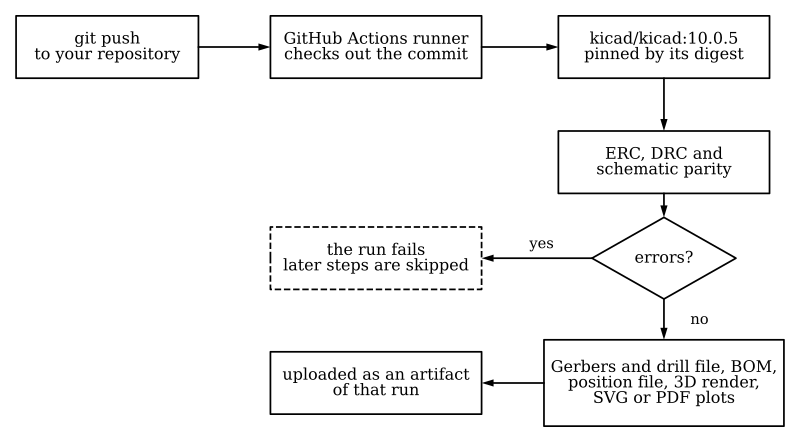
One CI run for a board. If ERC, DRC or schematic parity fails the board, that step fails, and GitHub Actions skips the steps after it that build the outputs, so a broken board never produces a set of Gerbers that looks ready to order. In Lab 05’s workflow the upload step runs anyway, so a red run’s artifact still holds the ERC and DRC reports. Made by scripts/figures/ci_flow.py.
Other KiCad projects already build their outputs in CI. wafer.space’s chip-on-board repository, for example, has a GitHub Actions workflow that runs in the kicad/kicad:10.0 container each time a release is tagged. It renders the top and bottom of each board with kicad-cli pcb render, plots the copper and silkscreen layers with kicad-cli pcb export svg, exports each schematic with kicad-cli sch export pdf, and commits the results back to the repository (.github/workflows/release-docs.yml and .github/scripts/gen_docs.py in wafer-space/chip-on-board-wire-bonded-pcbs). This course’s own repository uses CI for checks instead. Its labs.yml workflow runs the board check on every lab’s reference solution whenever something in labs/ changes. It also runs once a week, to catch breakage that comes from outside the repository, such as a pinned Tiny Tapeout commit or KiCad image that stops being served.
Checks that fail the run
A CI step fails when its command exits with a status other than 0, so each check needs a command that exits with a nonzero status when, and only when, the board has the problem you’re checking for. By default kicad-cli exits 0 even when it finds problems. On Tiny Tapeout’s DIP dock (breakout-pcb at 91a2bf1), ERC found 42 violations and DRC found 156, and both exited 0. With --exit-code-violations it exits 5 if it reports anything, and the --severity-... options decide which severities it reports. Here are both checks on the DIP dock with those options, run in the course’s pinned image. We’ve shortened the paths. We’ve also left out the line that says where each report was saved, and the font message that each DRC run printed, which Fonts and 3D models explains.
$ kicad-cli sch erc --severity-error --exit-code-violations -o erc.rpt dip-dock.kicad_sch
Found 2 violations
exit status 5
$ kicad-cli pcb drc --severity-error --schematic-parity --exit-code-violations -o drc.rpt dip-dock.kicad_pcb
Found 0 violations
Found 0 unconnected items
Found 0 schematic parity issues
exit status 0
ERC fails on two power_pin_not_driven errors, and DRC passes. With --severity-all in place of --severity-error, the same DRC command reports this:
Found 162 violations
Found 0 unconnected items
Found 3 schematic parity issues
exit status 5
The three parity issues were there in the first run too, but --severity-error left them out. In every project we checked, KiCad reported schematic parity problems as warnings, including missing_footprint, a footprint that is in the schematic and missing from the board. On the DIP dock all three are about the logo footprint PSYLOGO01, which is placed twice on the board and isn’t in the schematic, so they’re harmless. On your board the same filter would let a missing connector through with a green run.
So the labs’ checks don’t rely on kicad-cli’s own exit status. In every lab that checks a board, the check runs labs/common/check_board.py instead. It runs ERC and DRC with every severity, reads the JSON reports, and fails on any error, any unconnected item, and any parity item at all. On the DIP dock it took 28 s with the container limited to one CPU, and ended like this:
                errors  warnings  excluded
  ERC                2        40         0
  DRC                0       156         6
  unconnected        0         0         0
  parity             0         3         0
...
FAIL  erc.error: 2 (want 0)
FAIL  parity.warning: 3 (want 0)
It exits 1 on a FAIL, so a workflow step that runs it fails the run. The 156 DRC warnings don’t fail it. They’re lib_footprint_issues and lib_footprint_mismatch warnings, which compare the footprints on the board with the libraries installed wherever the check runs. Their count depends on which KiCad image runs the check and on which user runs it, and the next two sections take those in turn.
Pinning the image
In a Docker image name such as kicad/kicad:10.0, the part after the colon is a tag, and the publisher moves a tag from one image to another as new releases come out. On Docker Hub, kicad/kicad:10.0 and kicad/kicad:10.0.8 were both last updated on October 30, 2026, and both are 812 MB, because 10.0 currently points at 10.0.8. KiCad posted 10.0.5 on July 22, 10.0.6 on August 29, 10.0.7 on October 7 and 10.0.8 on October 30, so a workflow that names 10.0 gets a new KiCad every few weeks without anyone committing anything. That doesn’t matter much for pictures, but for checks it means a DRC count can change on a Monday morning for reasons that have nothing to do with your board.
A digest names one exact image, and unlike a tag it can’t be moved to another. The course’s checks name kicad/kicad:10.0.5@sha256:182c8005cb77… (in full in labs/common/kicad-image.txt), and labs/common/kicad.sh prints that digest before every check, so the log of each check records which KiCad produced it. The course pins 10.0.5 rather than the newer 10.0.8 so that the checks, KiBot and the course’s 3D renders all run the same KiCad release (see KiBot below). We moved the pin from 10.0.8 to 10.0.5 on November 16, 2026, after running the checks in both releases. The course’s own boards gave the same counts in both, but Tiny Tapeout’s boards gave different warning counts, and a broken copy of one of KiCad’s demo boards gave a different number of DRC errors. Getting started lists the differences. Moving the pin meant running every check again and copying the new counts onto every page, and a move to a newer release will take the same work.
The user and the library tables
Pinning the image isn’t quite enough, because KiCad’s warnings also depend on which user runs it. Many warnings compare the parts in your design with the libraries KiCad knows about, and KiCad keeps the list of those libraries, its library tables, in the user’s settings folder. A container that runs as root, or as your own uid with an empty home folder, has no library tables at all, so every standard library looks missing. On the SKY130 breakout, the course’s setup gives 97 ERC warnings and 120 DRC warnings. Run as root in the image, kicad-cli gives 233 and 128, and Getting started shows 236 and 130 when Tiny Tapeout’s own library is missing from beside the board as well. ERC finds 10 errors and DRC finds none in every one of these setups.
So kicad.sh runs the image as your uid, and before it runs your command, it copies KiCad’s default library tables into place. The course’s labs.yml calls kicad.sh instead of running its steps in a job container:, so that CI sees the same tables that the counts on the lab pages were recorded with. wafer.space’s workflow runs its container with --user root. That’s fine for renders and plots, but if it ran ERC and DRC, its warning counts wouldn’t match ours.
Fonts and 3D models
KiCad made the image for automation workflows, and it carries KiCad, Python and KiCad’s standard symbol and footprint libraries. Two things that board outputs can use aren’t in it: some of the fonts a designer might choose, and KiCad’s 3D models of parts.
The DIP dock’s designer set three silkscreen labels, ui_in, uio and uo_out, in the FreeMono font, which the image doesn’t have. Every export of the board, and every DRC run, printed this line (after a timestamp, which we’ve left off):
Font 'FreeMono' not found; substituting 'DejaVu Sans Mono Bold'.So in CI’s outputs those three labels are drawn in DejaVu Sans Mono Bold instead of the font the designer chose. Text in KiCad’s own default font doesn’t depend on the fonts installed on a machine, which makes it the safe choice for a board whose outputs come from CI.
The image also has no 3D models of parts (/usr/share/kicad/3dmodels doesn’t exist in it), so a render made in CI with this image shows the bare board, apart from any part whose model is saved inside the board file. The models are in kicad/kicad:10.0.5-full, which has the same kicad-cli as the plain image (we compared the two binaries’ checksums) and adds the models. It’s a 1,444 MB download, against 808 MB for the plain image. The course’s 3D renders are made in that image, named by its digest in scripts/screenshots/kicad/render-image.txt.
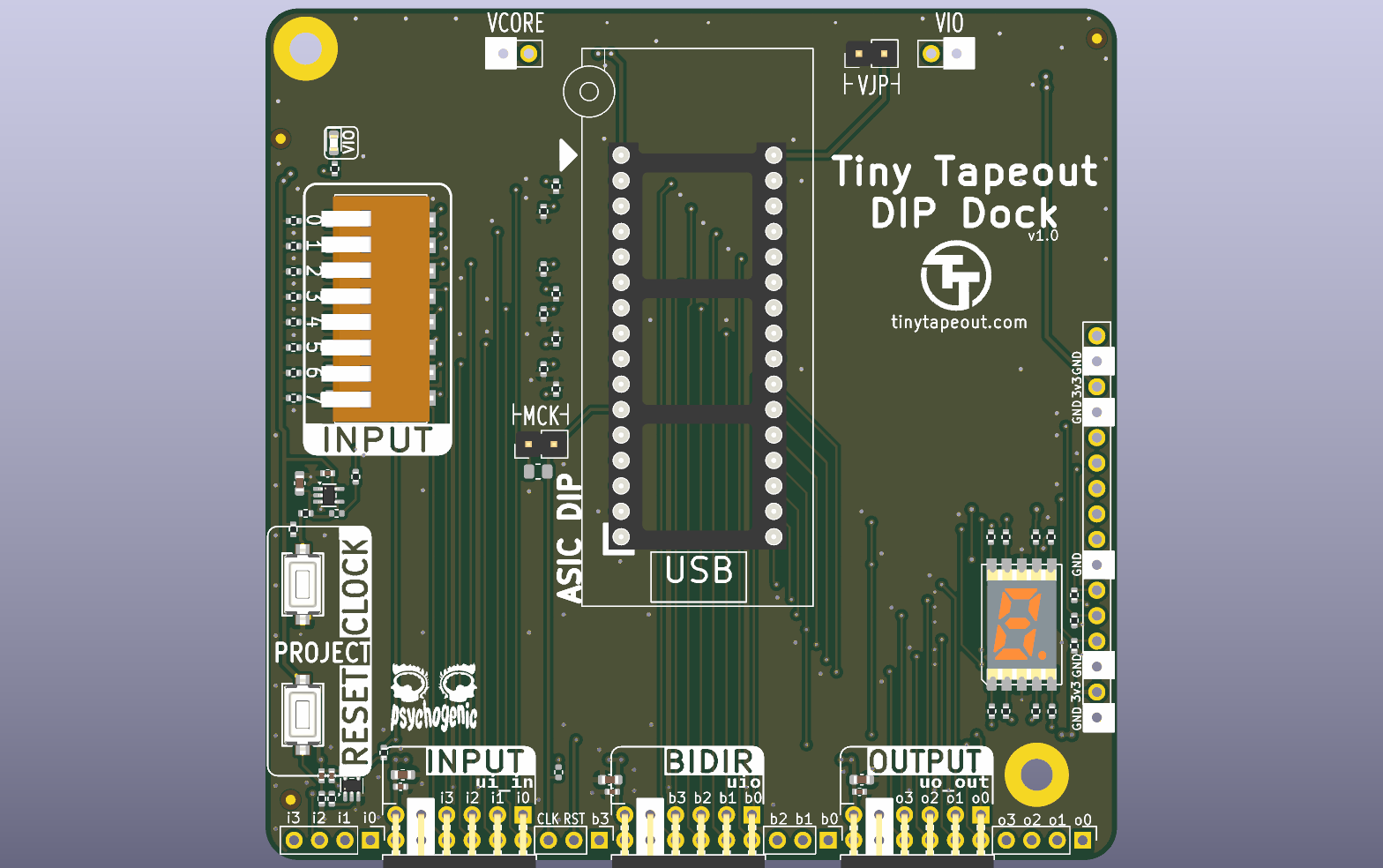
The top of Tiny Tapeout’s DIP dock as kicad-cli pcb render draws it in kicad/kicad:10.0.5-full: copper under the green mask, gold pads, silkscreen and holes, and a 3D model for each part whose footprint names one that the image has, such as the DIP switch, the push buttons and the 7-segment display. Made by scripts/figures/board_renders.sh.
For a reviewer, a render without the parts is often better, since the pads and the silkscreen are what they’re checking, and that’s what the plain image gives you.
Outputs that repeat from run to run
It helps to know which outputs come out the same on every run, because then CI can tell you whether a commit changed them:
- SVG plots of layers were identical from run to run once the date that
kicad-cliwrites into each file’s<title>was removed. - Two top-view renders of the DIP dock were byte-identical. Two bottom views of the SKY130 breakout differed: the PNGs were 161,218 and 161,207 bytes, and 54 of their 1,542,912 pixels were different.
- Gerbers, the job file and the drill file carry the date of the export, as Fabrication outputs shows, so two exports made at different times are never identical as they stand.
A render can change by a few pixels from one run to the next, so the renders are for people to look at. When a workflow needs to decide whether the board changed, have it compare the Gerbers with their date lines removed.
kicad-cli also writes a .kicad_prl file of local settings next to the project it reads, even for a check. In CI that doesn’t matter, because the runner is thrown away afterwards. On your own machine, it’s one of the files that KiCad files in git tells you to ignore.
Jobsets
Instead of listing every export in the workflow, you can save the list in the project as a jobset and run it with kicad-cli jobset run. The list of outputs then lives in one file next to the board. We haven’t tried a jobset in this course yet.
KiBot
KiBot is a tool that drives KiCad from a YAML file and produces outputs that kicad-cli doesn’t, such as an interactive HTML BOM. It’s free software, under the AGPL-3.0. In Lab 05, Part 5, your workflow runs it after the checks to make an interactive BOM and a design report. On November 16, 2026 its newest release was 1.9.1, dated 2026-07-28. Under “Render 3D”, the changelog for that release says “KiCad 10: support for kicad-cli interface, adds some new options but has various limitations”. Four things about KiBot affect how the course runs it:
- Its KiCad 10 images lag behind KiCad’s releases. The newest KiCad version in any
ghcr.io/inti-cmnb/kicad10_auto_fulltag was 10.0.5, three releases behind KiCad’s own 10.0.8. So KiBot’s image has the same KiCad version as the course’s checks, but it isn’t the same build askicad/kicad:10.0.5. In the1.9.1-2_k10.0.5_d13.2_b4.2.4LTSimage,kicad-cli versionprints10.0.5, but that KiCad is KiCad’s Ubuntu package, version10.0.5-testing-188+202607221313~667fa36054~ubuntu25.10.1, and the image has the 10.0.4 symbol and footprint libraries and no 3D models. We ran the course’s board check in it on the SKY130 breakout and on Lab 04’s reference board, and it gave the same counts askicad/kicad:10.0.5on both. - KiBot’s GitHub Action for KiCad 10,
v2_k10, builds its imageFROM ghcr.io/inti-cmnb/kicad10_auto_full:latest, andlatestmoves to each new KiBot release. On November 16, 2026,latest,1.9.1and1.9.1-2_k10.0.5_d13.2_b4.2.4LTSall named the same image,sha256:96e75f885b15…. Lab 05’s workflow doesn’t use the action. It names the fixed tag and that digest inci/kibot-image.txt, a copy of the course’slabs/common/kibot-image.txt, and runs the image withdocker runas the runner’s uid, the same way it runs KiCad’s image. On your own machine,labs/common/kibot.shruns it the waykicad.shruns KiCad’s. - The image runs as root unless you give it another user, and it’s a 1,347 MB download that takes 3.9 GB on disk. Lab 05’s workflow pulls it in KiBot’s own step, which GitHub skips when an earlier step has failed, so a run whose board check fails never downloads it.
- KiBot can run ERC and DRC itself, as preflights, but the course doesn’t use them. Its DRC fails only on errors unless you tell it to fail on every warning. KiCad reports a footprint that’s missing from the board as a warning, so with its default settings KiBot passed Lab 04’s board with R3 deleted. The course keeps its checks in
check_board.py, run inkicad/kicad:10.0.5, and uses KiBot only for outputs. Lab 05, Part 5 shows these runs.
Check yourself
A workflow runs
kicad-cli pcb drc --severity-error --schematic-parity --exit-code-violationsand goes green, but the board is missing a footprint that the schematic has. How?TipAnswerKiCad reports schematic parity problems, including a missing footprint, as warnings, and
--severity-errorleaves warnings out, so DRC found nothing at error severity and exited 0.check_board.pyfails on any parity item for this reason.Your workflow names
kicad/kicad:10.0. One week the DRC warning count changes, and nobody has committed anything. What’s the likeliest reason?TipAnswerThe tag moved to a new 10.0 patch release, so CI ran a different KiCad. Naming the image by its digest, as
labs/common/kicad-image.txtdoes, keeps it the same until you change it on purpose.You run ERC on the SKY130 breakout in a container as root and get 233 warnings. The lab page says 97. Which number is wrong?
TipAnswerNeither. Root in the image has no library tables, so ERC reports the standard libraries as missing, and the warnings go up. Both setups give the same 10 errors. The lab pages quote warnings only for the course’s setup, which
kicad.shgives you.The render in your CI artifact shows bare pads and no parts. Is your workflow broken?
TipAnswerNo. The
kicad/kicad:10.0.5image has no 3D models of parts, so a render made in it shows the bare board. The-fullimage has them, and the course’s own 3D renders are made in it.
Next: KiCad files in git.