Lab 02: A layered testbench without pyuvm
You’ll finish a testbench for the router. Its pieces are plain Python classes on cocotb, with no pyuvm. You’ll write the monitor, which turns the handshakes on a valid/ready stream into packets, and the scoreboard, which predicts the packets that should come out of output 0 and checks the ones that do. Then you’ll use the testbench to catch two planted bugs, B05 and B09, and rerun it with different plusargs to find out what each catch depends on.
Package: labs/lab-02-a-layered-testbench-without-pyuvm/
Before you start
- Finish Lab 01. This lab uses the same
maketargets, the same terminal and the same course folder. - Read Python classes and cocotb concurrency and Driving and sampling on the clock.
- Read The router in one page, and keep the specification open. You’ll use its Cycles and handshakes, Packets, Routing and The outputs sections, and the stream rules under Valid/ready rules.
Time: about 1 h 30 min.
Part 1: The starter
What does the shipped testbench do, and what does it check?
Open a terminal on the workbench desktop, as in Lab 01, and go to the lab folder:
. /foss/designs/common/.designinit   # in every new terminal
mod dd105-b
cd labs/lab-02-a-layered-testbench-without-pyuvm
Build the simulator:
make buildYou should see:
python3 ../common/inject.py --all --out build/rtl
faulty build with 15 bugs -> build/rtl/router.f
========================================================================
 BUILD  router   (Verilator, 2 jobs)
 Full log: /foss/designs/modules/dd105-b/labs/lab-02-a-layered-testbench-without-pyuvm/build/build.log
========================================================================
========================================================================
 built /foss/designs/modules/dd105-b/labs/lab-02-a-layered-testbench-without-pyuvm/build/sim_build/Vtop in 2.2 s (1.9M in /foss/designs/modules/dd105-b/labs/lab-02-a-layered-testbench-without-pyuvm/build/sim_build)
 ccache:  Hits: 11 / 21 (52.38%)  Misses: 10 / 21 (47.62%)
========================================================================
 /foss/designs/modules/dd105-b/labs/lab-02-a-layered-testbench-without-pyuvm/build/sim_build/Vtop is up to date.
In the first two lines,
inject.pywrites a copy of the router’s RTL with all fifteen planted bugs in it, each behind the+BUGswitch, as Lab 01’s ALU had its three bugs. So the simulator you just built is the one that every run in this lab uses, whichever bug you switch on.The ccache’s counts add up over every build in your clone. Before this build, our counts covered only Lab 01’s two builds, which came to 6 hits and 8 misses, so this build’s own counts were 5 hits and 2 misses. The two files that this build compiled are
Vtop__ALL.o, the router, andverilator.o, cocotb’smain()for the simulator, which includes the header that Verilator writes for whichever design it built. The other five are Verilator’s support code, which Lab 01’s builds had already put in the ccache. With an empty ccache, the build took us 7.6 to 7.7 s.Read the files in
tb/. The generator hands its packets to the driver through a queue, and each monitor hands the packets it sees to the scoreboard through a queue of its own. Each queue is acocotb.queue.Queue. One end callsawait q.put(p), and the other callsawait q.get(), which waits until there’s a packet to take.File Class Its job packet.pyPacketone packet: its beats, header first RouterCfgthe test’s knobs, read from plusargs generator.pyGeneratormakes the packets and puts them in a queue driver.pyDriveroffers each beat on the input until the router takes it Sinkholds one output’s ready ( out0_readyorout1_ready) at 1, and counts its beatsApbMasterwrites the routing table and CTRL.ENmonitor.pyMonitoryours: turns a stream’s handshakes into packets scoreboard.pyScoreboardyours: predicts output 0 and checks it env.pyEnvmakes the pieces from GeneratortoScoreboard, connects them with queues, and runs the testtest_router.pyrouter_class_testthe clock, the reset, the Env, and the assert at the end, which fails the test if the testbench reported errorsRead
Env.run()closely. It waits for the reset to end and writes the routing table andCTRL.EN. Then it starts the sinks, the monitors, the scoreboard and the generator withcocotb.start_soon(), which runs each one’srun()as a task of its own beside the test. It runs the driver itself. When the driver has sent every packet,Env.run()waits 50 cycles for the outputs to drain and asks the scoreboard for its report. Nothing inEnv.run()waits for the monitors or the scoreboard, so the test ends after those 50 cycles however much of the monitor and the scoreboard you’ve written.router_class_teststarts a 10 ns clock, holdsrst_nlow through the rising edges at 0, 10 and 20 ns, and then makes theEnvand runs it. The driver and the scoreboard log each error they find and count it. A logged error fails nothing by itself, so the test’s last line is anassertthat the count is 0. When the count isn’t 0, the assert raises anAssertionError, which the verdict counts as a check that fired. This lab has no pyuvm and noBaseTest, so its Makefile setsBASE_TEST := 0, as Lab 01’scocotb/Makefiledid. That setting tells the verdict not to look for the line thatBaseTestprints at the end of a test.Run the test:
make runAfter cocotb’s start-up lines you should see:
     0.00ns INFO     cocotb.regression                  running test_router.router_class_test (1/1)
    20.00ns INFO     tb.env                             [ENV] 100 packets, DST from 0123, routes 0110, 1 to 8 beats
  7960.00ns INFO     tb.env                             [ENV] sent 100 packets (476 beats); output 0 took 243 beats and output 1 took 233
  7960.00ns INFO     tb.sb                              [SB] 0 packets in, 0 predicted for output 0, 0 checked, 0 errors
  7960.00ns INFO     cocotb.regression                  test_router.router_class_test passed
and, last:
------------------------------------------------------------------------
 ok: passed   0.25 s   log: build/runs/router_class_test-s1/run.log
------------------------------------------------------------------------
The third column is the logger that wrote the line. The environment, the driver, the two monitors and the scoreboard each have a logger of their own, named
tb.followed by a short name for the piece:tb.env,tb.drv,tb.in,tb.out0andtb.sb. The first[ENV]line gives the test’s knobs, which are plusargs (the package README lists them).routes 0110is the routing table, one character per entry fromROUTE0toROUTE3, and each character is the output that the entry sends packets to. So packets forDST0 and 3 go to output 0, and packets forDST1 and 2 go to output 1.make check-allruns the test on the golden router and on the two bugs this lab hunts. Write down what you expect it to report, then run it:make check-allYou should see:
      ok  the golden design                        passed                          0.2s
------------------------------------------------------------------------
  MISSED  tier 2  B05_dst_field_off_by_one         passed                          0.2s
  MISSED  tier 3  B09_write_pointer_power_of_two   passed                          0.2s
------------------------------------------------------------------------
 0 of 2 caught.
 Still hiding from this test:
   B05_dst_field_off_by_one
      hides behind: sending to DST 0 only, or setting every route the same way
   B09_write_pointer_power_of_two
      hides behind: short tests: fewer than 16 beats through one output
On the golden router, output 0 took 243 beats and the test passed. It passed on both broken routers as well. Why?
TipAnswerThe starter’s monitor and scoreboard are empty, so nothing compared those 243 beats with anything. That’s why the
[SB]line says the scoreboard took in 0 packets and checked 0. A pass means only that no check fired, and this testbench has no checks that could fire, so it passes on all three routers.
Check: 0 of 2 caught, and [SB] 0 packets in in make run.
Part 2: The monitor
What goes into the router, and what comes out of output 0, packet by packet?
Open
tb/monitor.py. AMonitoris given the prefix of one stream’s signal names, so the same class watchesin_valid,in_ready,in_dataandin_laston the input andout0_valid,out0_ready,out0_dataandout0_laston output 0.Driver,SinkandApbMasterchange the router’s inputs right after a rising edge, and every class that reads the pins,Monitorincluded, reads them at the falling edge in the middle of the cycle. The router’s outputs come from flip-flops and change just after a rising edge too, so at the falling edge every signal holds the value it has for the whole cycle. That’s what the specification means by a signal’s value “in cycle n”. A cycle in whichvalidandreadyare both 1 is a handshake, and the beat moves at the rising edge that ends it. The monitor sees the handshake at the falling edge in the middle of that cycle, so the times it records are 5 ns before the edges at which the beats moved.This is the golden router taking the first packet on its input and delivering it on output 0:
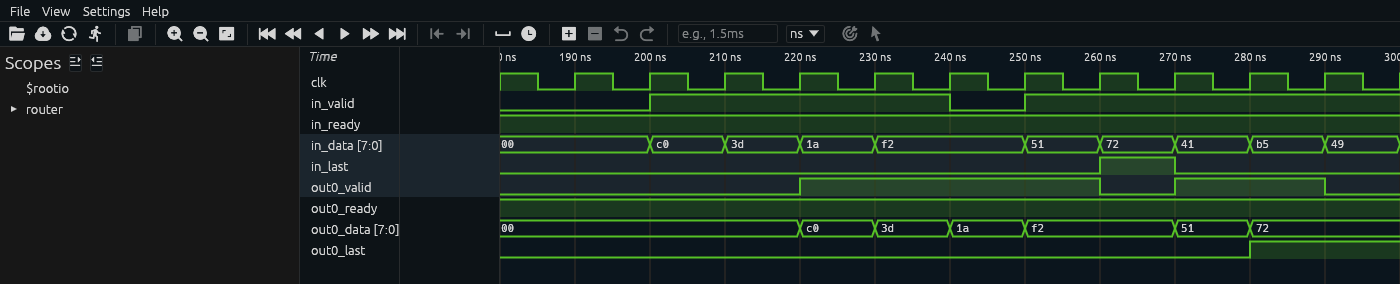
The packet c0 3d 1a f2 51 72 going in and coming out of output 0, in Surfer Seed 1, 180 to 300 ns.
in_validgoes high at 200 ns withc0, the header, and the router takes it at the rising edge at 210 ns.c0is onout0_datafrom 220 ns.out0_readyis 1 throughout.Find
f2onin_data. At how many falling edges is it onin_data, and how many beats is it?TipAnswerIt’s on
in_dataat two falling edges, 235 ns and 245 ns, and it’s one beat. The driver put it there at 230 ns, the router took it at the edge at 240 ns, and the driver then left one idle cycle within_validat 0. So at 245 nsin_datastill showsf2, but within_validat 0 there’s no handshake. A monitor that looked only atin_datawould record it twice. Output 0 shows the same idle cycle two cycles later, without0_validat 0 from 260 to 270 ns.Write
Monitor.run()as theTODOdescribes. Each time round awhile Trueloop, wait for the next falling edge withawait FallingEdge(self.dut.clk); drop any half-assembled packet whilerst_nis 0; and in a handshake cycle add the beat to the packetp, starting a new one whenpisNone. When the beat haslast= 1, the packet is finished, so put it into_sbwithawait self.to_sb.put(p)and setpback toNonefor the next one. Log each finished packet with theself.log.info(f"{p}")line and the condition in theTODO, so that you can compare your output with the one below.Run
make build. It printsVtop is up to date., because the simulator is built from the router’s RTL alone andtb/is Python, as in Lab 01. So you’ll find a mistake in your code only when you run the test. Ifrun()raises an exception, such as aNameError, the test ends there, the verdict isBROKEN, and the traceback is in the log.+SHOW=5makes each monitor log the first 5 packets it sees, each at the time it saw the packet’s last handshake. Using the routing table0110and rule O8 of the specification, write down which input packets you expect to see again on output 0, and how many ns eachtb.out0line should come after thetb.inline of the same packet. Then run it:make run PLUSARGS="+SHOW=5"You should see, with the reference monitor:
    20.00ns INFO     tb.env                             [ENV] 100 packets, DST from 0123, routes 0110, 1 to 8 beats
   265.00ns INFO     tb.in                              dst 3, 6 beats: c0 3d 1a f2 51 72
   285.00ns INFO     tb.out0                            dst 3, 6 beats: c0 3d 1a f2 51 72
   365.00ns INFO     tb.in                              dst 1, 8 beats: 41 b5 49 a0 a6 fc 48 0e
   405.00ns INFO     tb.in                              dst 3, 1 beat: c2
   425.00ns INFO     tb.out0                            dst 3, 1 beat: c2
   485.00ns INFO     tb.in                              dst 0, 4 beats: 03 03 16 14
   505.00ns INFO     tb.out0                            dst 0, 4 beats: 03 03 16 14
   525.00ns INFO     tb.in                              dst 0, 4 beats: 04 57 6c 1b
   545.00ns INFO     tb.out0                            dst 0, 4 beats: 04 57 6c 1b
   555.00ns INFO     tb.out0                            dst 0, 1 beat: 05
  7960.00ns INFO     tb.env                             [ENV] sent 100 packets (476 beats); output 0 took 243 beats and output 1 took 233
  7960.00ns INFO     tb.sb                              [SB] 0 packets in, 0 predicted for output 0, 0 checked, 0 errors
The header’s low six bits are the packet’s sequence number, so
c0is packet 0,41packet 1 andc2packet 2. Why is packet 1 missing from output 0, why does eachtb.out0line come 20 ns after thetb.inline of the same packet, and why does05come out of output 0 with notb.inline?TipAnswerPacket 1’s header,
41, hasDST1 in bits 7:6, andROUTE1sends packets to output 1, which this testbench doesn’t watch. The 20 ns is two clock cycles. Rule O8 puts each beat on the output from the second cycle after its input handshake, as example E2 in the specification shows, unless the beat before it is still waiting there, as in E3. Here the sink takes every beat in the first cycle it’s offered, so nothing waits, and each packet’s last beat is taken from output 0 two cycles after it went in.05is packet 5. The five packets that the input monitor logged were packets 0 to 4, including packet 1, which went to output 1, so output 0’s fifth packet is packet 5, which went in after the input monitor had stopped logging.The
[SB]line says 0 packets in, because you haven’t written the scoreboard yet.
Check: your tb.in and tb.out0 lines match the ones above. Your seed is the same as ours, so your packets are the same too.
Part 3: The scoreboard
Which packets should come out of output 0, and did they?
Read the docstring at the top of
tb/scoreboard.py. The rule you’re checking is O5, which says that an output delivers the beats of the packets routed to it in the order the router accepted them, unchanged. (The full rule also allows a changedout_laston a packet that the router cut for being oversize, but every packet in this lab is 1 to 8 beats, so none is cut.) In this lab the sinks never stall, so no packet is dropped for a full output, and a packet goes to output 0 exactly whenROUTE[DST]is enabled withPORT0.Write the four
TODOs:run(): two loops that each run forever, each in anasync defmethod of its own. One takes packets fromfrom_inand callspredict()with each, and the other takes packets fromfrom_out0and callscheck()with each. Start both withcocotb.start_soon()and await both.predict(): append the packet toexpectedif it will come out of output 0.check(): compare what came out with the oldest packet inexpected, usingPacket.same(). A packet that comes out whileexpectedis empty is an error too.report(): report an error for each packet still inexpected, because it never came out, and one more if the test checked no packets at all.
Report each error with
self.error(), which logs the message on thetb.sblogger and counts it inn_errors:self.error(f"out0 delivered {got} at {got.t_last} ns; expected {want}, which went in at {want.t_last} ns")Run the test on the golden router:
make runYou should see
[SB] 100 packets in, 51 predicted for output 0, 51 checked, 0 errorsandok: passed. The golden router is correct, so if an error fires here, the mistake is in your scoreboard or your monitor.Run it on five seeds:
make seeds SEEDS="1 2 3 4 5"You should see
5 ok (5 runs). The command took us 1.5 s.Write down what you now expect from
make check-all, then run it. With the reference scoreboard you should see:ok the golden design passed 0.3s ------------------------------------------------------------------------ caught tier 2 B05_dst_field_off_by_one AssertionError 0.3s caught tier 3 B09_write_pointer_power_of_two AssertionError 0.3s ------------------------------------------------------------------------ 2 of 2 caught. Every bug in the list, each one caught by a check that fired.Each caught row names the exception that ended the run, which is the
AssertionErrorfrom the test’s last line. The number of errors is in that assert’s message, which you’ll see in the next step.Look at the first error on B05:
make run BUG=B05With the reference scoreboard, the first line after
[ENV]is:505.00ns ERROR tb.sb out0 delivered dst 0, 4 beats: 03 03 16 14 at 505 ns; expected dst 3, 6 beats: c0 3d 1a f2 51 72, which went in at 265 nsand the end of the run is:
  7960.00ns INFO     tb.sb                              [SB] 100 packets in, 51 predicted for output 0, 49 checked, 47 errors
  7960.00ns WARNING  ..ter_class_test.router_class_test the testbench reported 47 errors; the first: out0 delivered dst 0, 4 beats: 03 03 16 14 at 505 ns; expected dst 3, 6 beats: c0 3d 1a f2 51 72, which went in at 265 ns
                                                        assert 47 == 0
followed by the traceback of the failed assert and the verdict,
caught: AssertionError. In theWARNINGline, cocotb prints the assert’s message, and under it the comparison that failed.In Part 2, on the golden router,
c0 3d 1a f2 51 72came out of output 0, 20 ns after it went in. Its header,c0, is1100_0000. Which routing table entry should the router have used, which one did it use, and which bits of the header did it read?TipAnswerDSTis bits 7:6 of the header, and inc0they’re11, so the router should have usedROUTE3, which sends packets to output 0. Bits 6:5 ofc0are10, so this router read the field one bit too low and usedROUTE2, which sends packets to output 1. That’s B05,dst_field_off_by_one. Packet 0 never came out of output 0, so the scoreboard compared it with the first packet that did,03 03 16 14, and reported the mismatch. Packet 3’s header,03, has00in both bits 7:6 and bits 6:5, so it went where it should.Now the first error on B09:
make run BUG=B09775.00ns ERROR tb.sb out0 delivered dst 3, 6 beats: c0 3d 1a f2 51 72 at 775 ns; expected dst 0, 1 beat: 05, which went in at 535 nsYou’ve seen this packet before, in your Part 2 printout. Where, and which beat into output 0 is the first bad one?
TipAnswerIt’s packet 0,
c0 3d 1a f2 51 72. It was the first packet that output 0 delivered, at 285 ns, in your Part 2 printout and in this run alike. At 775 ns its beats came out of the buffer a second time. Before that, output 0 had delivered 15 beats: packet 0’s 6 beats, thenc2, then03 03 16 14and04 57 6c 1b. So the 16th beat into output 0,05, is the first bad one. Part 4 shows why.
Check: 2 of 2 caught from make check-all.
Part 4: What each catch depends on
Which property of the stimulus does each catch depend on? The test’s knobs are plusargs, so none of these runs rebuilds anything.
+ROUTES=0000sets all four routes to output 0. Predict whether your test still catches B05, then run:make check BUG=B05 PLUSARGS="+ROUTES=0000"You should see
okon the golden design,MISSEDon B05 andVERDICT: FAIL -- your test passes B05_dst_field_off_by_one too.Why does the test miss B05 now?TipAnswerB05 changes which routing table entry the router reads. With
+ROUTES=0000, every entry sends packets to output 0, so whichever entry the router reads, each packet still comes out of output 0 in the order it went in, and nothing at the pins shows which entry was used. A test checks theDSTfield only when each of its bits has an effect of its own on where a packet goes. With the default0110, changing either bit ofDSTchanges the output a packet goes to, and with0000neither bit does.+DSTS=0makes the generator give every packetDST0. Predict both results, then run:make check BUG=B05 PLUSARGS="+DSTS=0 +N=32" make check BUG=B05 PLUSARGS="+DSTS=0"The first prints
MISSED. The second, with the default 100 packets, printscaught B05_dst_field_off_by_one AssertionError 0.3s router_class_test: AssertionError: the testbench reported 68 errors; the first: out0 delivered dst 0and
make run BUG=B05 PLUSARGS="+DSTS=0"shows its first error in full:4845.00ns ERROR tb.sb out0 delivered dst 0, 6 beats: 00 77 ce 9b 6b 1e at 4845 ns; expected dst 0, 8 beats: 20 27 e4 05 51 e4 6b 4f, which went in at 2345 nsWhy does
DST0 alone catch B05 with 100 packets and not with 32?TipAnswerThe header’s other six bits are the sequence number, which counts 0 to 63 and wraps. For packets 0 to 31, bits 7:5 are all 0, so bits 6:5 read
00, the same asDST, and the bug has no effect. A run of 32 packets sends only those. Packet 32’s header is20, which is0010_0000, so its bits 6:5 are01. The router usesROUTE1for packets 32 to 63, so it sends all of them to output 1. In the first error, output 0 was expecting packet 32 (20), and the next packet it delivered was packet 64, whose sequence number has wrapped to 0, so its header is00.In Part 1,
make check-allsaid that B09 hides behind short tests, with fewer than 16 beats through one output. With+DSTS=0 +LEN=1, every packet is one beat long and goes to output 0. Work out the smallest+Nthat should catch B09 and write it down. Then try it and the number below it:make check BUG=B09 PLUSARGS="+DSTS=0 +LEN=1 +N=15" make check BUG=B09 PLUSARGS="+DSTS=0 +LEN=1 +N=16"You should see, from the two commands:
MISSED B09_write_pointer_power_of_two passed 0.2scaught B09_write_pointer_power_of_two AssertionError 0.2s router_class_test: AssertionError: the testbench reported 1 error; the first: out0 delivered dst 0,make runwith the sameBUGandPLUSARGSprints the whole error:out0 delivered dst 0, 1 beat: 00 at 405 ns; expected dst 0, 1 beat: 0f, which went in at 385 ns.Record the 16-beat run and open it:
make waves BUG=B09 PLUSARGS="+DSTS=0 +LEN=1 +N=16"
surfer build/runs/router_class_test-s1-B09/waves.fst &
Surfer lists two scopes at the top.
$rootioholds the router’s ports a second time, androuteris the router itself, which is cocotb’s top level. Addclk,in_valid,in_ready,in_data,out0_validandout0_datafromrouter, andwr_ptr_qandrd_ptr_qfromrouter.u_buf0, output 0’s buffer:
Sixteen one-beat packets through output 0 with B09 switched on, in Surfer B09, 160 to 420 ns. The first beat,
00, is offered from 170 ns;in_dataalready held00, so onlyin_validshows it. Beats00to0ecome out as they went in.wr_ptr_qgoes on frometofwhilerd_ptr_qwraps frometo0, and the 16th beat comes out as00instead of0f.The buffer holds 16 beats, one in the output register that drives the pins and 15 in a small RAM behind it (
labs/common/rtl/router_fifo.sv), so both pointers should wrap after entrye. Why does the 16th beat come out as00?TipAnswerThe write pointer wrapped at 16, as if the RAM had 16 entries, so beat
0fwas written to entryf, which doesn’t exist, and was lost. The read pointer wrapped correctly to entry 0, which still held beat00from the start of the test. For the first 15 beats, each beat is read from the entry it was written to, so no test that puts fewer than 16 beats through an output can see the bug.
Check: MISSED with +ROUTES=0000 and with +N=15, and caught with +N=16.
Finishing
You’re done when make check-all prints 2 of 2 caught. with the monitor and scoreboard you wrote in tb/monitor.py and tb/scoreboard.py.
Questions:
In Lab 01 the pyuvm testbench was split into the same kinds of pieces. Which jobs did pyuvm do there that the shipped classes, or you, did by hand here?
TipAnswerIn Lab 01,
AluEnv.connect_phase()connected the monitor’s analysis port to the scoreboard. HereEnv.__init__()makes three queues and passes each one to its two ends. In Lab 01, pyuvm’s phases started every component’srun_phase(), and the test’s objection decided when the test was over. HereEnv.run()starts the sinks, the monitors, the scoreboard and the generator withcocotb.start_soon(), runs the driver itself, and ends the test after a fixed 50-cycle drain. In Lab 01BaseTestcounted every error any component logged, and failed the test if the count wasn’t 0. Here the driver and the scoreboard each keep their ownn_errors,Env.n_errors()adds them up, and the test’sassertfails the test if the sum isn’t 0. In Lab 01 each test was its own class, picked withTEST=, and both tests reused the same driver, monitor and scoreboard. Here there is one test, its variations are the plusargs thatRouterCfgreads, and anything those can’t express needs a change toEnv.run(). In Lab 04 you’ll finish a pyuvm port of this testbench as it stands after Lab 03, and compare the two piece by piece.On B09 the reference scoreboard’s second error is
out0 delivered dst 3, 1 beat: c2 at 785 ns; expected dst 3, 6 beats: c8 5c f3 ea 11 09, which went in at 765 ns. Is that a second bug, and which error should you read first when a scoreboard reports many?TipAnswerIt’s the same bug.
c2is packet 2, which was the second packet that output 0 delivered, and here its beat has come out of the buffer a second time. After the first wrong packet, the buffer keeps handing back old beats, and the packets that output 0 delivers no longer line up with the ones inexpected. Read the first error first. Most of the later ones are comparisons that failed because the delivered packets andexpectedhad fallen out of step, so their number says little about how many packets the router got wrong.
Submit: Nothing to submit.
Going further (optional)
Watch output 1 as well. The Env needs a third Monitor, on the prefix out1, and a fourth queue to carry that monitor’s packets to the scoreboard. The scoreboard needs a second list of expected packets, which predict() fills for routes with PORT 1, and a third loop that takes output 1’s packets and checks them against it. Nothing needs rebuilding. Run make seeds SEEDS="1 2 3 4 5" to check that the golden router still passes.
Next on the Course path: the reading on constrained random with pyvsc and functional coverage, then Lab 03: Constraints and coverage.