Branch rules
This page answers: how can a repository make sure every change to main goes through a pull request, a review and a passing check, and why do the rules in the team’s repositories stop so little?
Pull requests and review describes the habit. A branch rule is how a repository enforces it: GitHub rejects a push, or blocks a merge, that breaks the rule, whoever makes it. Rules are easy to get subtly wrong, though, and the three sets of rules in the team’s repositories each look protective and leave main open in a different way. This page goes through all three, because between them they show what each setting does.
What a ruleset is
GitHub has two ways to set branch rules: the older “branch protection rules” and the newer rulesets. The team’s repositories use rulesets, so this page does too. A ruleset has five parts:
- A name, which is only a label. A ruleset called “protect-main” protects whatever its other settings say, and nothing more.
- An enforcement status: active, or disabled.
- Target branches, the branches it applies to, given as names or patterns. The default branch (
mainin a Tiny Tapeout repository) is the usual target. - Rules. The ones that matter here are Restrict deletions (nobody can delete the branch), Block force pushes (nobody can rewrite its history), Require a pull request before merging (nobody can push to it directly, and you can require some number of approvals), and Require status checks to pass (named jobs must have passed on the pull request’s latest commit).
- A bypass list: people, teams or roles that may skip the rules. Each entry is either “Always allow”, or “For pull requests only”, in which case the actor “is now required to open a pull request” but may merge it without meeting the other requirements (creating rulesets).
Rulesets, like the older protection rules, are available in public repositories on GitHub’s free plans, and in private repositories only on paid ones (about rulesets). The team’s organization is on the free plan, so a private repository such as dpll can’t have branch rules at all. Anyone who can read a public repository can also read its rulesets, at github.com/<owner>/<repo>/rules, which is how the pictures on this page were taken without signing in.
Three rulesets in the team’s repositories
hart-1, “Don’t Push to Main” (created Nov 15, 2026). Its name says what it’s for, but GitHub’s own page for the ruleset says that it “will not be applied”:
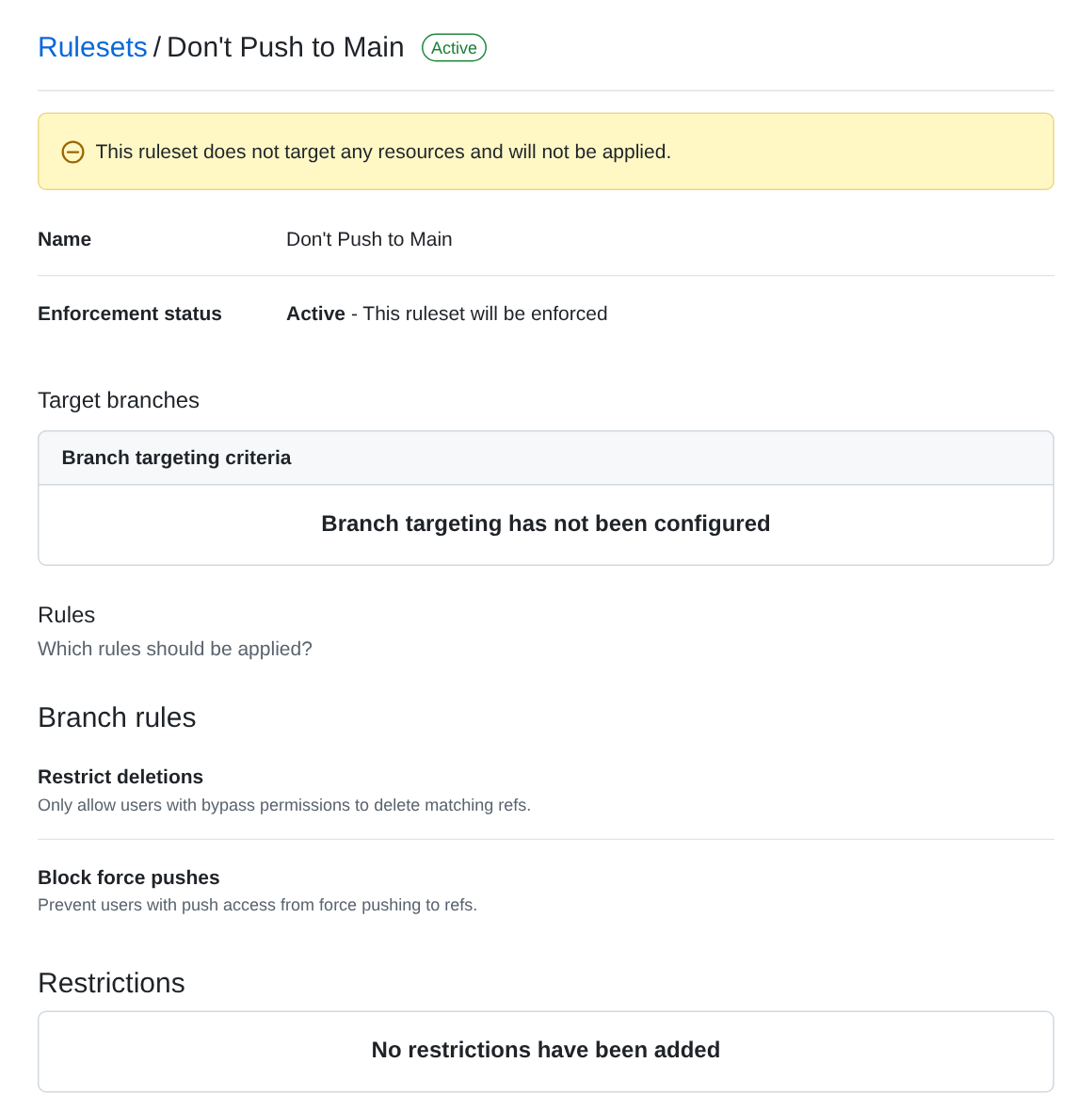
The ruleset is active, but its list of target branches is empty, so it applies to no branch. Suppose it did target main, though. Its two rules stop anyone deleting main or force-pushing to it, which are worth having, but neither stops an ordinary git push to main. To do what its name says, it would also need Require a pull request before merging and the default branch as its target.
crosswalk, “protect-main” (created Oct 31, 2026). On paper this one is set up properly: it targets the default branch, restricts deletions, blocks force pushes, and requires a pull request with one approval. Its bypass list, however, has one entry: a repository role, with “Always allow”. Since the ruleset was created, six commits have reached main without a pull request (61156d4, 3985abc, 34cf810, 8973a92, 685608c and 2f71732; the last is a merge made locally and pushed, “Merge Sample/hold and CDAC, update interface details”), and all six pull requests merged in that time were merged by their own authors with no approval. With “Always allow”, everyone who holds the role is outside the rule for every push and every merge.
protocol-emulator, “main” (created Oct 24, 2026). This one targets refs/heads/main, blocks force pushes and requires a pull request, with the required number of approvals set to zero, and one person on the bypass list with “Always allow”. Zero approvals is a reasonable choice: every change still arrives as a pull request, with its diff and its workflow runs in one place, even when nobody else is available to review it. The same repository has a second ruleset, “Branch Hierarchy (L*) Ruleset”, for branches named L1/*, L2/* and L3/*, which is disabled.
Rules like these are easy to end up with, because a ruleset with a reassuring name and a few rules looks as if it’s doing its job. Reading each of its five parts, as above, is how you check one.
What write access allows
When we checked on Nov 15, 2026, the uoftasic organization’s base permission for members was write: every member can push to every one of the organization’s repositories, to any branch that no rule protects. This course doesn’t use the organization, and everything you do in it happens in your own account. If you later join one of the team’s projects as a member, though, in most of its repositories the only thing between your laptop and their main will be your own judgment. Use that access the way you’d want others to use theirs: push to your own branch, open a pull request, and leave main to the project’s own process.
Rules that do what they say
For a shared repository such as a team project, a ruleset that matches its name looks like this:
| Part | Setting |
|---|---|
| Enforcement | Active |
| Target | The default branch |
| Rules | Restrict deletions; Block force pushes; Require a pull request before merging, with at least one approval; Require status checks to pass, naming the jobs that must be green |
| Bypass list | Empty, or project leads with “For pull requests only” |
The status checks are named after jobs (docs, test, gds, precheck, gl_test, viewer in the digital template; docs, gds, precheck and viewer in the analog one). Tiny Tapeout’s workflows run on every push, so a pull request from a branch in the same repository gets runs on its latest commit, and those are the results the rule checks. A pull request from a fork is different: its commits are pushed to the fork, not to the repository it’s aimed at, so that repository’s workflows have to run on pull_request as well, or the required checks never report. A bypass “For pull requests only” keeps a way for a project lead to merge an urgent fix without an approval, while still putting that fix through a pull request where everyone can see it.
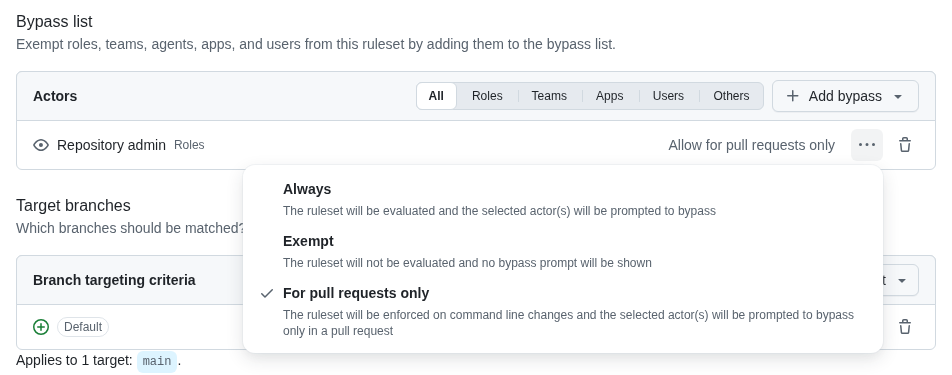
In Lab 04 you’ll put rules like these on a repository of your own, with yourself on the bypass list “For pull requests only”, and you’ll see your partner’s pull request wait until it has both your approval and green checks.
Check yourself
- A ruleset on
mainhas two rules, Restrict deletions and Block force pushes, and it’s active and targets the default branch. Can a member push a new commit straight tomain?
Yes. Those rules stop the branch being deleted or its history being rewritten, but an ordinary push adds commits without rewriting anything. To stop direct pushes, the ruleset needs Require a pull request before merging.
crosswalk’s ruleset requires one approval, yet all six pull requests merged since it was created have none. How?
Its bypass list gives a repository role “Always allow”, so anyone holding that role can merge without an approval, and push to main without a pull request at all, which six commits did.
- A friend’s Tiny Tapeout repository is private, in a personal account on the free plan. Can they add a ruleset to protect
main?
No. On GitHub’s free plans, rulesets and branch protection are available only in public repositories. They’d need to make the repository public (which this course does anyway, for free runners and for Pages) or move to a paid plan.
- What’s the difference between “Always allow” and “For pull requests only” on a bypass list?
“Always allow” exempts the actor from every rule, so they can push directly to the branch. “For pull requests only” still requires them to open a pull request, but lets them merge it without meeting the other requirements, such as an approval, so their changes stay visible.
Next: the next page in this row of the Course path.