Lab 04: A change through review
You and a partner each make a review repository from the course’s sandbox, a small analog project with eight empty slots, each for one inverter. You’ll claim a slot in your partner’s repository through a pull request from a fork, and review the one your partner opens in yours. Because you also claim the slot next to theirs in your own repository, their pull request will conflict with main, and they’ll resolve the conflict the way a layout repository needs it resolved, by building the GDS and LEF again from the merged sources.
Package: labs/lab-04-a-change-through-review/
Before you start
- Read Pull requests and review, Branch rules, Layout files in git and How open-source projects work.
- Finish Lab 03. You’ll copy your inverter cell from your
ttsky-ic102-arepository. - Find a partner who is taking IC102-A, and swap GitHub usernames. You both do every part: Parts 1, 3, 4 and 6 in your own repository, as its owner, and Parts 2 and 5 in your partner’s, as a contributor.
- Your token from Lab 01, Part 2 already covers the two repositories you’ll make here, because it was made for “All repositories”.
This lab takes about 1 h 30 min of your own time, spread over a day or two, because each of you waits for the other: your partner’s pull request has to be open before Part 3, and yours can’t be merged until your partner approves it.
Part 1: Your review repository
Set up the repository your partner will send a pull request to, with rules on its main.
On GitHub, make a new repository (the + menu › New repository) with your own account as the owner, the name
ttsky-ic102-a-review, Public, and no README,.gitignoreor licence, so that it starts empty.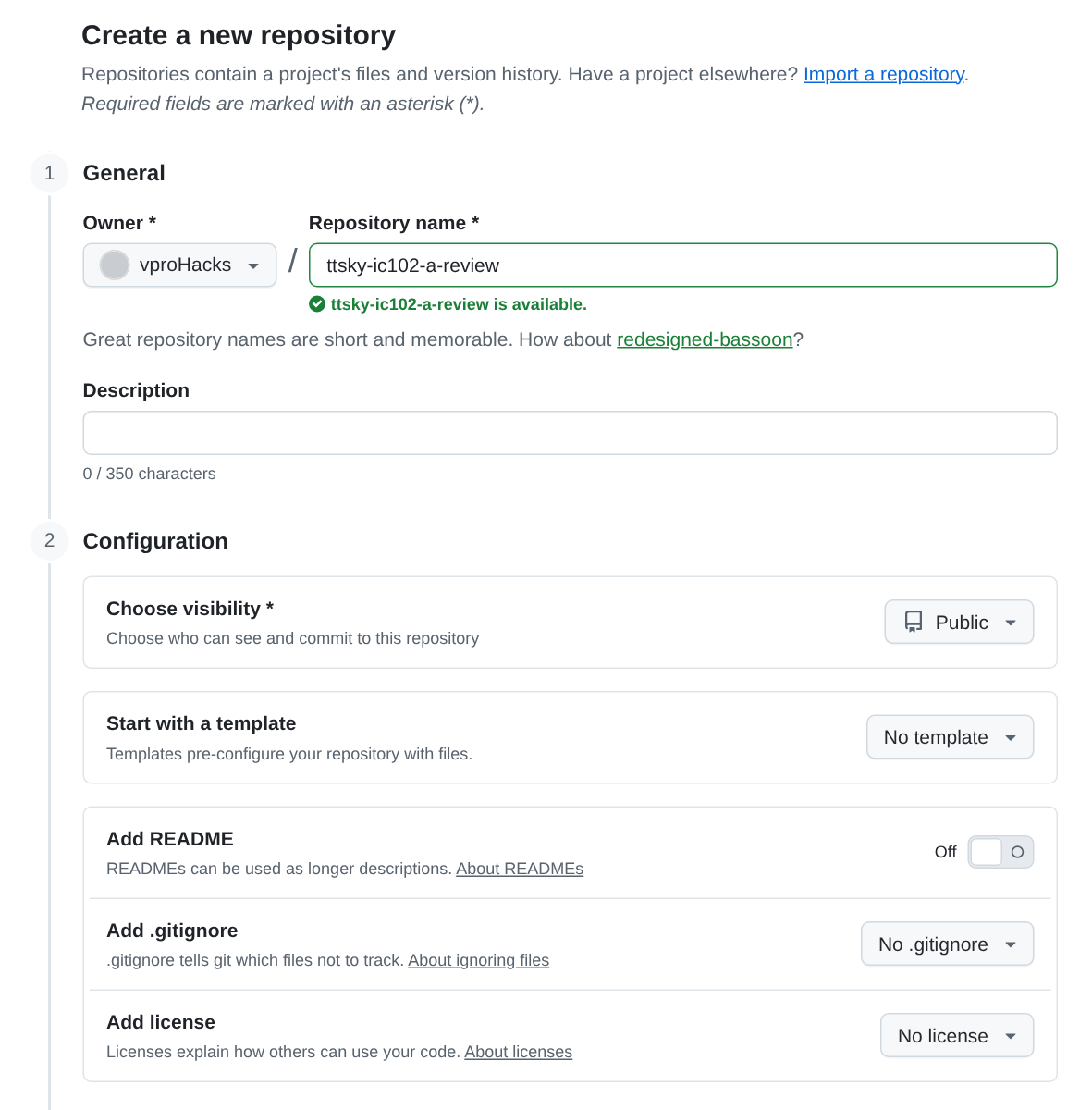
The new-repository form filled in for the review repository: your own account as the owner, Public, no template, Add README off, and no .gitignore or licence. Copy the sandbox into your projects folder, make it a git repository, and push it:
mkdir -p /foss/designs/projects && cd /foss/designs/projects
cp -r /foss/designs/modules/ic102-a/labs/lab-04-a-change-through-review/sandbox ttsky-ic102-a-review
cd ttsky-ic102-a-review
git init -b main
git config user.name "Your Name"
git config user.email "ID+USERNAME@users.noreply.github.com"
git config credential.helper 'cache --timeout=28800'
git add -A
git commit -m "Start from the IC102-A sandbox"
git remote add origin https://github.com/YOUR-USERNAME/ttsky-ic102-a-review.git
git push -u origin main
You should see
[main (root-commit) ...] Start from the IC102-A sandboxand25 files changed. This push adds files under.github/workflows/, which is why the token needs the Workflows permission as well as Contents.The push starts the
docsandgdsworkflows, andviewerfails with the 404 from Lab 01, because Pages is off in a new repository. Turn it on (Settings › Pages › Source: GitHub Actions), then start a new run: Actions ›gds› Run workflow onmain. As in Lab 01, don’t use “Re-run failed jobs” for this. You should seedocsgreen, andgds,precheckandviewergreen in the new run. In our test of this lab on Nov 16, 2026, the push’sdocsrun passed in 42 s; itsgdsrun hadgdsandprecheckgreen andviewerred after 8 s, withFailed to create deployment (status: 404); and the Run workflow run after Pages was on passed all three jobs in 2 min 42 s.Add the rules. Open Settings › Rules › Rulesets › New ruleset › Import a ruleset, and choose
ruleset.jsonfrom your clone; on your own computer it’s in your workspace folder, underprojects/ttsky-ic102-a-review/. Check what the page shows against the table inRULESET.md, then press Create.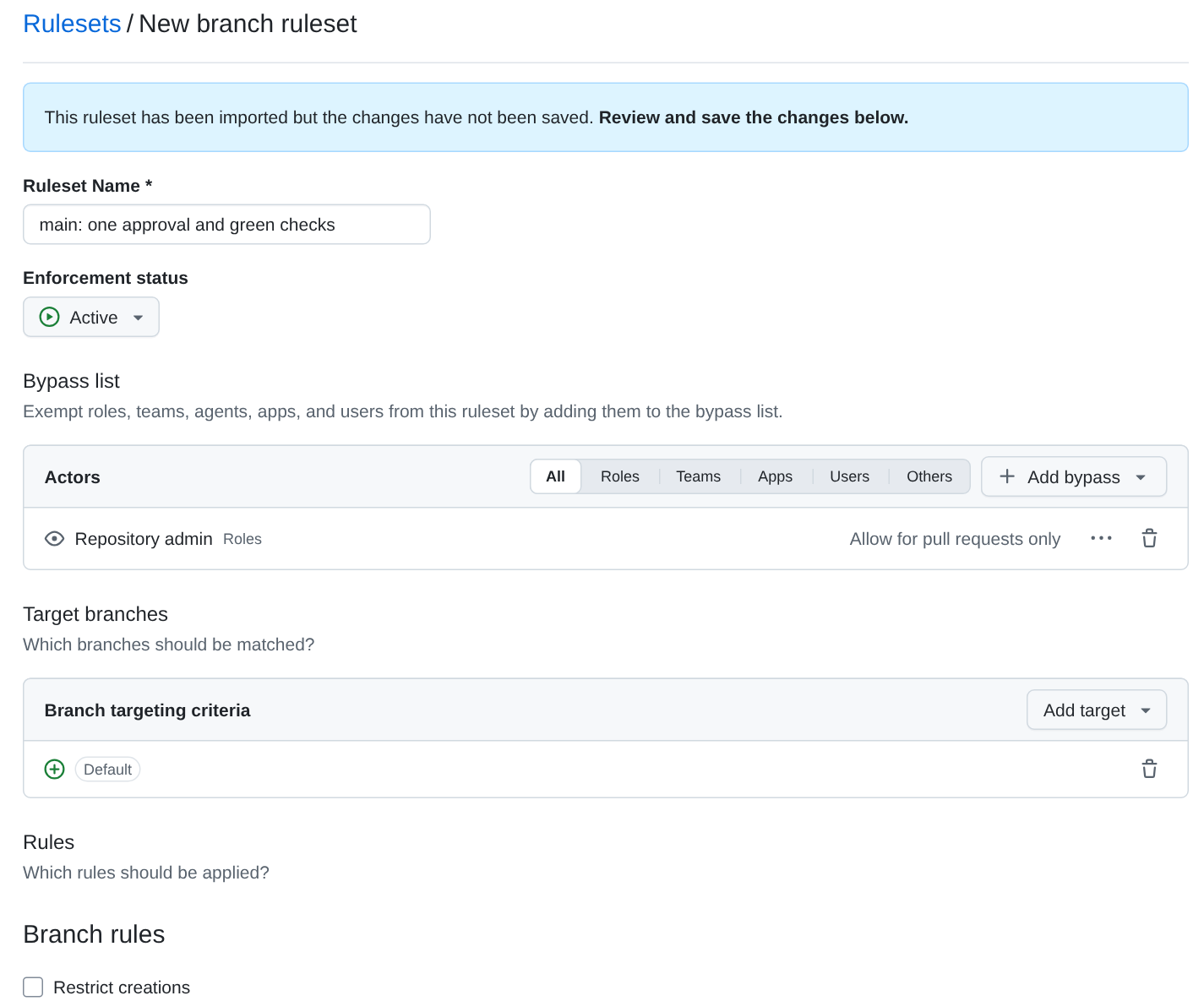
The imported ruleset before Create, with the repository admin on the bypass list, “Allow for pull requests only”. GitHub takes the file as written: the bypass entry shows as “Repository admin” with “Allow for pull requests only”, and the rules below it match
RULESET.md. One box is ticked that the file doesn’t mention, “Require an additional approval for unattributed Copilot pull requests”. That’s GitHub’s default, and it matters only for a pull request that Copilot opens by itself.You’re the repository’s admin, and the admin role is on the bypass list. Before you try it, write down whether a commit pushed straight to
mainwill be accepted. Then try one that changes nothing, and throw it away afterwards:git commit --allow-empty -m "Try to push to main" git push git reset --hard origin/mainTipAnswerIt’s refused, and GitHub’s message names the rule that requires a pull request. In our test repository,
git pushprinted:remote: error: GH013: Repository rule violations found for refs/heads/main. remote: Review all repository rules at https://github.com/vproHacks/ic102-review-sandbox-a/rules?ref=refs%2Fheads%2Fmain remote: remote: - Changes must be made through a pull request. remote: remote: - 3 of 3 required status checks are expected. remote: To https://github.com/vproHacks/ic102-review-sandbox-a.git ! [remote rejected] main -> main (push declined due to repository rule violations) error: failed to push some refs to 'https://github.com/vproHacks/ic102-review-sandbox-a.git'The bypass is “For pull requests only”: it lets you merge a pull request of your own without an approval (you’ll use that in Part 3), but it doesn’t let you push to
maindirectly.Send your partner the address of your repository.
Check: a green gds run on main with all three jobs, an active ruleset, and a refused push.
Part 2: Claim a slot in your partner’s repository
What does a layout change look like when you can’t read it in a diff?
Open
https://github.com/PARTNER-USERNAME/ttsky-ic102-a-reviewand click Fork, in the top-right corner of the page. On the form that opens, keep your own account as the Owner and keep “Copy the main branch only” ticked; both were already set that way in our test. Without that box, every branch in your partner’s repository is copied into your fork as well. Change the Repository name tottsky-ic102-a-review-fork. A fork gets the name of the repository it was made from unless you change it, and you already have a repository calledttsky-ic102-a-review. GitHub says the new name “is available” once you’ve typed it. Then click Create fork. GitHub describes the form in forking a repository.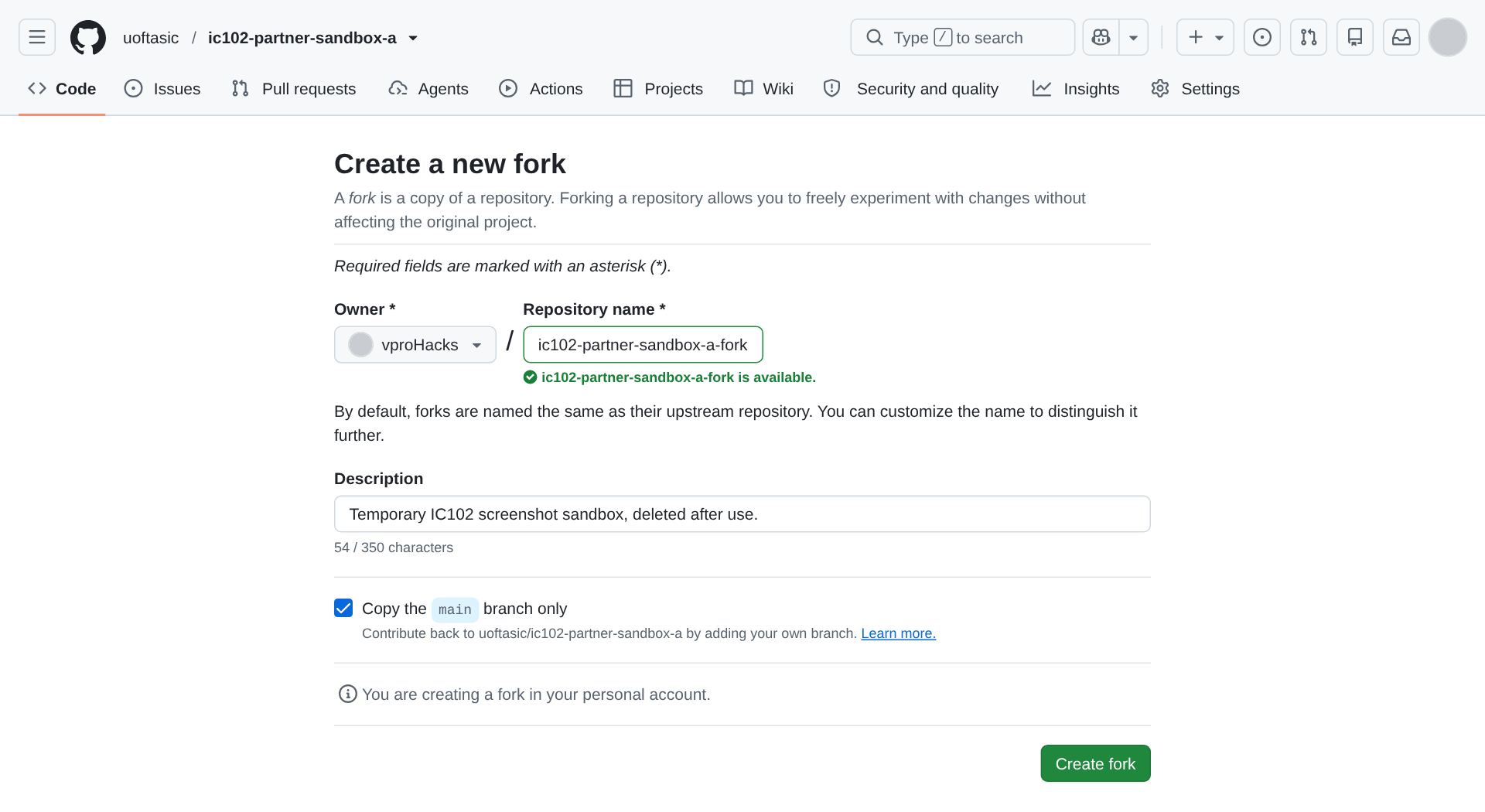
The fork form for your partner’s repository. In our test the uoftasic organisation stood in for the partner, so the form forks uoftasic/ic102-partner-sandbox-a, and the new name is that repository’s name with -fork on the end. Clone your fork, set it up as you did your own, and add your partner’s repository as a second remote called
upstream, so you can fetch what they merge:cd /foss/designs/projects git clone https://github.com/YOUR-USERNAME/ttsky-ic102-a-review-fork.git cd ttsky-ic102-a-review-fork git config user.name "Your Name" git config user.email "ID+USERNAME@users.noreply.github.com" git config credential.helper 'cache --timeout=28800' git remote add upstream https://github.com/PARTNER-USERNAME/ttsky-ic102-a-review.git git remote -vgit remote -vshould listorigin(your fork) andupstream(your partner’s repository), each twice.Pick a slot, K, from 0 to 7, and tell your partner which one. Make a branch for it:
git switch -c slot-K-YOUR-USERNAMEMake the change, with
youstanding for your GitHub username with any-changed to_:- Copy your cell from Lab 03:
cp ../ttsky-ic102-a/layout/cells/ic102_inv.mag layout/cells/inv_you.mag. - Add one line to the end of
layout/slots.tcl:slot K inv_you. - In
info.yaml’s pinout, describeui[K]anduo[K], for example"you's inverter, input"and"you's inverter, output".
- Copy your cell from Lab 03:
Run
make,make lvsandmake precheck. You should seewrote gds/tt_um_ic102a_sandbox.gds and lef/tt_um_ic102a_sandbox.lef, thenFinal result: Circuits match uniquely., thenPrecheck passedwith all 15 checks ✅.make lvschecks the layout against a reference thatlayout/lvs/reference.pywrites fromslots.tcl, so your slot is in it.Commit, and look at what you’re about to ask someone to review:
git add -A
git commit -m "Claim slot K for YOUR-USERNAME's inverter"
git show --stat HEAD
Here’s the same change for a student called
bobin slot 4, from a rehearsal of this lab:gds/tt_um_ic102a_sandbox.gds | Bin 19716 -> 24770 bytes info.yaml | 4 +- layout/cells/inv_bob.mag | 116 +++++++++++++++++++++++++++++++++++++++++++ layout/slots.tcl | 1 + lef/tt_um_ic102a_sandbox.lef | 57 ++++++++++----------- 5 files changed, 148 insertions(+), 30 deletions(-)TipWhich of these lines can a reviewer actually read?slots.tclandinfo.yaml, five changed lines between them. The cell is 116 lines of Magic’s format, which reviewers don’t read line by line, and it’s a copy of a cell that already passed LVS. The GDS is binary, so the diff shows only a change of size. The LEF is text, but it’s generated, so its 57 lines say nothing a reviewer can act on. That’s why your description has to carry the evidence, and why the reviewer looks at the render and the precheck table, as Layout files in git says.Push the branch to your fork with
git push -u origin slot-K-YOUR-USERNAME. git prints a link for opening a pull request; open it, and check that the base is your partner’s repository and itsmain. Fill in the description from the template: which slot, the cell’s name, theFinal resultline ofmake lvsand thePrecheck passedline ofmake precheck. If an AI tool wrote part of the change or the description, say which part, and what you checked yourself. Create the pull request and tell your partner its number.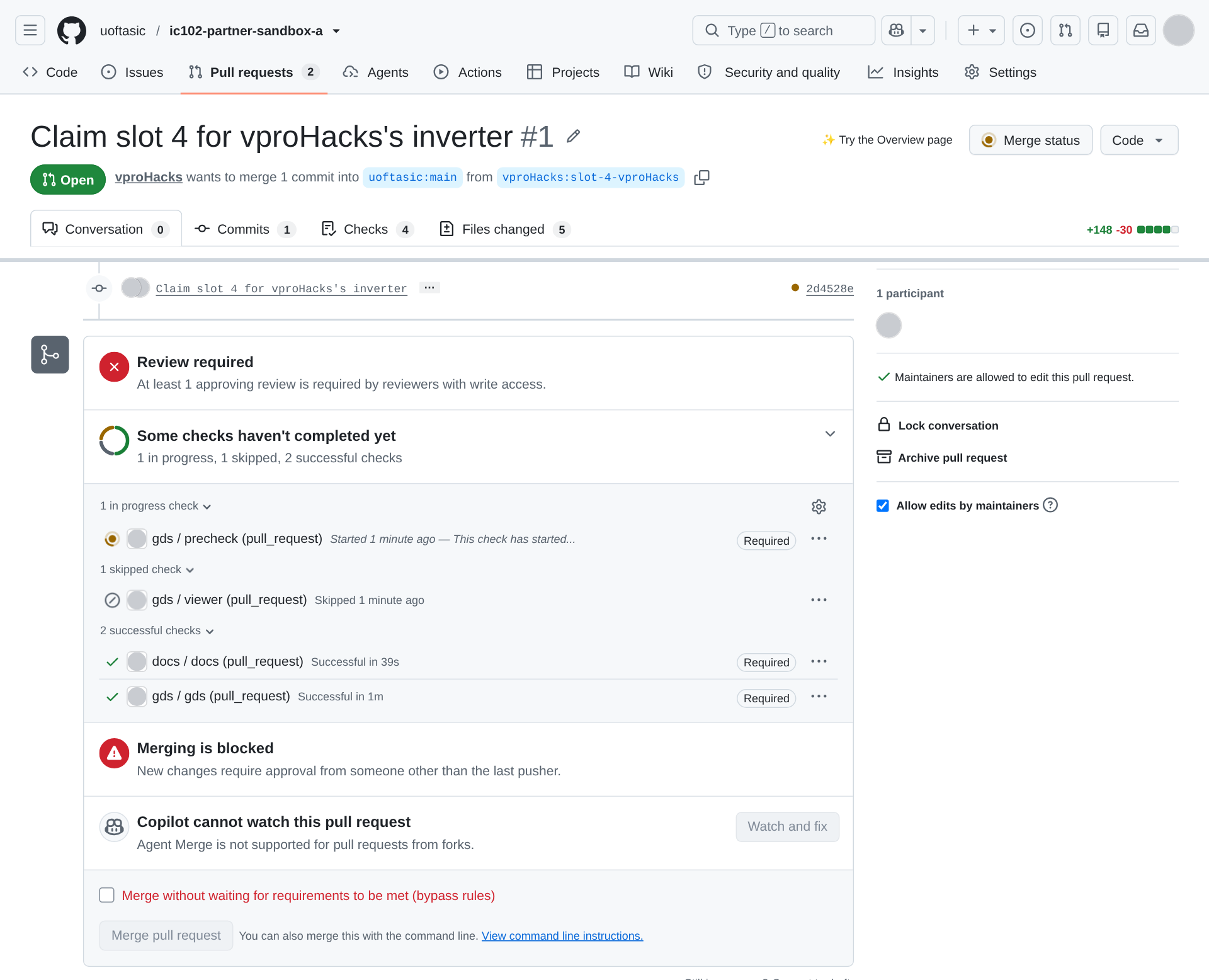
Your pull request on your partner’s repository, in our test, where uoftasic/ic102-partner-sandbox-a stood in for the partner’s. The line under the title names the base, uoftasic:main, and the branch in the fork. Docs and gds have passed, and precheck is still running. The bypass box near the bottom is there because the account that opened the pull request also owns the organisation; the ruleset gives the bypass only to the repository’s admin, so you won’t have it on your partner’s repository.
Check: your pull request is open on your partner’s repository, with one commit that changes those five files.
Part 3: Main moves
What happens to an open pull request when main changes under it?
Open your partner’s pull request in your repository. Its checks haven’t started, because by default GitHub holds the runs of anyone who has never had a commit or pull request merged into a repository, until someone with write access approves them (repository Actions settings). A
pull_requestrun uses the workflow files from the pull request itself, so read Files changed first and check that nothing under.github/changed. Then click Awaiting approval, in the upper right corner of the page, to open the Merge status panel, and click Approve workflows to run in it (approving workflow runs from forks). Do this before you merge anything of your own in step 4, because once the pull request has a conflict it gets no runs at all.Those two labels are from GitHub’s documentation. In both of our tests of this lab, the pull request came from an account with write access to the repository, so GitHub never held its runs and we never saw the panel. With nothing held, the button in the upper right corner read Merge status, as in the picture in Part 2, step 7.
You should see
docs,gdsandprecheckrun and pass, andviewerskipped. The merge box listsdocs / docs (pull_request),gds / gds (pull_request)andgds / precheck (pull_request), each marked Required, andgds / viewer (pull_request)as skipped, and it says “Review required” and “Merging is blocked”.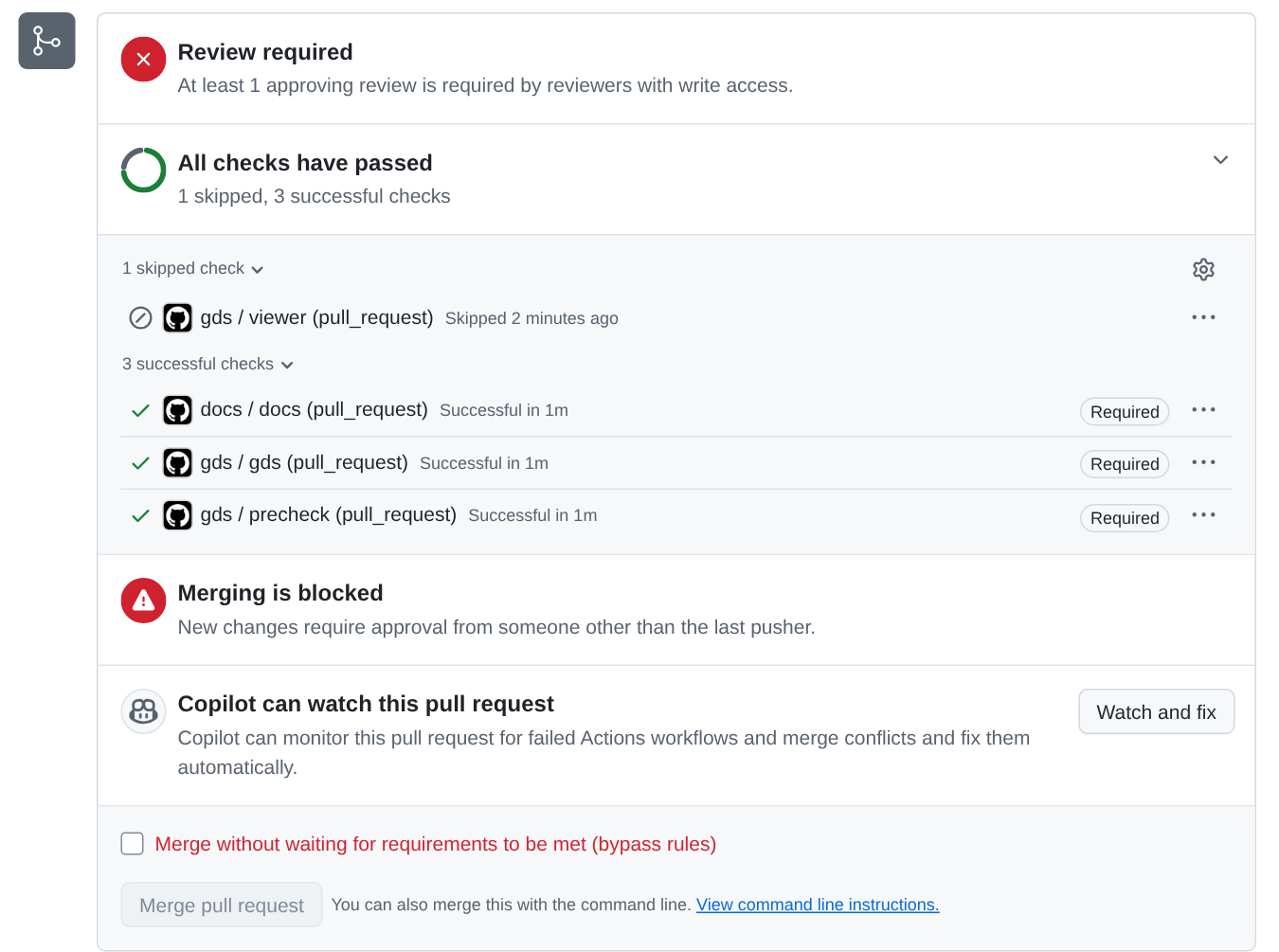
A pull request waiting for its approval, with its three required checks passed and viewer skipped. Now claim the slot next to your partner’s in your own repository: if they took slot K, take K + 1, or K − 1 if they took 7. In your own clone (
cd /foss/designs/projects/ttsky-ic102-a-review), make a branch withgit switch -c slot-J-YOUR-USERNAME, with J your slot, and repeat Part 2’s steps 4 to 6 there.Push the branch with
git push -u origin slot-J-YOUR-USERNAMEand open a pull request into your ownmain. Wait for its three checks to go green.Your partner can’t approve it: only an approval from someone with write access counts, and on a repository in your account that’s only you. Merge it yourself with the bypass: tick Merge without waiting for requirements to be met (bypass rules), and the button below it turns into Bypass rules and merge. The ruleset allows only merge commits, so there’s no merge method to choose.
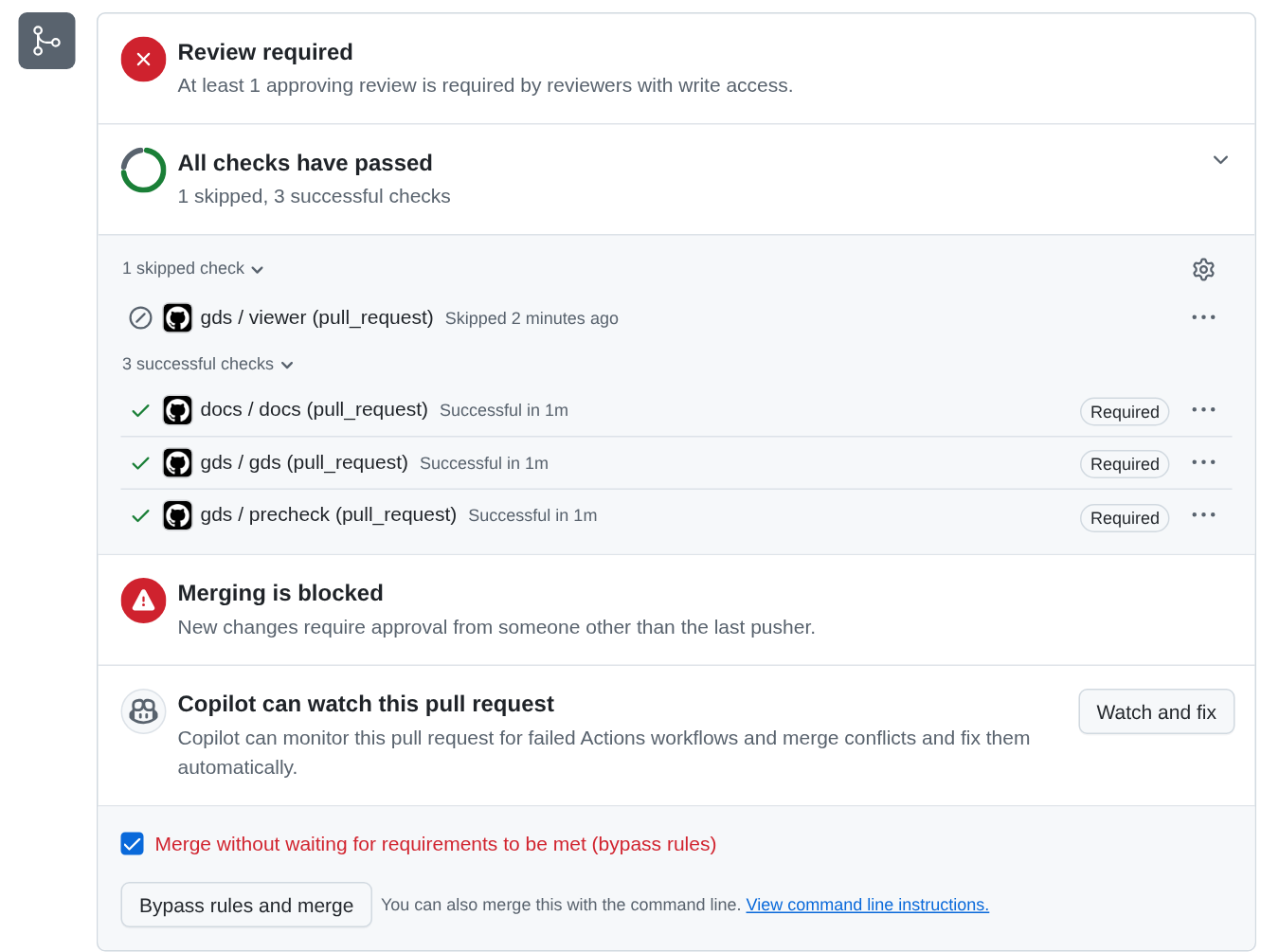
Merging your own pull request with the bypass. Before you look at your partner’s pull request again, predict which of its five files will conflict with your
mainnow. Then open it. You should see “This branch has conflicts that must be resolved”, and no new runs, because GitHub’s documentation says “Workflows will not run onpull_requestactivity if the pull request has a merge conflict.” The checks box keeps the results of the runs that the pull request already had, under the heading “Checks awaiting conflict resolution”. While the conflict lasts, the merge box also drops “Review required” and the bypass box.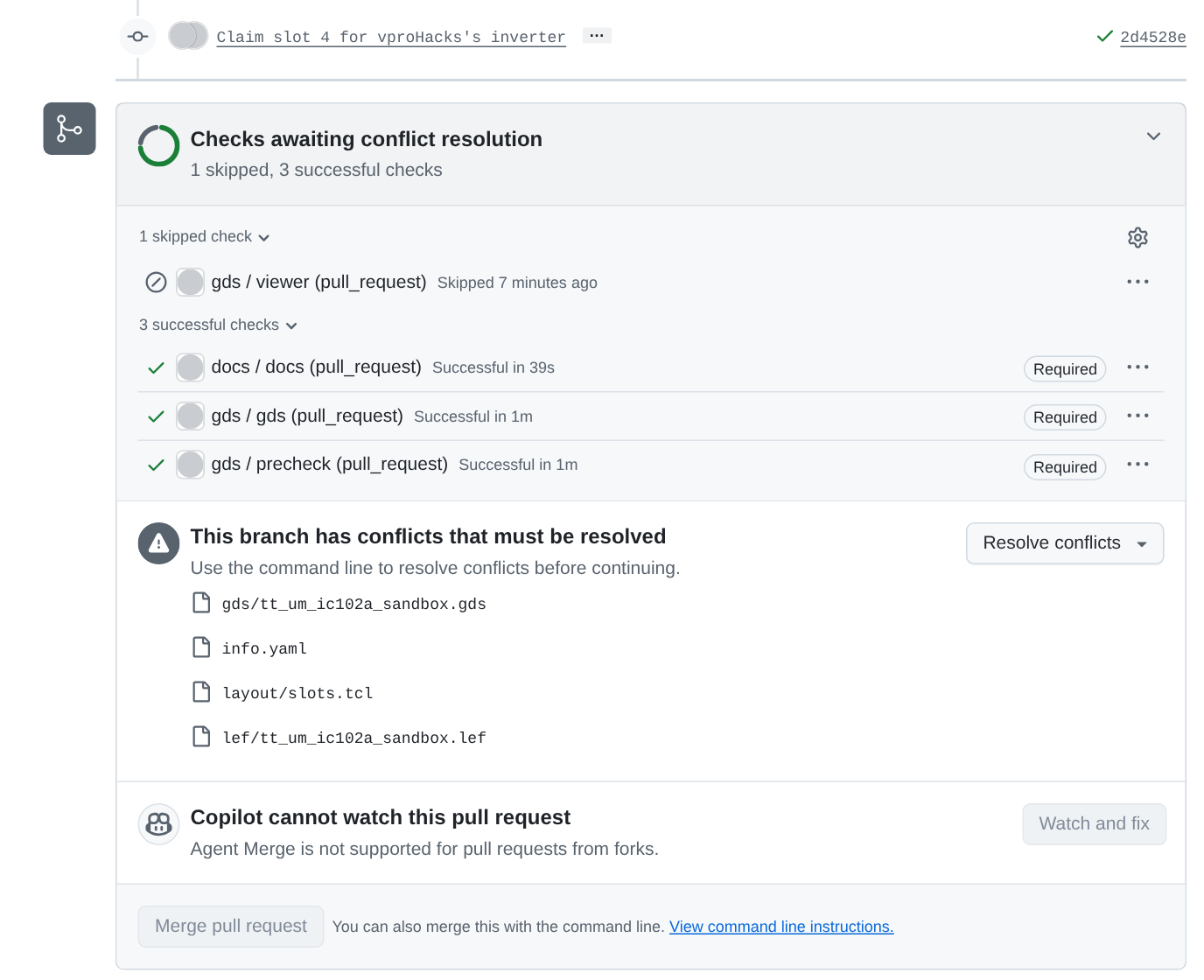
Your partner’s pull request once your claim is merged: the checks it had, and the four files that conflict. In our test the roles were the other way round. This is our pull request from a fork to uoftasic/ic102-partner-sandbox-a, which stood in for a partner’s repository, after the organisation merged its own claim.
Check: your claim is merged into your main, and your partner’s pull request shows a conflict.
Part 4: Review your partner’s pull request
Can you tell, without reading the GDS, whether a layout change is what its description says?
Go through
REVIEWING.mdfrom the top, and note what you checked, with the evidence for each line.Download the
gds_renderartifact from the pull request’sgdsrun and open the PNG. Slot K sits at y = 40 + 20K µm, between the two stripes. You should see one more inverter than the empty sandbox has, with a wire up to the top edge on each side. Here’s a sandbox with slots 3 and 4 claimed, rendered the same way: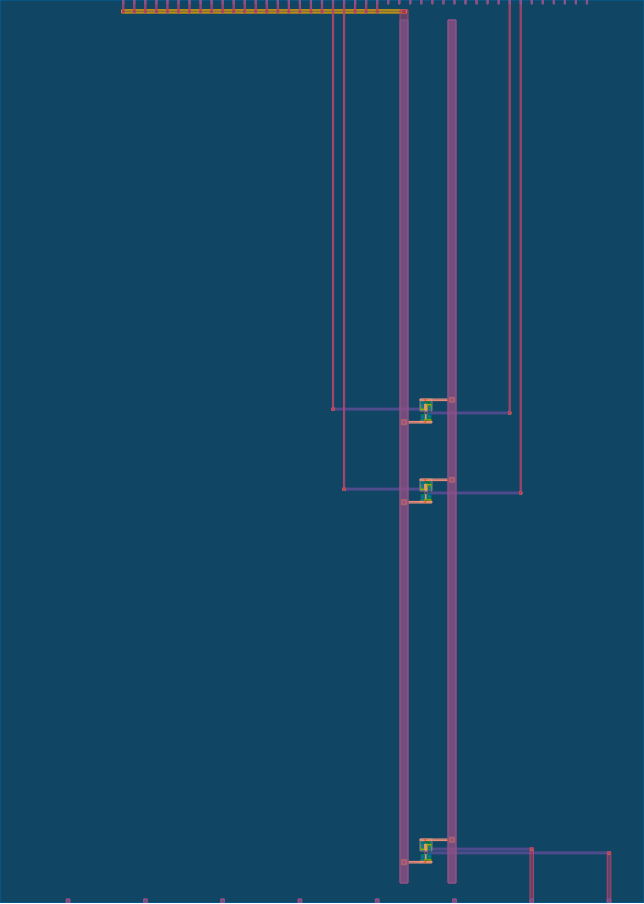
The sandbox with two slots claimed: the anchor at the bottom, and two inverters between the stripes with their wires running up to ui_in and uo_out on the top edge. Run LVS on the pull request yourself. GitHub keeps every pull request’s commits under a name in your repository,
pull/N/head, so you can fetch them without adding your partner’s fork:cd /foss/designs/projects/ttsky-ic102-a-review git fetch origin pull/N/head:pr-N git switch pr-N make lvs git switch mainYou should see
Final result: Circuits match uniquely.if the slot is right.Compare the slot in the render with the line in
slots.tcland the two pinout lines. A description that says slot 5 for a pinout that describesui[4]is a mistake that precheck can’t catch, because it doesn’t read the digital pins’ descriptions at all.Write the review. On Files changed, click Submit review above the changed code. It opens the Finish your review dialog: type a comment that says what should change and why, select Request changes, and click Submit review in the dialog (submitting your review). There usually is something, even if it’s only a description that’s missing the LVS line. Make each request specific enough to act on: your partner can act on “Paste the
Final resultline ofmake lvsfrom the latest commit”, but not on “looks off”.
Check: you’ve submitted a review on your partner’s pull request that requests a specific change.
Part 5: Answer the review and resolve the conflict
What happens to an approval when you push again?
Back in your fork’s clone, make the change your partner asked for, commit it, and push. That push starts no runs, because the pull request still has its conflict; the checks can run again after step 4. Reply to each of their comments and resolve it, because the ruleset blocks the merge while a conversation is still open. Ask your partner to look again; they can approve a pull request that has a conflict.
Once they’ve approved, bring their
maininto your branch. Predict which files will conflict first, then:git fetch upstream git merge upstream/mainIn the rehearsal,
bobhad claimed slot 4 andalice, the owner, then merged slot 5.bobsaw:warning: Cannot merge binary files: gds/tt_um_ic102a_sandbox.gds (HEAD vs. upstream/main) Auto-merging gds/tt_um_ic102a_sandbox.gds CONFLICT (content): Merge conflict in gds/tt_um_ic102a_sandbox.gds Auto-merging info.yaml CONFLICT (content): Merge conflict in info.yaml Auto-merging layout/slots.tcl CONFLICT (content): Merge conflict in layout/slots.tcl Auto-merging lef/tt_um_ic102a_sandbox.lef CONFLICT (content): Merge conflict in lef/tt_um_ic102a_sandbox.lef Automatic merge failed; fix conflicts and then commit the result.TipWhy does info.yaml conflict when the two of them described different pins?git compares changes line by line, and treats two changes to neighbouring lines as one conflict, because it can’t know whether they depend on each other.
ui[4]andui[5]are next to each other in the pinout:<<<<<<< HEAD ui[4]: "bob's inverter, input" ui[5]: "" ======= ui[4]: "" ui[5]: "alice's inverter, input" >>>>>>> upstream/mainslots.tclconflicts because both added a line at its end, and the GDS and LEF because both sides rebuilt them.Resolve the two text files by hand, keeping both sides’ claims: in
info.yaml, each pin line keeps whichever side has a description; inlayout/slots.tcl, keep bothslotlines, in slot order. Delete every<<<<<<<,=======and>>>>>>>line.Don’t resolve
gds/orlef/by taking either side’s version. Instead runmake, which builds both again from the merged sources, check the result, and then finish the merge and push:make && make lvs && make precheck git add info.yaml layout/slots.tcl gds lef git commit --no-edit git pushThe merge commit’s message is
Merge remote-tracking branch 'upstream/main' into slot-K-YOUR-USERNAME. Ifmakestops withmake: can't read project.top_module from info.yaml, there’s a conflict marker left ininfo.yaml, andmakelists the lines. If it stops withError parsing "../build.tcl": slot 3 is claimed twice in slots.tcl(with your slot number), you and your partner claimed the same slot, and you need to pick another one and change it in bothslots.tclandinfo.yaml.The conflict is gone, so the new commit can have runs again, but they may have to wait for your partner to approve them, the way you approved theirs in Part 3. To decide, GitHub checks both the pull request’s author and whoever triggered the run. Here both are you, and you still have nothing merged into your partner’s repository (repository Actions settings). Before you look, predict whether your pull request is still approved.
TipAnswerNo. The ruleset dismisses an approval when new commits arrive, because your partner approved the commits they saw, and the merge you pushed is a new layout that neither of you has reviewed. Ask them to look again. GitHub’s pull request rule calls the setting “Dismiss stale pull request approvals when new commits are pushed”.
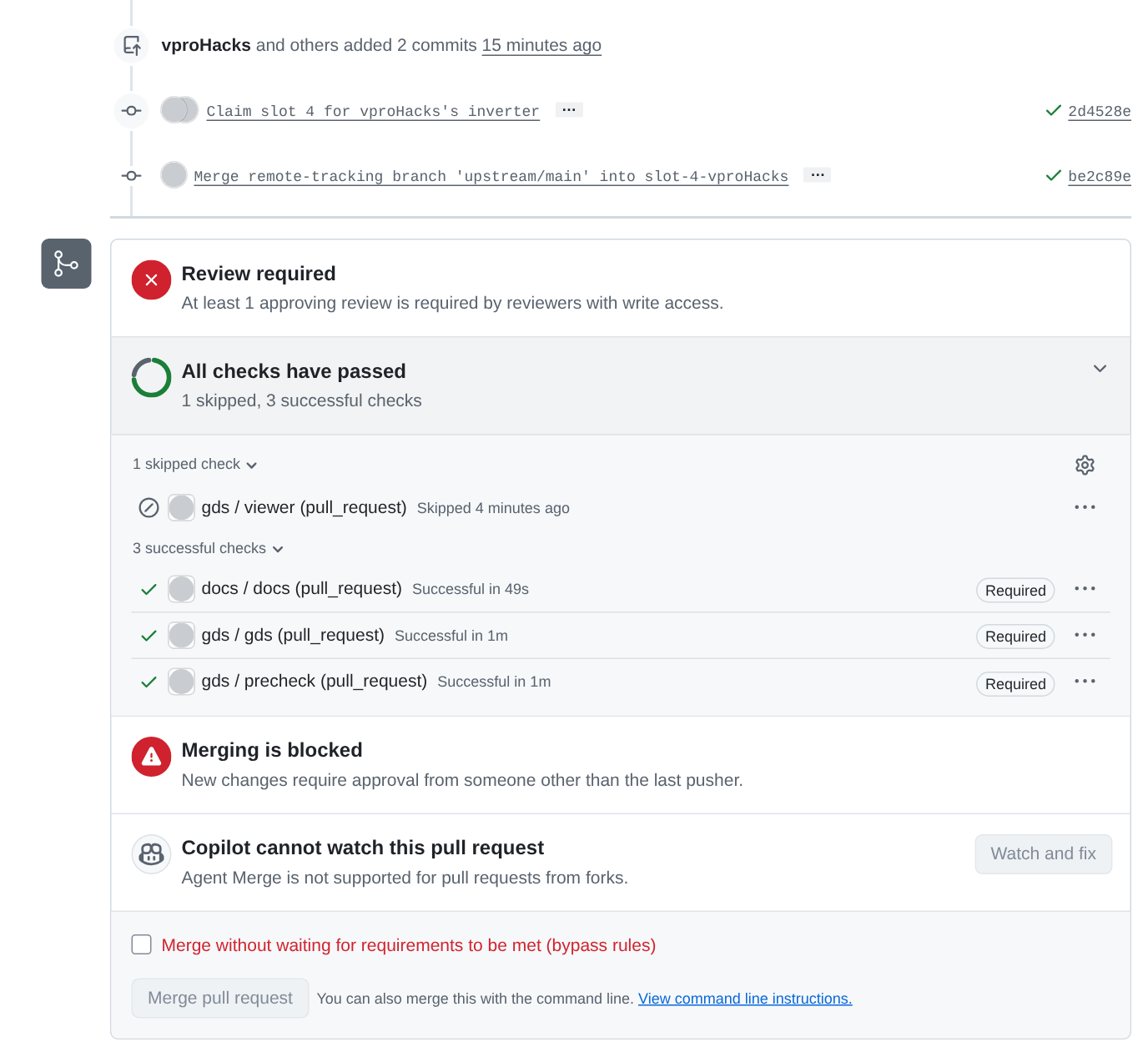
Your pull request on your partner’s repository once the merge is pushed, in our test, where uoftasic/ic102-partner-sandbox-a stood in for the partner’s. The conflict is gone, the three required checks are green again and viewer is skipped, and it still says “Review required” and “Merging is blocked”. Nobody had approved it, so the picture can’t show an approval being dismissed. Its runs weren’t held either, because the account that pushed owns the organisation.
Check: your branch has a merge commit, make lvs matches and make precheck passes on it, and the pull request shows no conflict.
Part 6: Approve and merge
When your partner has pushed their merge, look at their pull request again. If its runs are waiting for approval again, approve them as you did in Part 3, step 1, reading Files changed first. Then look at the checks, the new render, and the
slots.tcland pinout lines, which now hold both claims. When it’s right, approve it: click Submit review on Files changed, select Approve in the Finish your review dialog, and click Submit review there. Then click Merge pull request and Confirm merge. GitHub’s merging a pull request gives those two clicks for a merge commit, the only kind the ruleset allows. You have to do this yourself, because your partner has no write access to your repository. The merge is a push tomain, so the workflows run there,viewerincluded, and your Pages site shows the layout with both slots.Look at your repository’s history:
cd /foss/designs/projects/ttsky-ic102-a-review
git switch main
git pull
git log --oneline --graph
In our test of this lab it looked like this, with the oldest commit at the bottom. One account played both parts, so both claims are
vproHacks’s, and slot 2’s branch stood in for a partner’s fork:* 195a352 Merge pull request #1 from vproHacks/slot-2-vproHacks |\ | * adea902 Merge remote-tracking branch 'upstream/main' into slot-2-vproHacks | |\ | |/ |/| * | fbb2e43 Merge pull request #2 from vproHacks/slot-3-vproHacks |\ \ | * | 40dd01d Claim slot 3 for vproHacks's inverter |/ / | * 6ee85be Name the slot in the pinout descriptions | * f8867cd Claim slot 2 for vproHacks's inverter |/ * 9672e13 Start from the IC102-A sandbox6ee85beis the change the review asked for, pushed while the pull request still had its conflict.
Check: your partner’s pull request is merged, and the gds run on your main is green with all three jobs.
Part 7: A pull request written by an AI tool (optional)
This part takes about 20 minutes. The package has a pull request that an AI coding tool wrote. We left problems in it on purpose, and every check passes on it. Each of you opens it on the other’s repository and reviews the copy opened on your own.
In your fork’s clone, with your own pull request merged, run:
cd /foss/designs/projects/ttsky-ic102-a-review-fork
git switch main
/foss/designs/modules/ic102-a/labs/lab-04-a-change-through-review/ai-pr/ai-pr.sh
It branches from your partner’s
main, commits the change to a free slot, pushes the branch to your fork, and prints a title and a description. Open a pull request from that branch into your partner’smain, using that title and description, without reading the change yourself.When your partner’s copy arrives in your repository, approve its runs if GitHub holds them (it shouldn’t, now that your partner has had a pull request merged). Review it as you reviewed theirs, but treat every statement in its description as a claim to check, as Pull requests and review suggests. Request changes, and name each problem you find with its file and line. Don’t approve it or merge it; close it when you’re done.
TipAnswerThere are three, and none of them turns a check red.
gds/andlef/weren’t rebuilt, so every check ran onmain’s old layout. The file list has no GDS, the render has no new inverter, andmake lvson the branch warns thatlayout/slots.tcl layout/cells/inv_ai.mag changed after gds/tt_um_ic102a_sandbox.gds was writtenand reportsFinal result: Top level cell failed pin matching., so the description’s LVS line is false. Its precheck line is true, for the old GDS.- The pinout describes
ui[K+1]anduo[K+1]for slot K. Neither precheck nor LVS reads it. .gitignorenow listsgds/andlef/as build output, which the claim didn’t need and which is wrong for a template whosegdsworkflow reads both from the repository.
Finishing
You’re done when your pull request on your partner’s repository has been merged after your partner approved it, and your review on your own repository requested a change that your partner then pushed.
Questions:
In Part 5 you rebuilt
gds/withmakeinstead of picking one side’s file. What would have been wrong withgit checkout --theirs gds/?TipAnswer“Theirs” is
main’s GDS, which has your partner’s slot and not yours; “ours” has yours and not theirs. Neither is the layout of the merged sources. The only correct GDS is one built from the mergedslots.tcl, which is whatmakedoes. A GDS committed from the wrong side would still pass precheck, because both sides are legal layouts, so nothing on GitHub would tell you.The ruleset requires
docs,gdsandprecheckbut notviewer. Why?TipAnswervieweris skipped on pull requests, so it never reports a pass or a fail on one. It runs when the merge is pushed tomain.
Submit: the links to your pull request and to the review you wrote.
Next on the Course path: read History as evidence, then do Lab 05: Find the commit that broke it.