Git in one page
This page answers: what does git keep track of, and which few ideas do you need to work in a Tiny Tapeout repository alongside other people?
In IC101 you used git for exactly one thing, git clone. From Lab 01 of this course onwards you’ll make commits, push them to GitHub, open pull requests and read other people’s history, so you need a working picture of what git is doing. This page gives you that picture. The commands themselves are in the labs, where you’ll type them, so here we only explain what they do and why the team’s repositories look the way they do.
Four places a change lives
A change you make to a file passes through four places before anyone else can see it:
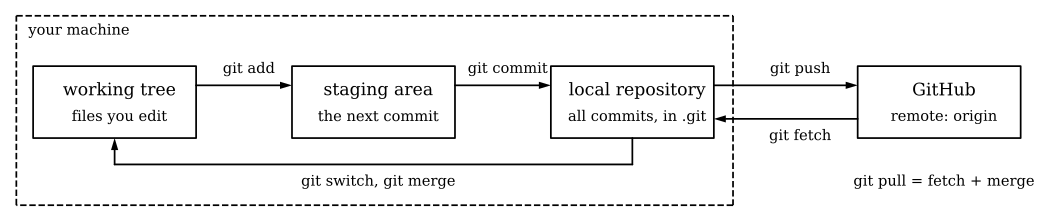
The working tree is the folder of files you open in your editor. Git watches it but doesn’t record anything until you ask. git add copies a file’s current contents into the staging area, which is git’s draft of the next commit, and git commit turns that draft into a permanent record in the local repository, the hidden .git folder at the top of your clone. None of this has left your laptop yet. git push sends your new commits to the remote, the copy on GitHub, which git calls origin because it’s where you cloned from.
A commit is a snapshot of every tracked file, plus a message, an author, a date and a pointer to the commit before it (its parent). Git names each commit by a hash of all that, which is why the team’s history is full of names like b976406: that’s the first seven characters of a 40-character hash, and seven are almost always enough to pick out one commit in a repository.
A branch is just a name that points at a commit, and it moves forward each time you commit on it. main is the branch everyone shares; you’ll do your work on a branch of your own and bring it into main with a pull request, which Pull requests and review explains. Going the other way, git fetch brings down commits other people pushed, and git merge or git switch brings them into your working tree. git pull does the fetch and the merge in one step.
Of these steps, the push matters most in a Tiny Tapeout repository, because GitHub runs the template’s workflows on every push, so a commit isn’t checked until you’ve pushed it.
Commit identity
Every commit records an author name and an email address, taken from your git settings (user.name and user.email) at the moment you commit. Both are part of the commit itself, so they’re public in a public repository, and anyone who clones it can list every address in the history with one command.
In four of the team’s repositories (sentry, simproc, crosswalk and asic-zoo-template) the history shows the same person committing under two addresses: a personal one and a GitHub no-reply one. It’s an easy thing to do, since every machine you commit from has its own git settings, and nobody did anything wrong. The personal addresses are in the history for good, though, because changing an old commit changes its hash and the hash of every commit after it.
GitHub gives every account a no-reply address of the form ID+USERNAME@users.noreply.github.com (GitHub’s email reference), and setting user.email to it before your first commit keeps your personal address out of every repository you work in. That’s the first thing you’ll do in Lab 01.

Commit messages
A good commit does one thing, and its message says what that thing is and, when it isn’t obvious, why. That matters because the history is the only record most projects keep: six weeks from now nobody will remember why a line changed, and the message will be the only place to find out.
Here are three real commits from protocol-emulator, all made while getting its workflows to pass:
| Commit | Message | What it changed |
|---|---|---|
b976406 |
docs: update info.yaml |
info.yaml, and the module name in src/project.v |
a5f1475 |
chore: temporarily remove assertion from test.py |
Commented out the template’s only assertion |
7c56c54 |
chore: updated module name in testbench |
test/tb.v, to match the new module name |
These are ordinary messages, and most of us have written ones like them, but two of them caused problems later. The first commit renamed the design’s top module, but its message mentions only info.yaml, so when the test workflow started failing at that commit, the message gave no hint why. The second one says what it did and not why, and “temporarily” is still true on main two weeks later: the assertion is commented out, so the test that passes there checks nothing. History as evidence follows this story further.
Compare b1896da in ttsky-verilog-tinyCGRA, “removed config_done assert (unreliable in GLS)”. It also removes an assertion, but it says which one and gives a reason a reviewer can argue with. That’s the standard to aim for. If a message needs more than a line, write a short summary line, a blank line, and then the explanation underneath; git and GitHub both show the first line on its own in lists.
Files that stay out of git
A repository should hold the files you wrote and nothing that a tool can regenerate from them. Generated files change on every run, they’re often large, and they make every diff noisy, so a reviewer can’t see your real change among them. The file .gitignore lists the paths git should pretend aren’t there. The digital template ships this one:
.DS_Store
.idea
*.vcd
*.fst
*.fst.hier
runs
tt_submission
src/user_config.json
src/config_merged.json
test/sim_build
test/__pycache__/
test/results.xml
test/gate_level_netlist.v
Every line is something a tool writes: waveforms (*.vcd, *.fst), the LibreLane run directory (runs), the simulator’s build folder and results, and the gate-level netlist the GDS action copies into test/. When a project adds a new place for tools to write, it needs a new line here. crosswalk did that in pull request #5, “Ignore simulation output”, which added test/digital/sim_build/, test/digital/results.xml, test/digital/tb.fst, test/digital/__pycache__/ and *.raw after the repository was split into analog and digital parts.
Once a file has been committed, ignoring it later doesn’t remove it from the history. sentry keeps two trace files in its top folder, ata_read.csv (1.6 MB) and ata_write.csv (393 KB). They were added in a commit called “first test case”, reverted the same day, and added again the next day. Whether those traces belong in the repository is the project’s call, and there can be good reasons to keep test data with the code. Either way the decision is permanent, because even after a revert every clone of the repository downloads them.
Two exceptions matter in this course. In IC102-A you commit GDS and LEF files on purpose, because the analog workflow reads your layout from the repository instead of building it. And nothing secret ever goes in a repository, ignored or not, because a single mistaken git add publishes it.
Branches, merges and conflicts
When you work on a branch, git can later bring the two lines of work back together with a merge. Most merges need no help, because the two branches changed different files or different lines. When both branches changed the same lines, git stops and asks you to decide, and that’s called a merge conflict.
In a Tiny Tapeout repository the most likely place for one is the pinout in info.yaml, because everyone who adds a block also claims pins there. Here is a real run, on a copy of the template’s info.yaml, where one branch named uart gives uo[0] to a UART transmitter and another named pwm gives the same pin to a PWM output. Both are merged into main:
$ git merge uart
Updating bc18097..e3031f2
Fast-forward
 info.yaml | 2 +-
 1 file changed, 1 insertion(+), 1 deletion(-)
$ git merge pwm
Auto-merging info.yaml
CONFLICT (content): Merge conflict in info.yaml
Automatic merge failed; fix conflicts and then commit the result.
The first merge is a fast-forward: main had no commits of its own since uart branched off, so git simply moved the main label forward. The second merge can’t do that, and git writes both versions into the file, between markers:
  # Outputs
<<<<<<< HEAD
  uo[0]: "UART TX"
=======
  uo[0]: "PWM out"
>>>>>>> pwm
  uo[1]: ""
Between <<<<<<< HEAD and ======= is what’s on the branch you’re merging into, and between ======= and >>>>>>> pwm is what the other branch wants. Git can’t know which is right, and here neither is: two signals can’t share a pin, so one of them has to move to uo[1], and that’s a design decision the two authors have to make together. Resolving a conflict means editing the file to what it should say, deleting the three marker lines, and committing the result. You’ll resolve a pinout conflict like this one in Lab 04.
Undoing a commit
There are two ways to undo a commit, and which one is safe depends on whether anyone else has it.
git revert makes a new commit that does the opposite of an old one. The history keeps both, so anyone who already has the old commit just gets one more on top. sentry has one on main, d12a672, whose message git wrote automatically:
Revert "first test case"

This reverts commit f0804819d4a77338811fe40a080d9eae9d4e6473.
git reset moves your branch label back to an earlier commit, as if the later ones had never happened. That’s fine for commits that exist only on your laptop. Once they’ve been pushed, though, other people may have built on them, and putting the reset on GitHub needs a force push, which replaces the branch there with yours. Anyone whose work was based on the commits you removed is now out of step, and the next time they pull and push, the commits you removed can come straight back.
So the rule is to revert on any branch someone else might have, and to reset only what you haven’t pushed. A repository can enforce the first half of this with a branch rule that blocks force pushes. crosswalk and protocol-emulator have one on main, and hart-1 has one that, as Branch rules shows, doesn’t apply to any branch at all.
Check yourself
- You made three commits with your personal email address and pushed them to a public repository. You then set
user.emailto your no-reply address. Which of your commits show the personal address now, and why can’t you simply edit them?
All three still do. The setting applies only to commits you make after changing it. The address is part of each old commit, and changing a commit changes its hash and the hash of every commit after it, which on a shared branch means a force push and trouble for everyone who has the old commits. That’s why you set the address before your first commit.
- A teammate’s commit on
mainbroke the test workflow, and three other people have pulled since. Should you fix it withgit revertor withgit resetand a force push?
git revert. It adds a new commit that undoes the broken one, so everyone else’s copy stays consistent and the history shows both what went wrong and how it was undone. A reset and force push would remove a commit that three people already have.
- Which of these belong in a digital Tiny Tapeout repository:
src/project.v,test/results.xml,runs/,info.yaml,test/tb.fst?
src/project.v and info.yaml, because you wrote them and no tool can recreate them. The other three are written by tools on every run (the test results, LibreLane’s run folder and a waveform), and the template’s .gitignore already lists all three.
- In the conflict above, what does the text between
=======and>>>>>>> pwmhold?
The pwm branch’s version of the line, uo[0]: "PWM out". The part above ======= is the version already on the branch you’re merging into (HEAD, which here is main with uart merged in).
Next: Templates, forks and clones.