Lab 02: Read the red X
You’ll put five mistakes into your repository from Lab 01, one at a time. Each is one that a real analog project has made, or one that a precheck rule exists to catch. For each one, you predict which job will fail and push the commit. Then you find the failed job, the step inside it and the first error line on GitHub, and write them down in DIAGNOSIS.md before you fix the mistake.
Package: labs/lab-02-read-the-red-x/
Before you start
- Read What a cloud runner is, Reading a workflow file and The analog workflows.
- Finish Lab 01: every workflow green on your latest commit.
This lab takes about 1 h 10 min, about a quarter of an hour for each breakage, most of it spent waiting for runs. When we ran this lab on a test repository on Nov 16, 2026, each gds run took between 2 min 28 s and 3 min 11 s from the push until precheck had finished, so expect about three minutes.
Part 1: The routine
Set up the file you’ll fill in, and learn the routine you’ll repeat five times.
Copy the template into your repository and commit it:
cd /foss/designs/projects/ttsky-ic102-a
cp /foss/designs/modules/ic102-a/labs/lab-02-read-the-red-x/DIAGNOSIS.md .
git add DIAGNOSIS.md && git commit -m "Lab 02: add DIAGNOSIS.md" && git push
For each breakage N, from 1 to 5, do this:
Apply it, and read what it changed:
/foss/designs/modules/ic102-a/labs/lab-02-read-the-red-x/break.sh N .
git diff --stat HEAD
git diff HEAD -- info.yaml layout/wires.tcl src/project.v
In
DIAGNOSIS.md, under “Predicted”, write which job you expect to fail first and why. You know enough from The analog workflows to make a real guess.Commit and push it:
git commit -am "Lab 02: breakage N"andgit push.On GitHub, find the failed run, the job, the step inside it, and the first error line, and write them down. Then write the cause in one sentence.
Fix it, fill in the rest of the entry, commit (
DIAGNOSIS.mdincluded), push, and wait until the run is green before the next breakage. Most fixes are an undo of the breakage’s commit. That commit holds your prediction inDIAGNOSIS.mdas well as the breakage, so undo it like this:git revert --no-commit HEAD git checkout HEAD -- DIAGNOSIS.mdThe first line puts every file back as it was before the breakage, and the second puts your notes back. A plain
git revert HEADwould commit the undo straight away, with your prediction gone fromDIAGNOSIS.md. Then finish the entry and commit, withgit commit -am "Lab 02: fix breakage N".break.shwon’t run while you have uncommitted changes, so each breakage gets a commit of its own.
You can check a fix before you push with
make docsandmake precheck, which run the same checks as thedocsandprecheckjobs. Don’t use them to skip the prediction, though, because this lab is for getting faster at reading the runner’s answer.When a check fails, precheck doesn’t stop. It runs all 15 and prints the table at the end, so on GitHub the quickest way in is the table on the run’s summary page. When something failed, the summary starts with a box headed “Some tests failed”, which counts the checks that passed and failed and shows the failure as a Python traceback; the table below it has the same results with plainer messages. Find the failed check in the table first, then look for the first error line in the log of the step that failed.
Every precheck log, green or red, has a block near the start of “Run Tiny Tapeout Precheck” that begins with
error:and ends with these two lines:error: file 'nixpkgs' was not found in the Nix search path (add it using $NIX_PATH or -I) will use bash from your environmentPrecheck’s setup prints it and carries on, so skip past it when you look for the first error.
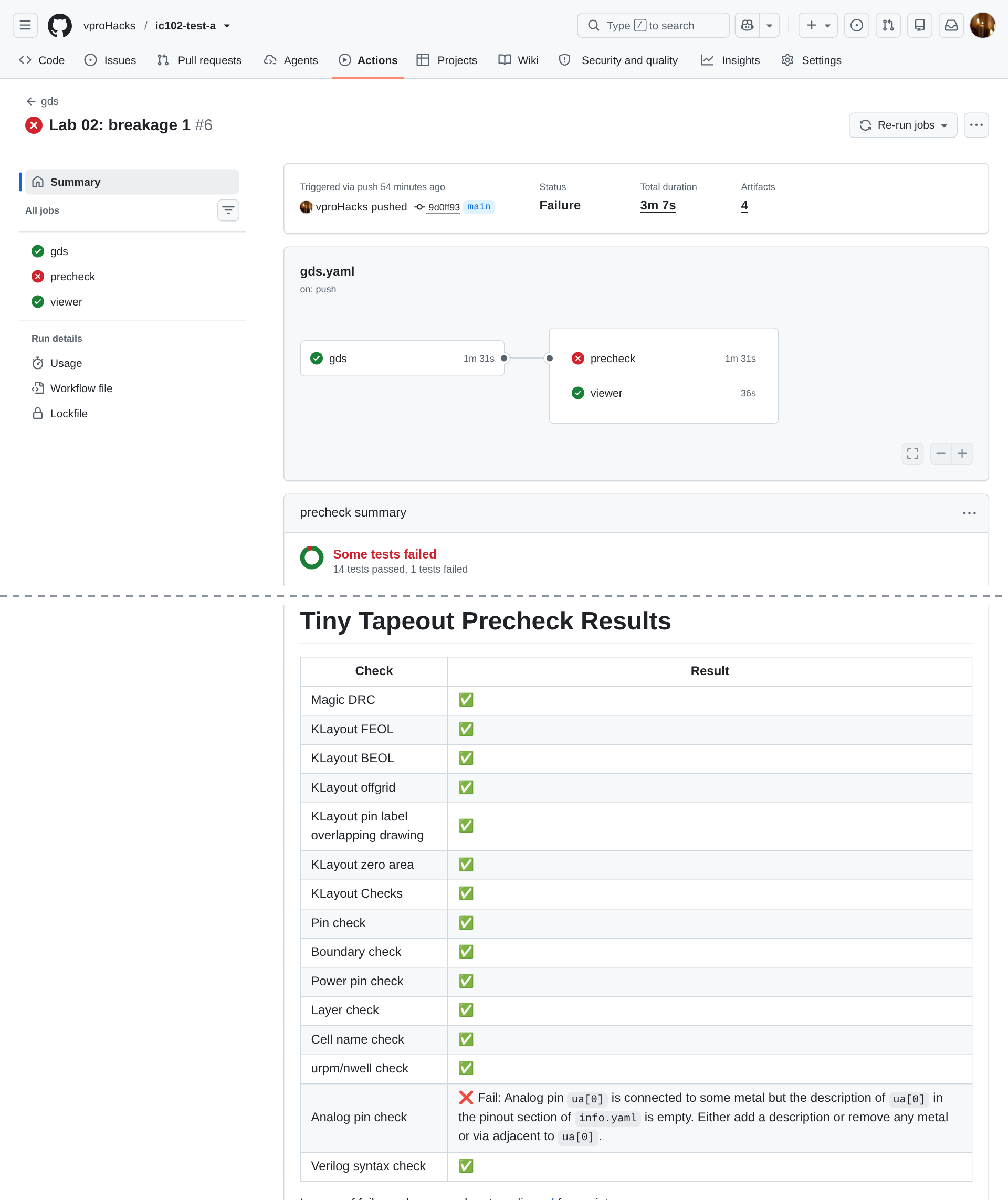
Precheck’s table on a run’s summary page, from breakage 1 in our test repository: the “Some tests failed” box at the top of the precheck summary, and further down, the table with its one ❌ row.
Check: DIAGNOSIS.md is on GitHub and both workflows are green.
Part 2: Breakage 1
What does an empty pinout break?
Apply breakage 1, read the diff, predict, commit and push.
Find the failures. You should see two red runs this time, and
docsred first, because it’s a single short job (27 s in our test), while thegdsworkflow runsgdsand thenprecheck. Thedocsjob’s step “Build docs” fails in its inner step “Check info.yaml and docs/info.md” with:## Errors in info.yaml - Please fill in the 'pinout' sectionThat’s the line the team’s
crosswalkgot on every push while its pinout was empty. About three minutes laterprecheckfails too, with one ❌ row in its table:| Analog pin check | ❌ Fail: Analog pin `ua[0]` is connected to some metal but the description of `ua[0]` in the pinout section of `info.yaml` is empty. Either add a description or remove any metal or via adjacent to `ua[0]`. |Why does precheck care about the pinout, which is documentation?
TipAnswerPrecheck reads
info.yamlto learn which analog pins you use, because auapin is connected to the outside world only ifanalog_pinssays so (the template’s comment above the analog pins: “make sure to also set”analog_pins” above, else the pins won’t be connected”). Its analog pin check requires the metal at eachuapin,analog_pinsand the pinout to agree, and a pin with metal on it and no description is one of the four ways they can disagree.Fix it by putting your two descriptions back. The undo from Part 1, step 2.5 does that, and so does editing
info.yaml; either is fine here.
Part 3: Breakage 2
What happens when the layout touches an analog pin that info.yaml doesn’t claim?
Apply breakage 2. This one changes
layout/wires.tcland rebuildsgds/andlef/, sogit diff --stat HEADlists the GDS asBin, and the diff ofwires.tclis the only place you can read what changed. Predict, commit and push.You should see
docsgreen andprecheckred, with:| Analog pin check | ❌ Fail: Analog pin `ua[2]` is connected to some metal but `analog_pins` is set to 2 in `info.yaml`. Either increase `analog_pins` to at least 3, or remove any metal or via adjacent to `ua[2]`. |The message offers two fixes. Which is right, and how would you know?
TipAnswerIt depends on what you meant, which precheck can’t know. If the metal on
ua[2]is a mistake, remove it. If you meant to use a third pin, setanalog_pins: 3and describeua[2]in the pinout. Here the stub is a mistake, so remove it, with the undo from Part 1, or by deleting the line fromlayout/wires.tcland runningmake.
Part 4: Breakage 3
What does precheck say when the name on the outside of the file doesn’t match the cell inside?
Apply breakage 3. It renames your project the way someone might by hand: a new
top_moduleininfo.yaml, the module insrc/project.v, and the two files ingds/andlef/, with the layout itself left as it was. Predict, commit and push.You should see three ❌ rows:
| KLayout Checks | ❌ Fail: Top macro name mismatch: expected tt_um_yourname_ic102_v2, got tt_um_yourname_ic102 |
| Pin check | ❌ Fail: Wrong cell at GDS top-level |
| urpm/nwell check | ❌ Fail: Klayout nwell_urpm failed |
If you then go to the log for the first error line, you’ll find 53 lines like the one below before any other error from the checks (on GitHub, they come after the Nix block from Part 1, step 3). This one is from
make precheck; on GitHub the path starts with the runner’s work folder instead of/foss/designs/projects:ERROR: Pin clk not found in /foss/designs/projects/ttsky-ic102-a/tt_submission/tt_um_yourname_ic102_v2.lefWhich of these is the cause, and which are consequences of it?
TipAnswerThe cause is the mismatch: the GDS’s top cell, and the LEF’s macro, are still called
tt_um_yourname_ic102, and precheck looks fortt_um_yourname_ic102_v2. The pin check looks for the pins of a macro by that name and finds none, which is why it prints a “not found” line for every one of the 53 pins, VGND and VDPWR included. The urpm/nwell check fails because the KLayout script it runs is told to look at a top cell that isn’t there. So in this case the first error line in the log is a consequence, and the table is the better guide.Magic DRC is ✅ in that table. Did it check your layout?
TipAnswerNo.
make precheckshows what Magic printed:Cell tt_um_yourname_ic102_v2 couldn't be read No such file or directory Creating new cell ... No errors found.Magic was asked for a cell that the GDS doesn’t contain, so it made an empty one and checked that. A check that ran on an empty cell still reports ✅, so when the rows around a ✅ are red, read the log behind it too. You’ll meet this again in Lab 05.
Fix it with the undo from Part 1, which reverses the rename. If you’d rather keep the new name, set
TOP_LEVEL_CELLinlayout/init.tclto it as well and runmake, so that the cell inside the GDS changes too.
Part 5: Breakage 4
Can a layout pass DRC and still fail precheck?
Apply breakage 4, which adds a 10 µm square on metal 5 in an empty corner. Predict, commit and push.
You should see one ❌ row, with Magic DRC and every KLayout DRC deck green:
| KLayout Checks | ❌ Fail: Forbidden layer met5.drawing found in /foss/designs/projects/ttsky-ic102-a/tt_submission/tt_um_yourname_ic102.gds |(That’s
make precheck’s row; on GitHub the path is the runner’s.)Why does a square that passes every DRC deck fail precheck?
TipAnswerMetal 5 is a legal layer in SKY130, so no DRC deck objects to a clean square of it. Tiny Tapeout’s analog specs forbid it in your tile, though: “You are not allowed to use the metal 5 layer in your design.” That’s a rule of Tiny Tapeout’s, not of the process, and precheck enforces it with its forbidden layer check.
Fix it with the undo from Part 1.
Part 6: Breakage 5
What does one word in info.yaml change?
Apply breakage 5. It changes one line,
uses_vapwr: falsetotrue. Predict, commit and push. Which rows of precheck’s table do you expect to go red?You should see four:
| Pin check | ❌ Fail: Inconsistent die area between LEF and template DEF: (161000, 225760) != (145360, 225760) |
| Boundary check | ❌ Fail: Shapes outside project area |
| Power pin check | ❌ Fail: Verilog doesn't contain VAPWR |
| Analog pin check | ❌ Fail: Analog pin `ua[0]` is not connected to any adjacent metal but `analog_pins` is set to 2 in `info.yaml`. Either wire up `ua[0]` to your design or decrease `analog_pins` to 0. |
Your layout didn’t change. Why do the pin check and the boundary check both say it’s the wrong size?
TipAnsweruses_vapwr: truetells precheck to compare your layout with a different template, the_3v3one, which has a VAPWR pin and is 145.36 µm wide instead of 161.00. Against that template your 161 µm tile is too wide, its pins are in the wrong places, andua[0]is at a different x, so the stub you drew is no longer on it. The power pin check readssrc/project.v, where the template leftVAPWRcommented out. All four rows come from the one setting.Fix it with the undo from Part 1, or by setting
uses_vapwr: falseagain.
Check: DIAGNOSIS.md has five entries, and the run after each fix is green.
Part 7: A red X that isn’t yours
Not every failure comes from your files. On Nov 9, 2026, the precheck job of a public project, erik1567/ttsky26d-VCO, failed in the step “Install sky130A PDK” before any check had run (run 42570954316):
Version 0536d02d875c8f67dd7cca3902ac457e62f20005 not found locally, attempting
to download…
The read operation timed out
##[error]Process completed with exit code 255.
What would you do if this happened on your repository?
TipAnswerRe-run it. The step failed while downloading the PDK from a server that didn’t answer in time, which has nothing to do with your commit, and nothing you push would fix it. Use “Re-run failed jobs”: that re-runs only
precheck, which downloads thett_submissionartifact from the same run and tries again. (The problem with re-running that you met in Lab 01 is in theviewerjob, andviewerisn’t re-run here, because it passed.) If it fails the same way again, wait, or ask on Discord whether others see it.In
DIAGNOSIS.md, under “A mistake no workflow catches”, write down one value in your repository that could be wrong while every workflow still passes. Then check your answer against the one below.TipAnswerThere are many; here are three. Swap the two descriptions in the pinout, so that
ua[0]claims to be the output: precheck checks only that a used pin has a description, not what it says. Or setclock_hzto a wrong number, asprotocol-emulatordid withclock_hz: 50: it’s an integer, so it passes. Or write a “How to test” indocs/info.mdthat describes a different design. The workflows check only that values are present and well formed; whether they’re right is for a reviewer to catch, and Lab 04 is about reviewing.
Finishing
You’re done when DIAGNOSIS.md in your repository has five filled-in entries, each naming a green commit that fixed its breakage, and the latest commit on main has both workflows green.
Submit: nothing for this lab.
Next on the Course path: read The analog layout kit, What precheck checks and Your tools and the runner’s tools, then do Lab 03: A layout that passes precheck.