History as evidence
This page answers: when something that used to work is broken, how do you find the commit that broke it, and what can a project’s history tell you, and not tell you, about what happened?
A repository’s history is a record of every change, in order, with a message and a date on each. Most of the time you only add to it. When something goes wrong, though, it’s the best evidence you have, as long as you know what it keeps, what it loses, and how to search it. In Lab 05 you’ll use it to find the commit that broke a project and undo that commit with a pull request.
What the history keeps
Commits last as long as the repository does. Workflow runs don’t. “By default, checks, workflow runs, commit statuses, and the artifacts and log files generated by workflows are retained for 90 days”, and a public repository can set any period from 1 to 90 days (repository Actions settings).
ttsky-verilog-tinyCGRA shows what that means in practice. In May 2026 two of its gds runs built the layout, passed precheck and then failed at gl_test, the gate-level test. The run records still say so, but asking GitHub for the logs of one of those runs on Nov 15, 2026 gave this:
failed to get run log: HTTP 410: Server Error (https://api.github.com/repos/uoftasic/ttsky-verilog-tinyCGRA/actions/runs/25332271003/logs)HTTP 410 means “gone”. The only account left of why the gate-level test failed is in the commit messages from those days, oldest first:
$ git log --oneline --reverse 21622f3..332cb3d
f42764b updated testbench (config mode mismatch)
7329711 commented config done (test)
3caef1b comment assert input in load_input()
96d508e comment assent input_reg.value in run_case()
17ef303 comment all user_project asserts
332cb3d commented asserts, no functional testing
followed, two days later, by the fix that was merged, which includes b1896da “removed config_done assert (unreliable in GLS)”. These messages are useful because they say what each commit did, including that the tests had been switched off. So when a run fails and the failure matters, copy the first error line into the issue or pull request where you discuss it, because that text will outlive the log.
The history also only covers what was pushed to that repository. simproc’s description is “SimpleProcessor, taped out on TTSky25b”, but the repository was created on Nov 10, 2025, all eight of its commits are from Nov 9 and 10, and GitHub has no workflow runs on record for it. The work that led to the taped-out design happened somewhere else, and this history doesn’t show it. (Its merge messages also name the organization ieeeuoft-asic, because the team’s organization has had another name.)
Reading a history
Three questions come up again and again. Git answers the first two with a single command each, and for the third you can start with the Actions tab.
Which commit last changed this line? git blame prints each line of a file with the commit that last changed it. Here are lines 38 and 39 of test/test.py on protocol-emulator’s main, run in the course image (-s leaves out the author’s name and the date):
$ git blame -s -L 38,39 test/test.py
a5f14750 38)     # Temporarily comment out this assert
a5f14750 39)     # assert dut.uo_out.value == 50
Which commits added or removed lines like this? git log -G searches the changes themselves, not the messages:
$ git log --oneline -G "^ +assert dut.uo_out" -- test/test.py
a5f1475 chore: temporarily remove assertion from test.py
04c0e8a Initial commit
The assertion arrived with the template in the first commit and left in a5f1475. Since then the test on main has passed without checking anything. Run on main in the course image, it ends with this table:
** TEST                          STATUS  SIM TIME (ns)  REAL TIME (s)  RATIO (ns/s) **
**************************************************************************************
** test.test_project              PASS      100000.00           0.00   59116335.45  **
**************************************************************************************
** TESTS=1 PASS=1 FAIL=0 SKIP=0             100000.00           0.00   40133039.90  **
When did it start failing? Here the Actions tab is a history of its own, because every push has a run. Here are the runs of protocol-emulator’s test workflow, one per pushed commit, oldest first:
| Commit | Pushed | test |
|---|---|---|
04c0e8a Initial commit |
Oct 18 | success |
b976406 docs: update info.yaml |
Oct 24 | failure |
8f7bc9f docs: update description |
Oct 24 | failure |
95bdb65 chore: update pinout and docs |
Oct 24 | failure |
f19bcb7 update info.md |
Nov 1 | failure |
a5f1475 chore: temporarily remove assertion from test.py |
Nov 1 | failure |
7c56c54 chore: updated module name in testbench |
Nov 1 | success |
The test broke at b976406 and was fixed at 7c56c54, and deleting the assertion in between made no difference, because the failure had nothing to do with it. This works only while the runs are kept, and only when every commit was pushed on its own. Usually several commits arrive in one push, and only the last of them is tested, which is where bisecting comes in.
Finding the commit that broke it
git bisect finds the first bad commit by binary search. You give it one commit you know is good and one you know is bad. It checks out the commit halfway between them and asks you whether that one is good or bad, and each answer halves the number of commits that could be to blame:
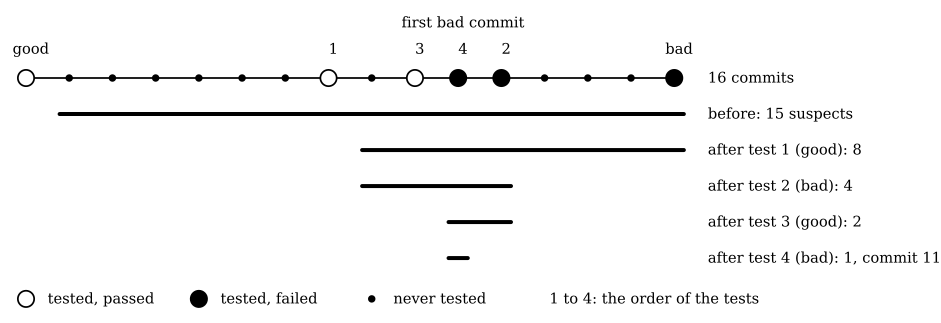
The number of tests grows only with the logarithm of the number of commits: 16 commits take 4 tests, and a history of 40 commits takes 6, because \(2^6 = 64 \ge 40\).
You don’t have to answer git’s questions by hand. git bisect run takes a script, runs it at each commit, and reads the answer from the script’s exit status. The git manual sets the rules: the script should “exit with code 0 if the current source code is good/old, and exit with a code between 1 and 127 (inclusive), except 125, if the current source code is bad/new”, and “The special exit code 125 should be used when the current source code cannot be tested” (git-bisect).
Here is a script for the protocol-emulator history above. It runs the cocotb test and decides from the results file, not from make’s exit status. With cocotb 2.x, make does exit non-zero when a test fails, but it exits with the same status when the design doesn’t compile and the simulation never starts, and the results file is what tells those two cases apart. (The comment in the template’s workflow, that make “will return success even if the tests fail”, dates from cocotb 1.x.)
#!/bin/bash
# For git bisect run: 0 = test passes (good), 1 = test fails (bad).
cd test || exit 125
rm -rf sim_build results.xml
make > /tmp/bisect-make.log 2>&1
if [ ! -f results.xml ]; then
    exit 1          # the simulation didn't run at all
fi
if grep -q "<failure" results.xml; then
    exit 1          # a test ran and failed
fi
exit 0
And here is the bisect, between the good first commit and the bad a5f1475, run in the course image. We’ve left out the author line of the result:
$ git bisect start a5f1475 04c0e8a
Bisecting: 2 revisions left to test after this (roughly 1 step)
[8f7bc9f7c8f48dd62fbda4dbf4c737dd515ae28d] docs: update description
$ git bisect run ../bisect-test.sh
running '../bisect-test.sh'
Bisecting: 0 revisions left to test after this (roughly 0 steps)
[b976406293b84f285ec8d36fb7b8fd09c3f19037] docs: update info.yaml
running '../bisect-test.sh'
b976406293b84f285ec8d36fb7b8fd09c3f19037 is the first bad commit
commit b976406293b84f285ec8d36fb7b8fd09c3f19037
Date:   Sat Oct 24 15:07:01 2026 -0400

    docs: update info.yaml

 info.yaml     | 10 +++++-----
 src/project.v |  2 +-
 2 files changed, 6 insertions(+), 6 deletions(-)
bisect found first bad commit
Two tests were enough for five suspects. The answer agrees with the Actions history, and it shows something the commit message doesn’t: a commit described as docs: update info.yaml also changed src/project.v, where it renamed the top module, and that’s what broke the testbench. Bisect never looks at commit messages, only at whether the test passes, so a misleading message can’t send it the wrong way.
The script above treats “the simulation didn’t run” as bad, which is right for this history, because a simulation that can’t start is exactly the failure being hunted. In a longer history there will be commits that can’t be tested for some unrelated reason, such as a half-finished file that doesn’t compile, and for those the script should exit with 125 so that git skips them instead of blaming them. Deciding which is which is the main thing you’ll think about when you write your own script in Lab 05.
Marking a commit
Bisecting needs a commit you know is good, and the easiest way to have one is to mark it when you make it. A tag is a permanent name for one commit, such as v1.0 or ready-for-review, and on GitHub a release adds notes and downloads to a tag. When a commit is the one you’d stand behind, with every workflow green, tag it, and anyone can later say “it worked at that tag” and check.
A tag in a repository you control is as fixed as you keep it. A tag in someone else’s repository may move: Tiny Tapeout moves its action tags with a force push when it updates a release, as Reading a workflow file describes. When you need to name an exact version as evidence, give the commit hash, which can’t change.
Check yourself
- A teammate asks why a gate-level test failed in a run from seven months ago. Where can you still look, and where can’t you?
The run’s logs and artifacts are gone, since GitHub keeps them for at most 90 days, so asking for them gives HTTP 410. What’s left is anything written into the repository: commit messages, and the text of issues and pull requests, which is why the first error line belongs in one of those.
- How many tests does
git bisectneed, at most, to find the first bad commit among 64 suspects?
Six, because each test halves the suspects and \(2^6 = 64\).
- A bisect script for a cocotb project runs
makeand exits withmake’s exit status. What will bisect conclude, and why?
With cocotb 2.x, make exits non-zero both when a test fails and when the design doesn’t compile, so the script calls every commit that doesn’t compile “bad” too. If a half-finished commit that doesn’t compile comes before the real bug, bisect names that commit as the first bad one, for a reason that has nothing to do with the bug. The script has to look at the results file: no results file means the commit couldn’t be tested (exit 125, unless not compiling is the failure you’re hunting), and a failure in it means bad. (With cocotb 1.x, whose make exited with 0 on a failing test, the same script would have called every commit that compiles “good”.)
- In the middle of the range, one commit doesn’t compile because a file was half-finished, and the bug you’re hunting came later. What should your script exit with at that commit?
125, which tells git the commit can’t be tested, so git skips it and tests a neighbour instead. Exiting with 1 would wrongly mark it as the first bad commit.
Next: Lab 05, where you find the commit that broke a project and revert it in a pull request.